The Space Shuttle's five1 general-purpose computers played a critical role in each flight: controlling the engines, monitoring thousands of sensors, displaying data to the astronauts, and navigating the Shuttle. Each computer consisted of two 60-pound aluminum-alloy boxes: the box on the right is the CPU, a 32-bit processor that executed 420,000 instructions per second. These computers were designed before microprocessors became popular, so the processor was built from multiple boards crammed with simple chips and they used magnetic core memory rather than DRAM chips.
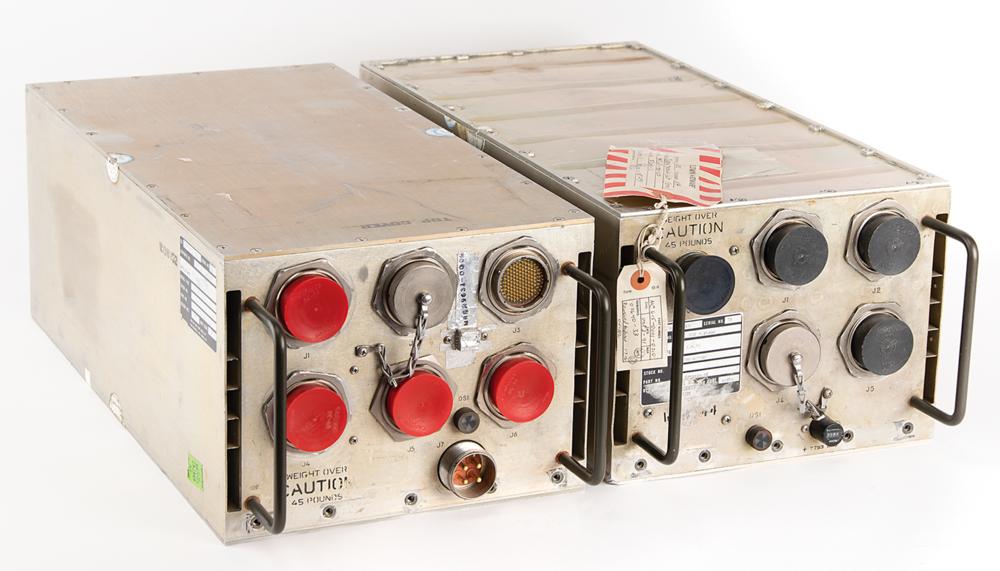
The box on the left is the I/O Processor (IOP): the link between the CPU and the rest of the Shuttle. It implemented the input/output capabilities for the computer, primarily 24 high-speed networks that connected the computer to the Shuttle's systems and sensors. But the IOP wasn't just a peripheral; it was a separate programmable computer, more complicated than the main CPU. The IOP had an unusual architecture: it was one of the first multi-threaded computers, implementing 25 virtual processors (with two completely different instruction sets) that ran on one physical processor.
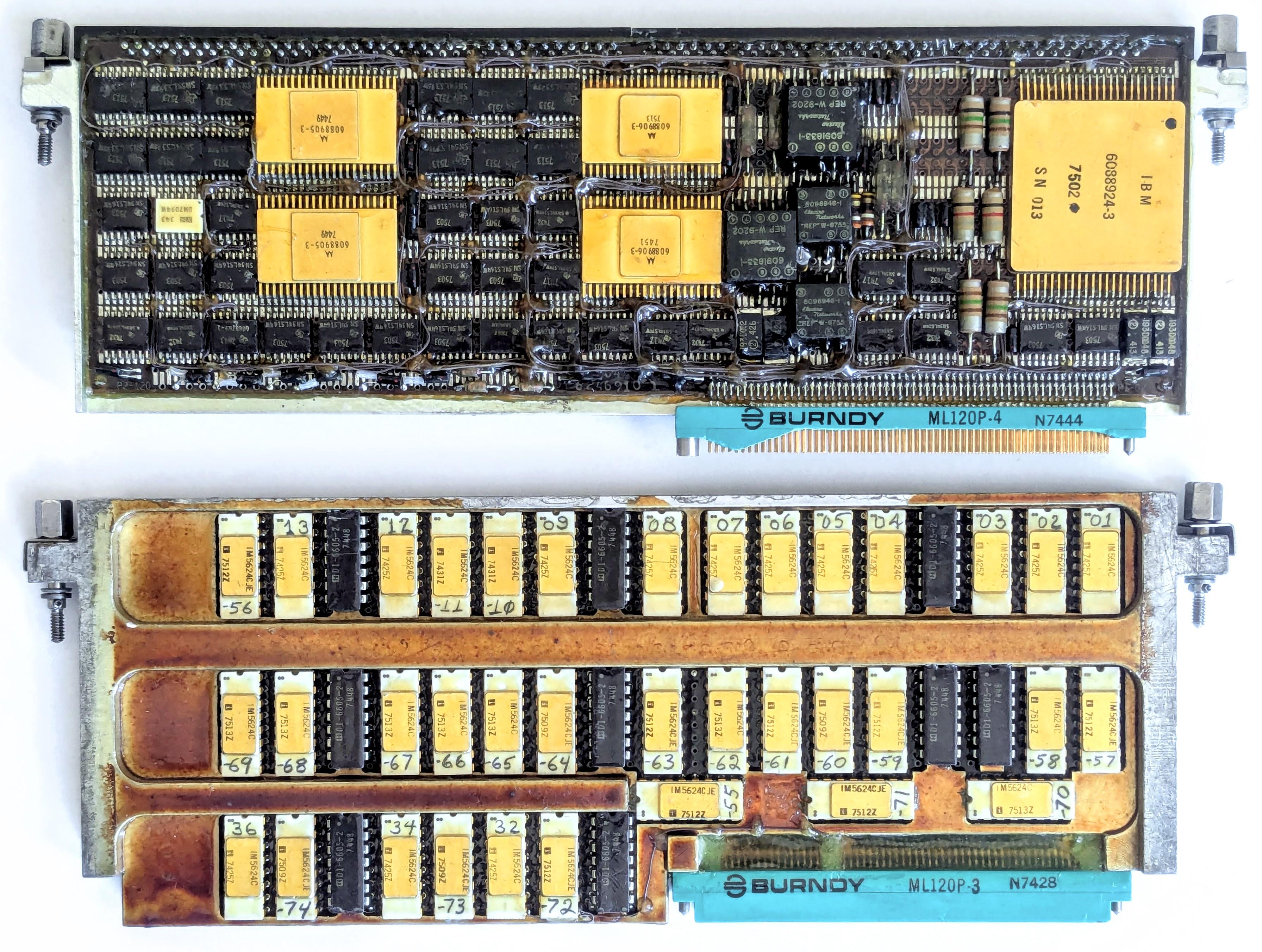
I obtained two circuit cards from the I/O Processor,2 each a 9"×3" rectangle packed with tiny chips and other components. In IBM lingo, each card is called a "page" (remember this term). The top page is a network interface, providing four network connections, each handling 1 million bits per second. (The IOP contained six of these cards for its 24 network connections.) The bottom page held the microcode for the IOP's processors, the low-level code that defined each instruction. The rows of white-and-gold chips stored the microcode's bits in tiny metal fuses, programmed by blowing a fuse for each 1 bit. In this article, I'll explain how the I/O Processor worked, and the roles of these two pages.
The MIA interface page
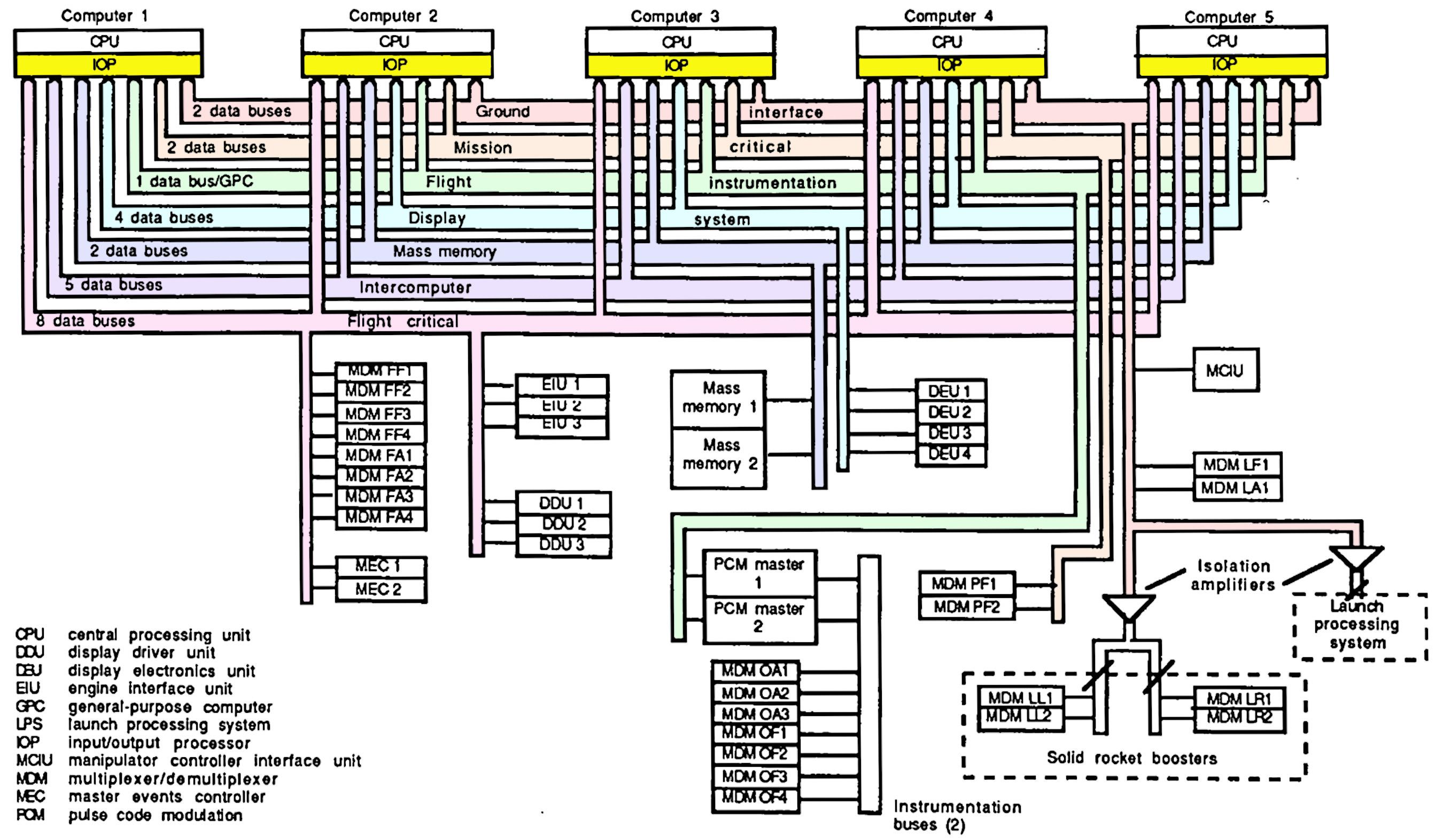
The Space Shuttle had 28 data bus networks that linked the computers to the rest of the Shuttle, with each computer attached to 24 of the networks.3 The large number of networks provided both high performance and reliability, with at least two networks between a computer and any Shuttle system. Eight networks were assigned to flight-critical systems, with each CRT display and engine controller connected to four networks for redundancy.
The page below is one of the six network interface pages in the I/O Processor. Space Shuttle engineers loved acronyms, so this page has the cryptic name MIA for "Multiplexer Interface Adapter". (Many of the networks were connected to boxes called Multiplexer/Demultiplexers, which provided the link between the network and the diverse analog and digital components of the Space Shuttle.5) The MIA interface page is tightly packed with integrated circuits and other components. The page holds two printed-circuit boards, one on each side of the page. The boards on both sides are almost identical,4 as you can see by comparing the photo above and the photo below. (Main difference: the connector switches sides.)
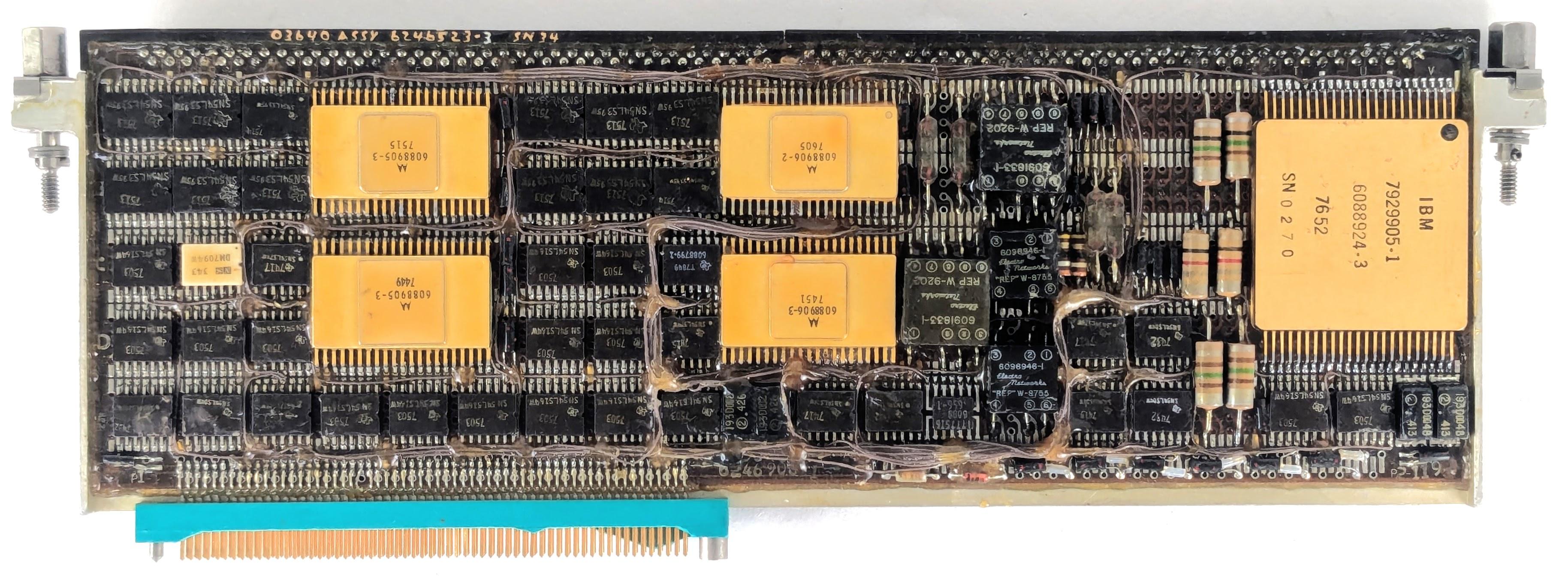
Each board implements two network interfaces, so the page supports four networks. Each network transmits data across a pair of wires, twisted together and shielded, rather than a coaxial cable. Although the network transmits digital data, the signals transmitted across the network are physical voltages that will weaken with distance and will have distortion and noise. Thus, the interface page must convert these analog signals back to 0's and 1's.
The right half of the board holds the analog circuitry. It is dominated by a large golden module labeled "IBM", with 46 pins. This is a hybrid module, consisting of tiny components such as transistor dies, resistors, capacitors, and potentially IC dies, connected by bond wires thinner than a hair. It's not quite an integrated circuit, but a collection of individual components mounted on a ceramic wafer. Hybrid modules were popular for aerospace applications, since a board of analog components could be shrunk down to a single (expensive) module. This module contains the analog circuitry for two I/O ports: the drivers to transmit network signals along with the amplifiers and comparators to receive signals.
Various discrete components are mounted next to the hybrid module: resistors, glass capacitors6, inductors, and small square transformers. The transformers provide the coupling between the interface board and the network. As with Ethernet, transformers provide isolation between the computer and the network, filter electromagnetic interference, and match impedances, all important for reliability.7
A key part of the Shuttle's networking dates back to the 1940s. In 1946, Frederic Williams became head of the Electrical Engineering department at the University of Manchester. By 1949, his team had created the groundbreaking Manchester Mark 1 computer. Along the way, they invented the stored-program computer, the Williams tube—the best form of computer memory before magnetic core—and the Manchester Carry Chain, still used for addition in modern processors.
But the relevant invention is the patented Manchester encoding, a way of encoding a sequence of 0's and 1's for storage or transmission. In the Manchester encoding, each 0 bit is replaced by a "low-high" sequence and each 1 bit is replaced by a "high-low" sequence, as shown below. This idea may seem trivial, but it is used in everything from floppy disks and remote controls to Ethernet and RFID tags, earning it recognition as an IEEE Milestone.
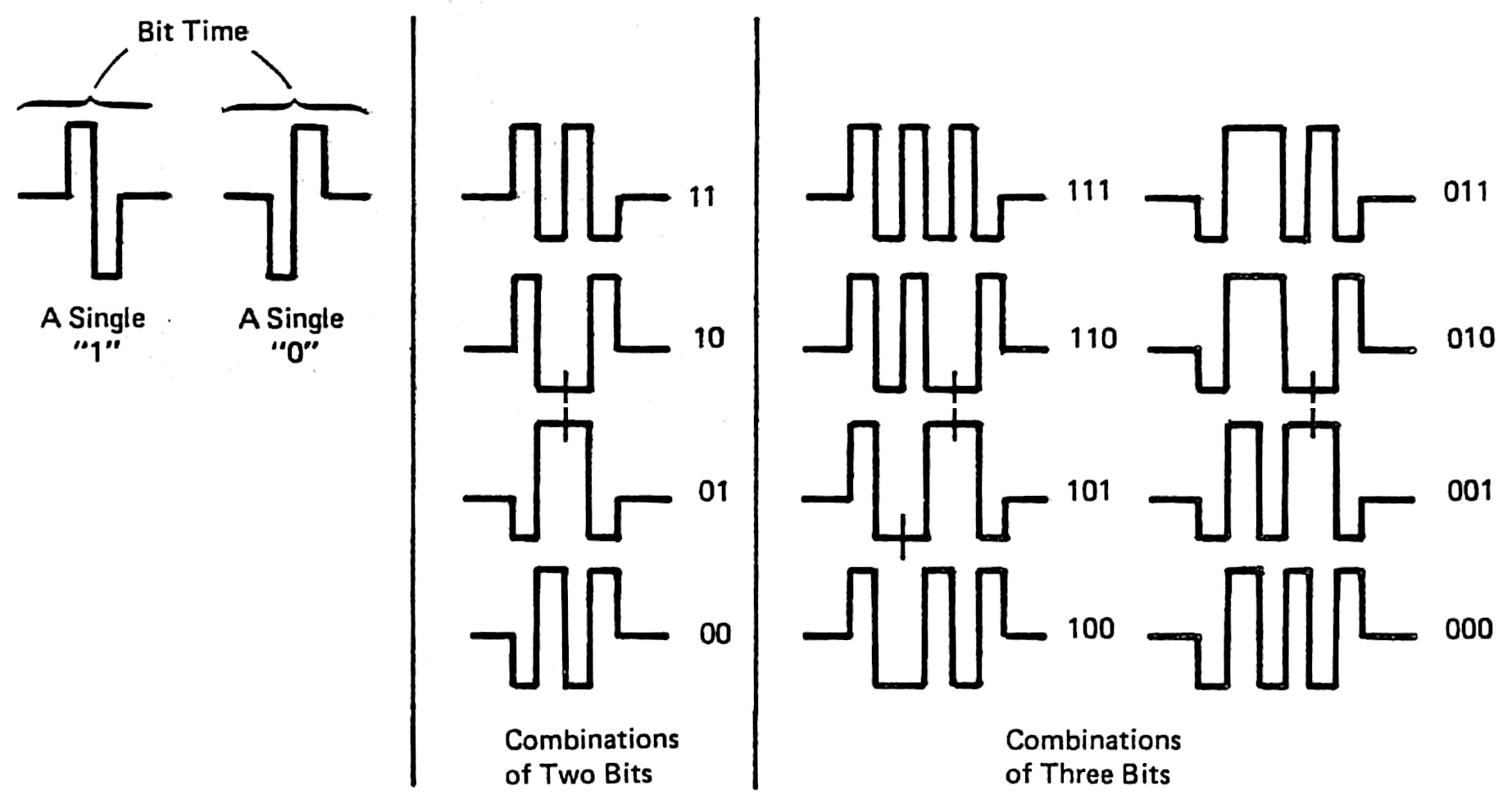
The obvious approach—sending binary data unencoded—has two problems. First, in a long string of 0's or 1's, it is hard to tell how many bits were sent: "Was that six bits or only five?" Second, such a sequence is unbalanced, so it has a "DC component". This DC component causes problems if the signal is stored on a magnetic medium or transmitted through a transformer. The Manchester encoding solves both these problems. Since every encoded bit has a transition in the middle, it is straightforward to separate the bits. Moreover, the encoding ensures that 0's and 1's occur in equal numbers, so there is no DC component.
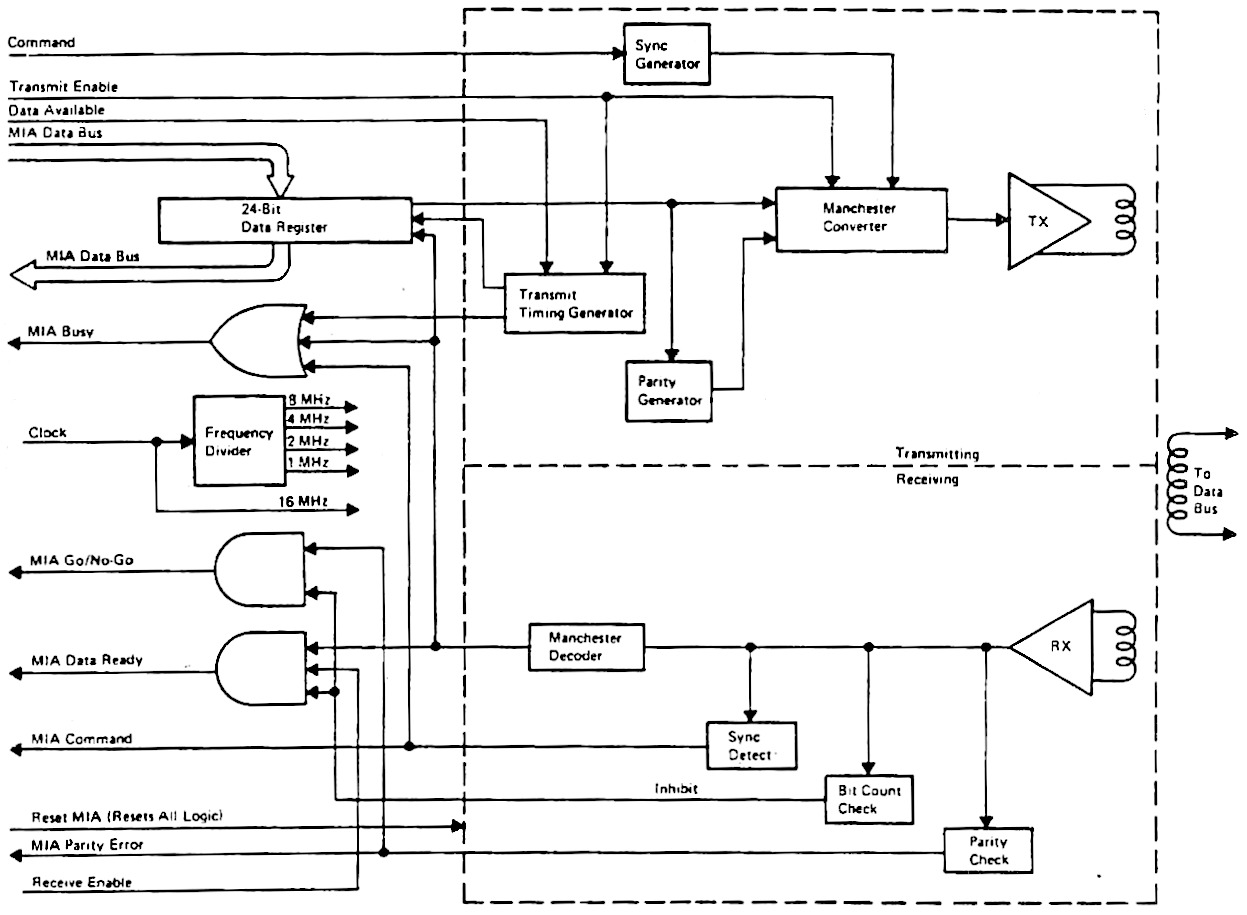
Because of these advantages, the Manchester encoding was selected for the data bus networks in the Space Shuttle.8 One of the key functions9 of the IOP's network interfaces is to convert between serial bits and the Manchester encoding. The digital circuitry for the interface is fairly complicated, but most of the logic is in the four large golden integrated circuits. These are custom Motorola integrated circuits: a transmit chip and a receive chip for each network port. On the transmit side, the chip converts binary data into the Manchester-encoded signals for the network. The circuitry also inserts a sync signal at the beginning of each word and adds parity. The receive chip reverses this process: detecting sync, decoding the Manchester signals, verifying the parity, and reporting any errors.
The smaller black chips are simple TTL chips, mostly shift registers. (Transistor-Transistor Logic was very popular in the 1970s, providing fast, reliable circuits.) There are twelve 4-bit shift register chips and sixteen 8-bit shift registers.10 The Shuttle's networks sent 24-bit words across the network: combining six 4-bit shift register chips produces a 24-bit shift register, which converted these 24-bit words to serial data and vice versa. The remaining chips are simple logic gates, flip-flops, buffers, and four-bit counters.
The physical structure of a page
Around 1967, IBM introduced a line of computers for avionics, called System/4 Pi.11 These systems were constructed from pages:12 two circuit boards sandwiching a metal layer that provided conduction cooling. Flat-pack integrated circuits, smaller than a fingernail, were mounted in rows13 on each circuit board, about 78 ICs on a board. The printed-circuit boards were advanced for the time, with six layers of wiring. Two jack screws at the top tightly secured the page into the system. Two 98-pin connectors connected the page to the backplane. The photo below shows a typical 4 Pi page (top), with its rows of chips.
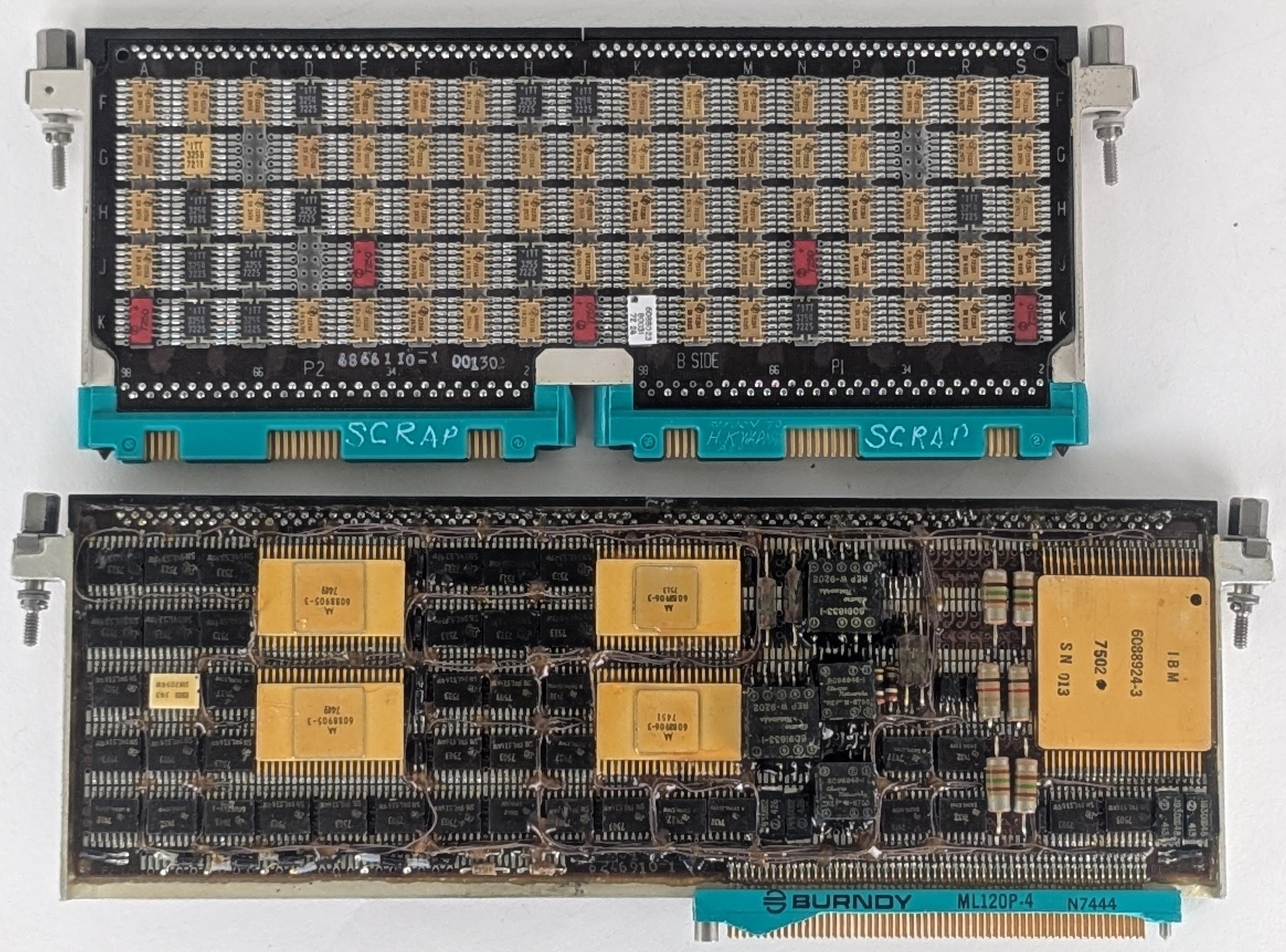
An I/O processor page (above, bottom) is almost identical to a standard 4 Pi page except that it is one inch wider (9" instead of 8"), and has a 120-pin connector or two instead of 98-pin connectors.14 One inch may not seem like much, but a 9-inch page fits 100 ICs rather than 78, a significant increase. I'm surprised that IBM changed from the standard size, but I suspect that the designers couldn't fit the IOP into the available space with standard pages, forcing the change. Likewise, the multiple I/O ports may have required more connections than the smaller connectors could support.
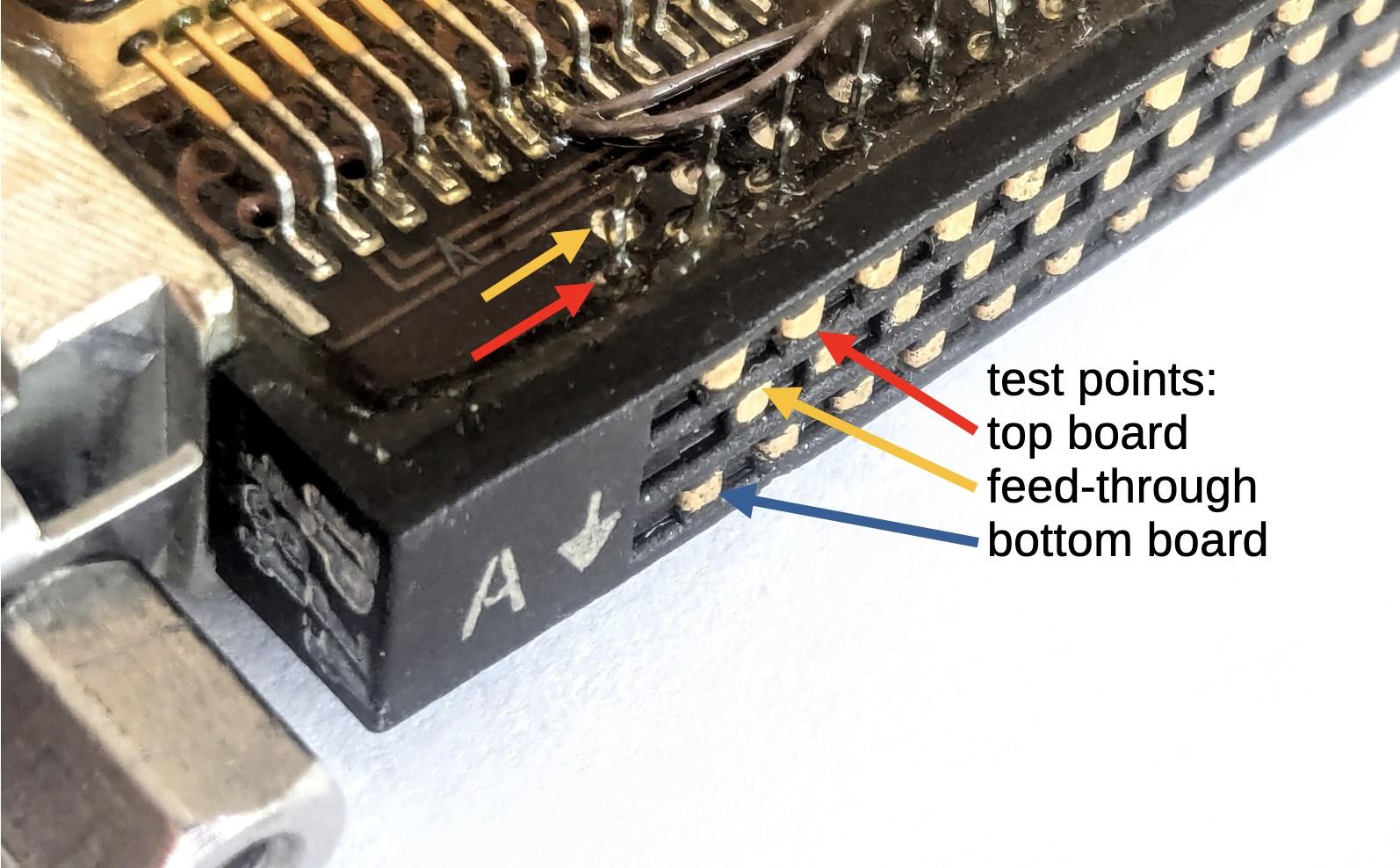
A page has circuit boards on either side, separated by a metal plate. To allow signals to flow between the boards, a special connector is attached to the top of the page to link the two boards. This connector not only provides feed-through connections between the boards, but also provides test points, so signals can be probed while the boards are mounted in the case. The photo below shows a close-up of the feed-through connector. It has three rows of test points. The first row (red) is connected to the top board. The middle row (orange) is connected to both boards and provides the feed-throughs. The bottom row (blue) is connected to the bottom board. The upper arrows show where the connector is soldered to the board.
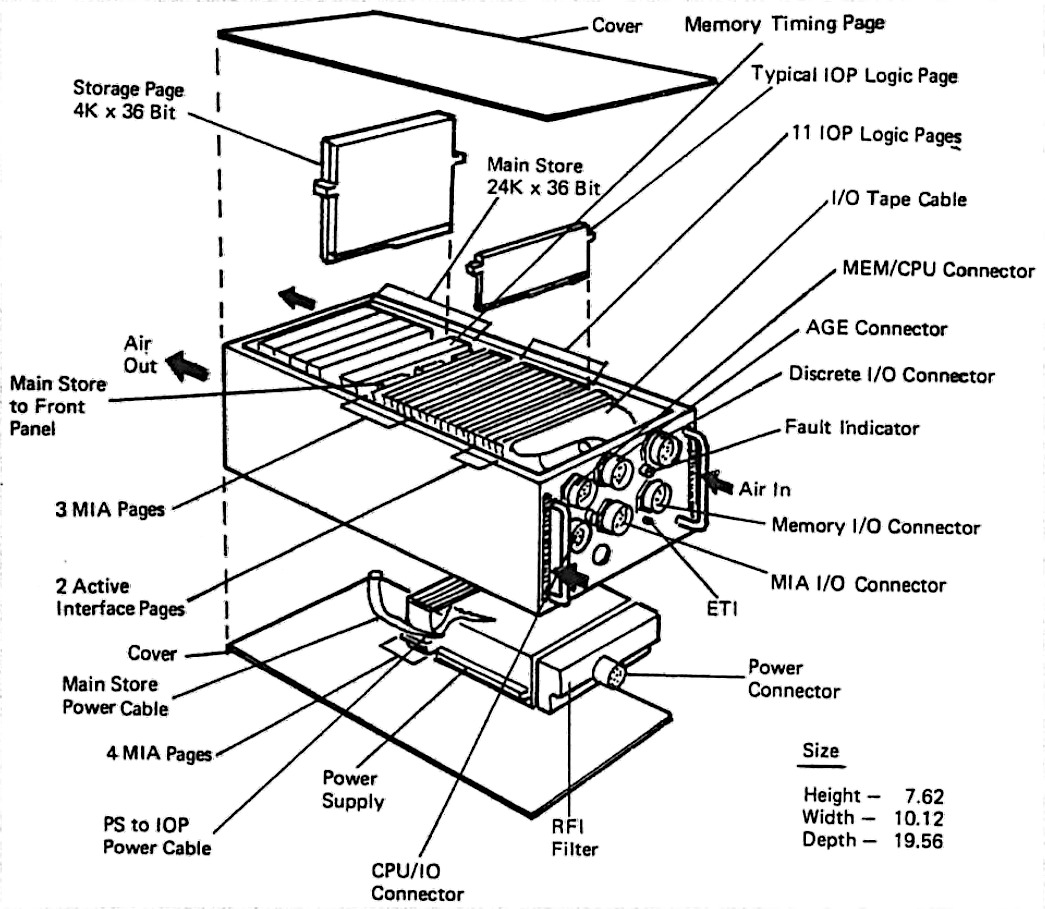
The diagram below shows the construction of the I/O Processor, with rows of pages plugged into the backplane.15 Note the 128-pin MIA I/O connector on the front of the IOP; this connects the 24 data buses (along with other signals) to other parts of the Shuttle. The arrows show how cooling air flowed through the sides of the IOP. The air did not flow over the pages. Instead, heat was transmitted by conduction through the metal plate inside each page, flowing to heat exchangers in the sides of the case. The CPU and the IOP both contained magnetic core memory (labeled "Storage Page" below); even though the memory is split between the boxes, it is treated as a unified shared memory, so programs for the CPU and the IOP can reside in memory in either physical box.
The IOP's architecture and the PROM page
The high-performance design of the I/O Processor was developed by Peter Kogge, an expert in parallel processing architectures. At the time, he was working at IBM's Federal Systems Division, where the Space Shuttle computer was developed.24 Kogge, now a professor at the University of Notre Dame, is also known for the Kogge-Stone adder, a fast circuit used in processors such as the Pentium. The I/O Processor has a very unusual architecture: although it had one physical processor, it ran 25 virtual processors with two completely different instruction sets. The virtual processors took turns, running for just one clock cycle and then letting the next processor run. The motivation behind this was to ensure that each network port got a predictable and guaranteed portion of the processor, so even if one network port was overloaded, it wouldn't affect the others. This approach, called a barrel processor16, was first used in the CDC 6600 supercomputer, the world's fastest computer from 1964 to 1969.
The I/O Processor has two types of (virtual) processors, which of course have cryptic acronyms: BCE and MSC. Each of the 24 network ports has a BCE, a Bus Control Element, which runs a small program to move data words between the network port and memory. An MSC (Master Sequence Controller) is the executive, running programs to manage the BCEs. The BCE and MSC processors run code that is stored in the computer's core memory. The instruction sets of the MSC and the BCE are completely different from each other and from the instruction set of the main CPU (which is derived from IBM's System/360 mainframes). The (executive) MSC is a 32-bit processor with the standard instructions of a normal processor—addition, logic, branches, and so forth—as well as specialized operations to configure and start BCEs.17 The instruction set of a low-level BCE is much smaller and much stranger, lacking all the basic instructions such as arithmetic and conditional branches. the instructions you'd expect from a processor. Instead, a BCE has I/O instructions such as Transmit Data, Receive Data, Load Timeout Register, Store Status, and Wait. In typical use, the CPU directs the MSC to run a program, the MSC configures the BCEs to execute a program, and the BCEs send and receive data as specified. When the BSE's operation is done, the MSC interrupts the CPU, which processes the data. Thus, the CPU can focus on the high-level algorithms without wasting cycles on network operations.
How do the MSC and BCE processors all run on one physical processor, when they have completely different instruction sets? The trick is microcode: each MSC and BCE instruction was implemented in microcode, through a sequence of 72-bit micro-instructions.18 A simple instruction might take five micro-instructions, while a complex instruction might require 60 micro-instructions. Each micro-instruction directed the action of the IOP's physical processor for one step of the MSC or BCE instruction. After each micro-instruction, the physical processor switched to the micro-instruction for the next virtual processor. The architecture of the physical processor was completely different from the MSC or the BCE: three 16-bit data paths and two ALUs (Arithmetic/Logic Units) that can operate in parallel. The physical processor had a separate register set, including a micro-instruction address register, for each virtual processor, to keep track of the state of each virtual processor.
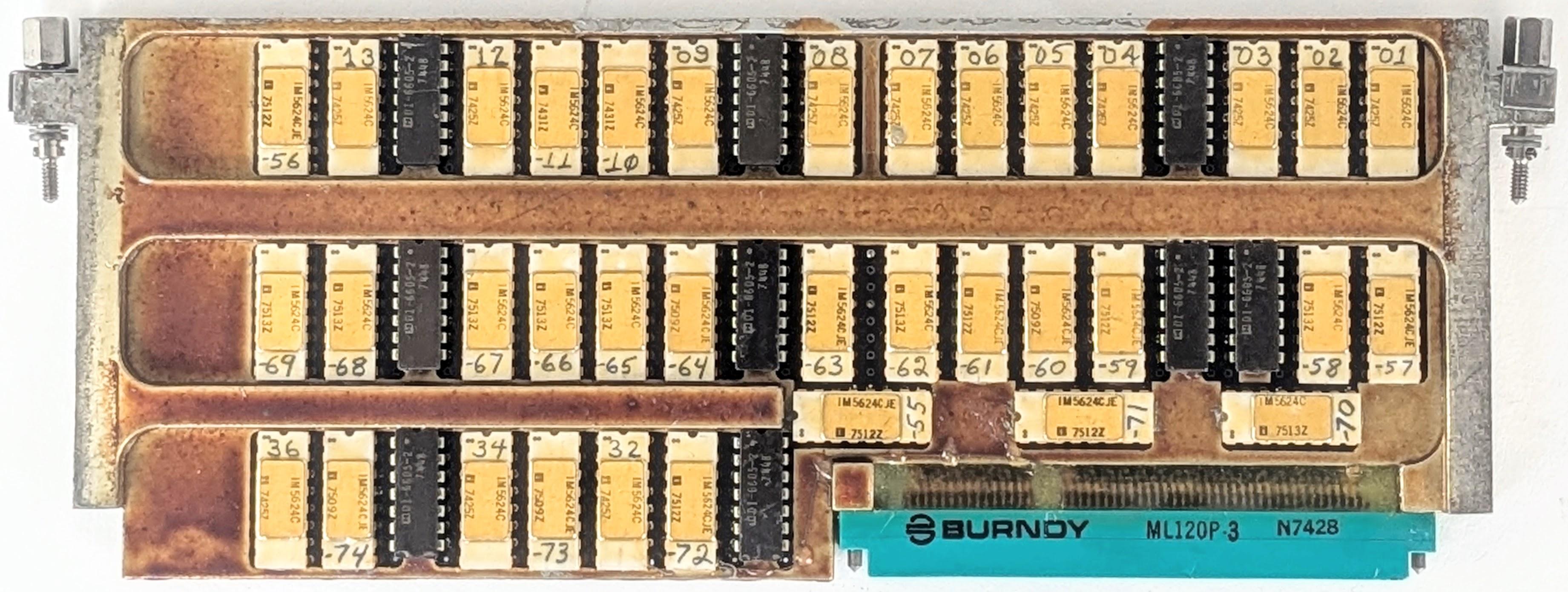
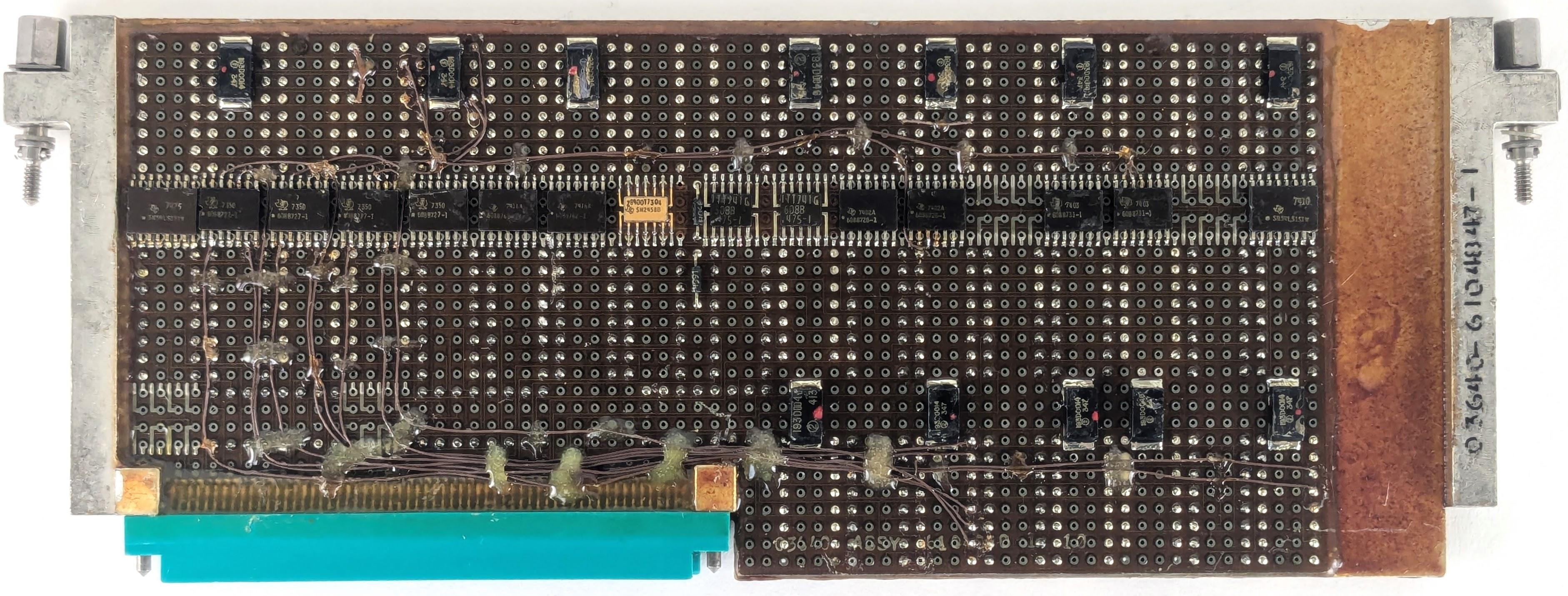
The IOP's micro-instructions were stored in the PROM page above. In the photo above, the white chips with gold lids are fusible-link PROM (Programmable Read-Only Memory) chips.19 These unusual chips contain a tiny fuse for each bit. If the fuse is intact, the corresponding bit is a 0, while a burnt-out fuse represents a 1 bit. The chip is programmed by applying 17-volt pulses to destroy fuses one by one, literally burning the PROM. (I discussed fusible PROM chips earlier.)
Each PROM chip holds 512 words of 4 bits, so in total, this page held 1024 72-bit micro-instructions; the remaining 512 micro-instructions were in another page.20 The chips are hand-labeled with numbers, since each chip has unique programming and must be installed in the correct location. With 36 chips, you'd expect the chips to be numbered from 1 to 36. Curiously, although many of the chips are sequentially numbered, others have numbers ranging from 55 to 74 in no obvious pattern.21
Physically, the PROM page is unusual in several ways. Instead of flat-pack integrated circuits, it uses DIP (Dual-Inline Package) ICs, larger integrated circuits with two rows of vertical pins that go through the circuit board. Since this page only has one circuit board, it doesn't have the test-point feed-throughs at the top. It still has the central metal plate, but the integrated circuits sit on top of the metal plate, while the circuit board is underneath—the plate has gaps for the pins. Between the rows of chips, the central plate is the full thickness of the board.
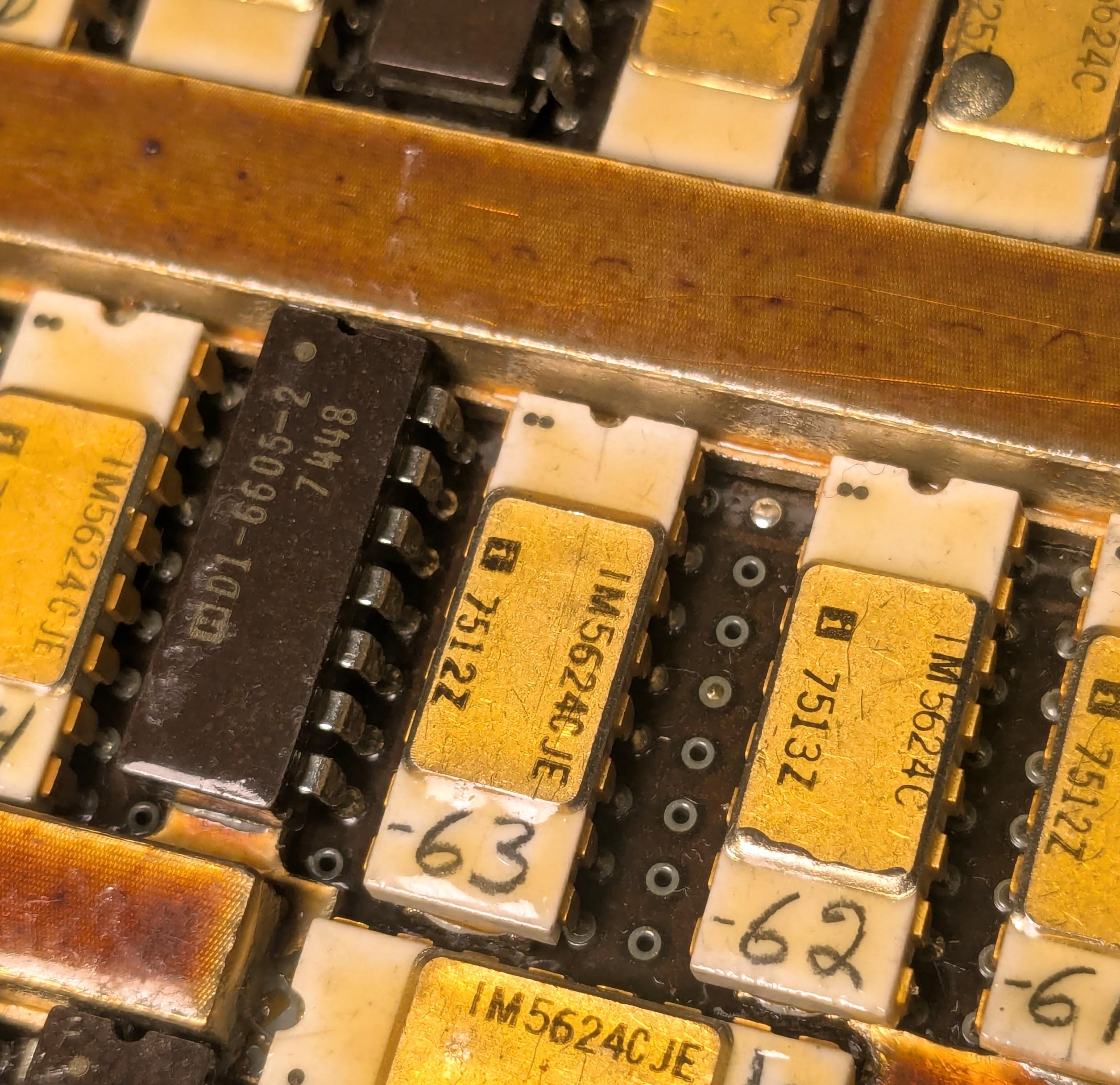
Presumably, the fusible-link PROM chips were only available in DIP packages, rather than flat-packs. These DIP packages take up much more space than the regular flat-pack integrated circuits; this page has about a quarter the density of a regular page.22
Conclusions
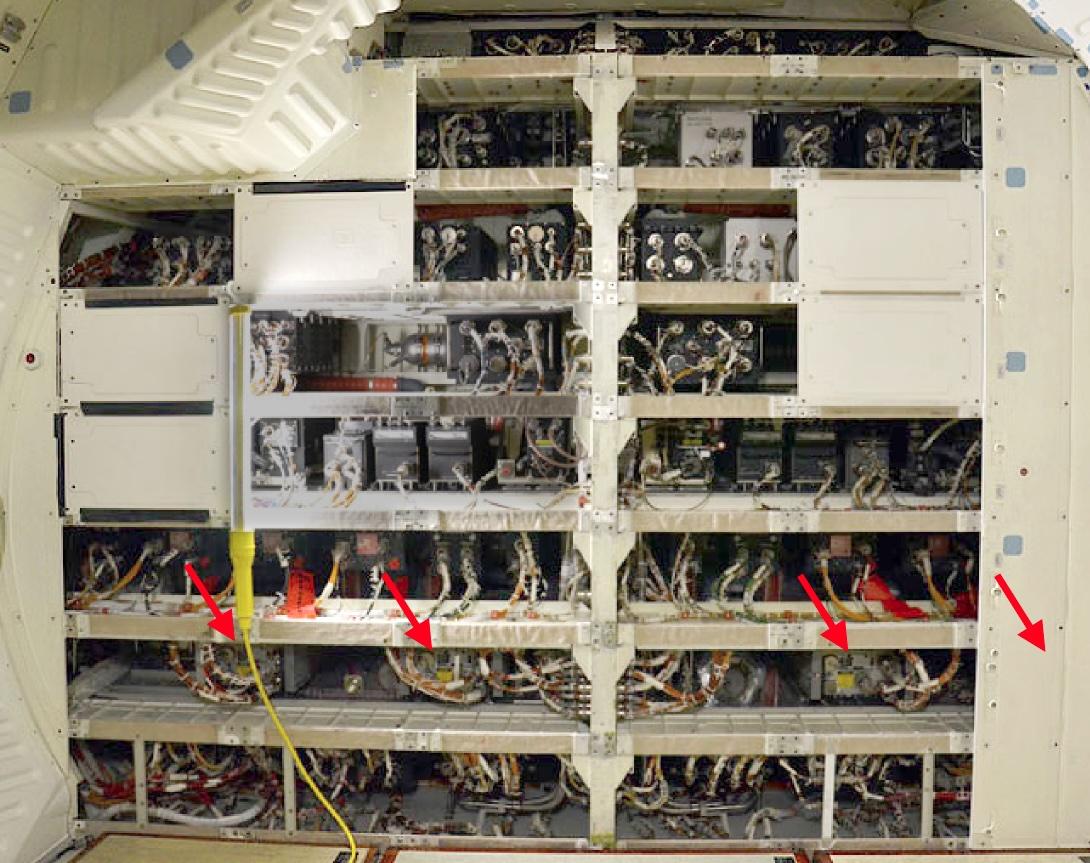
The Space Shuttle's CPU and IOP were advanced when they were designed, but they rapidly became obsolete. IBM redesigned the computer, combining both the CPU and IOP into a single box called the AP-101S, which first flew in 1991 (details). The improved computer was much faster and had more memory. Moreover, combining two boxes into one saved about 300 pounds in total. The photo below shows three of the updated AP-101S computers mounted in the Shuttle's avionics bays. (The wall hides the fourth computer, and the fifth is behind the camera.) These same positions are where the I/O Processors were mounted previously, with the CPUs installed in the empty spaces to the left.
Despite the critical role of the I/O Processor in the Space Shuttle, it doesn't get the attention given to the CPU. For instance, although NASA documents describe the architecture of the IOP in detail, I couldn't find any photos of its pages.23 I hope that this article has convinced you that the architecture and the physical construction of the IOP make it an interesting system.
For updates, follow me on Bluesky (@righto.com), Mastodon (@[email protected]), or RSS. Thanks to Richard for supplying the boards. Thanks to Mike Stewart for documents on the IOP. Thanks to Robert Pearlman of collectSPACE, and RR Auction for photos.
AI statement: I didn't use AI to write this article; the em-dashes are natural (details).
Notes and references
-
On some flights, a sixth computer was carried in a locker as a spare, providing an additional degree of reliability. If one of the five computers failed, the astronauts could connect the cables to the spare computer and it could take over for the failed one. The spare was put into use on flight STS-30 (1989) after computer #4 encountered a "data parity external storage error", indicating a hardware problem. ↩
-
I suspected that these pages were from the I/O Processor, but it was difficult to prove this. Fortunately, Mike Stewart found a document, the Prototype Input/Output Processor Function Description, that lists the pages in each IOP slot. The MIA page has a part number on it: 6246523-3, and the PROM page has 6104848-3; these match "MIA" 6246523-1 and "Micro Store (ROM)" 6104848-1 in the document. ↩
-
The diagram below shows how the 28 data bus networks connect the five computers at the top and various parts of the Shuttle. The networks are categorized as ground interface, mission critical, flight instrumentation, display system, mass memory, intercomputer, and flight critical.
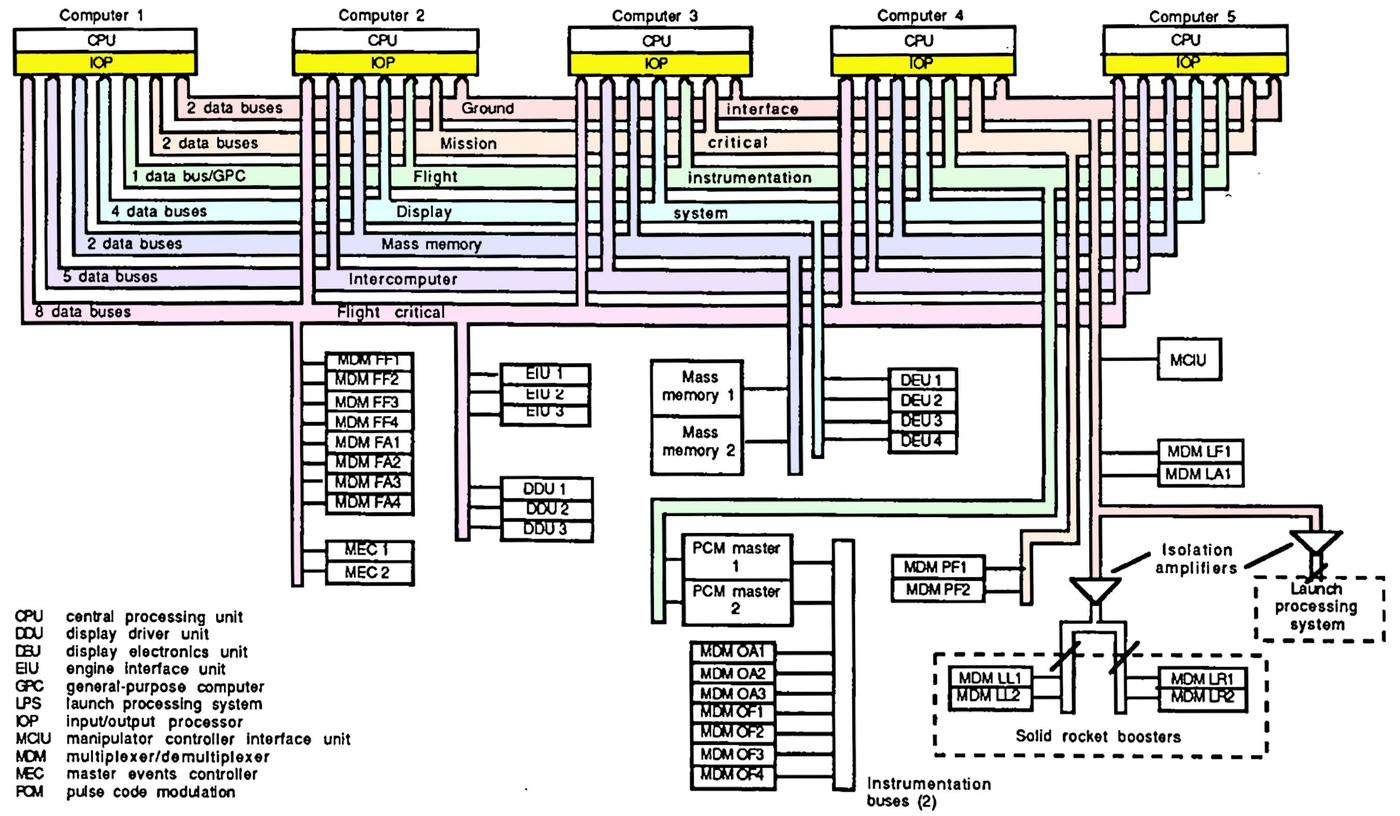 Data bus architecture. Click for a larger version. Adapted from Space Shuttle Avionics Systems.
Why was each computer connected to 24 networks and not all 28? Each Space Shuttle computer was connected to almost all the networks, so they could run in lockstep for reliability. The exception was that each computer sent its own monitoring data to the ground station. Since this data was of no importance to the other computers, it was sent over a private network called Flight Instrumentation to the PCM (Pulse Code Modulation) box, which encoded the data for transmission to the ground. There were 23 shared networks and 5 private networks (one for each computer), so there were 28 networks in total, with 24 networks connected to a particular computer. ↩
-
Both sides of the interface page are almost identical. However, the connector is on the left or the right side, depending on which side of the page you examine. This forced the decoupling capacitors at the very bottom to move to accommodate the connector. I also found a single integrated circuit that was different between the two sides, for some reason. ↩
-
While many of the data bus networks are connected to a Multiplexer/Demultiplexer (MDM), this is not always the case. Networks were also connected directly to systems such as an Engine Interface Unit or a Display Electronics Unit. Moreover, the MDM was not necessarily the final step between the network and the Shuttle's sensors. The MDM held cards to support over a dozen types of input and output signals: digital, analog, on/off (discrete), and serial. However, the thousands of signals in the Shuttle were much more diverse; sensors can provide AC signals, pulses, thermocouple values, resistances, and so forth. Other boxes converted the raw sensor signals into forms that the MDM could handle; these boxes were called Dedicated Signal Conditioners (DSC). A DSC had 15 or 30 slots to hold cards to perform the necessary signal conversion. Thus, the MDMs and DSCs combined a fixed architecture with the ability to be customized for each role. ↩
-
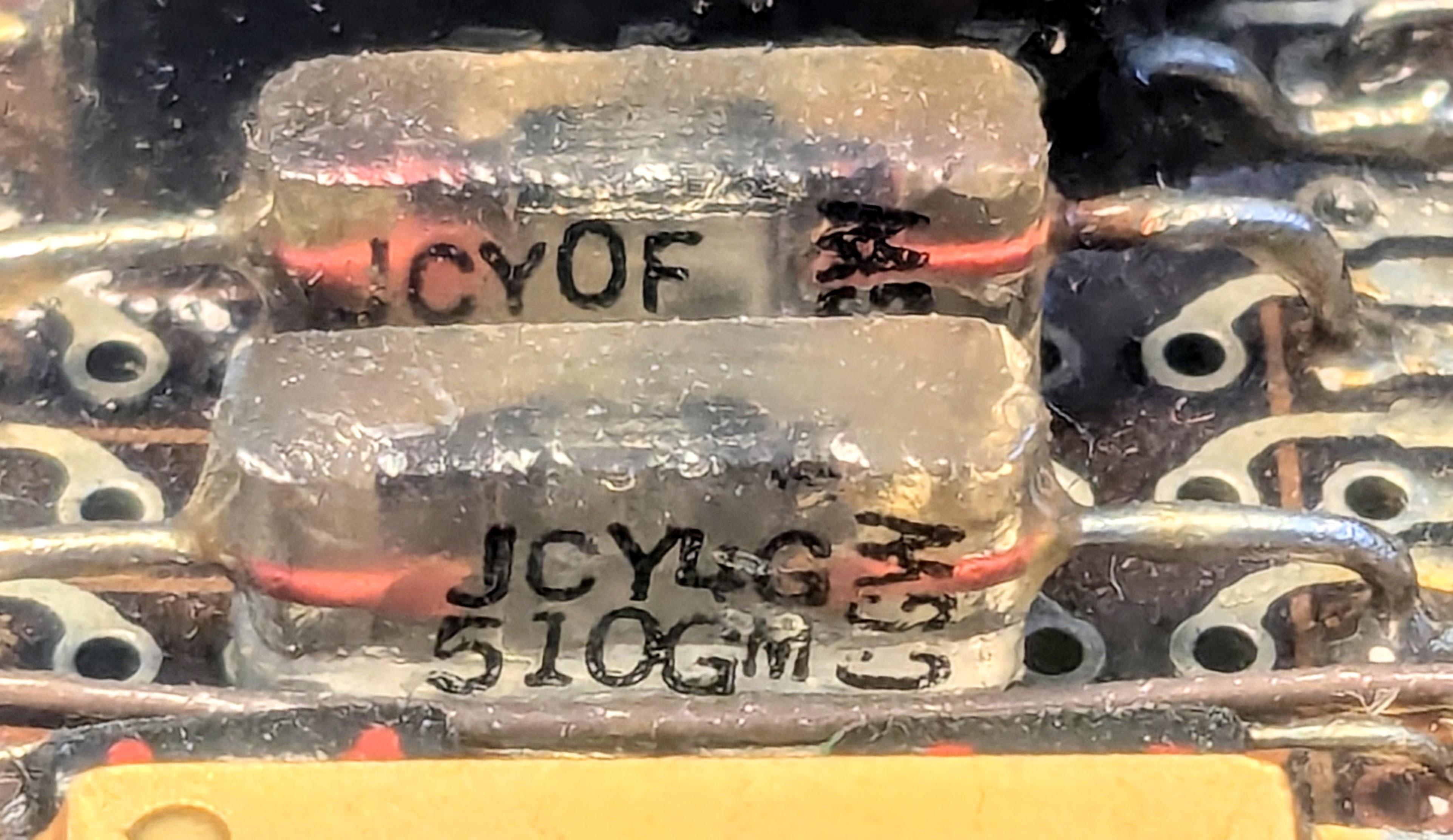
The glass capacitor is an interesting component, with an extremely thin layer of glass as the dielectric. Glass capacitors became popular in the 1960s for aerospace applications because of their stability and reliability (more). These capacitors were manufactured by Corning Glass Works, as indicated by the "CGW" label on the package.
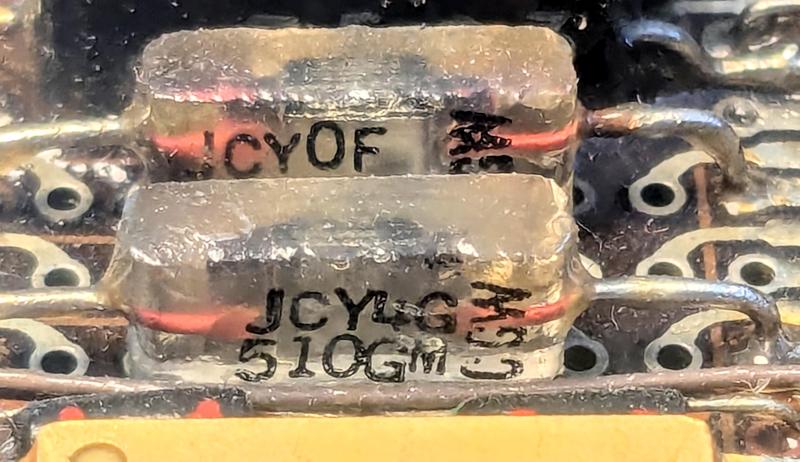 Two glass capacitors on the MIA page.
The capacitor is labeled with a military code. "J" indicates the Joint Army/Navy specification. "CY" indicates a glass capacitor, "4" apparently indicates axial leads, "G" indicates the temperature/voltage, "510" is the value (51×100 = 51 pF), and "G" indicates ±2% tolerance. (I don't know why one capacitor has "0F" and the other has "4G".) ↩
-
The Space Shuttle had a second layer of transformers between the computer and the network, ensuring a faulty device didn't bring down the network. Each device (such as the IOP) was connected to the network through a tiny device called the Data Bus Coupler. This one-inch cube contains a transformer and a few resistors to match impedance. The coupler acts as a network tap, providing a short stub from the network to a device. The coupler also provides line termination if the device is removed, ensuring signal integrity. ↩
-
The Space Shuttle's network is very similar to the U.S. military's serial network standard MIL-STD-1553. The 1553B standard is widely used in numerous military aircraft, missiles, tanks, navy systems, the Airbus A350 commercial plane, and the James Webb Space Telescope. However, since the Space Shuttle's network and the 1553 standard were both under development in the early 1970s, the two networks are not the same. The main differences are that the Shuttle uses 24-bit words instead of 16, and has 5.5µs gap between words (details). ↩
-
The functions of the MIA are described as:
- Transmit and receive data
- DC isolation
- Parallel/serial conversion
- Serial/parallel conversion
- Sync generation and detection
- Manchester encode and decode
- Parity generation and detection
- Bit count detection
- Provide status to BCE.
The functional block diagram below shows the circuitry for one port of the network interface. This circuitry is replicated twice on each board; with a board on each side of the page, the page supports four networks. The dashed Transmitting and Receiving boxes correspond, I think, to the large Motorola chips, except that the "TX" and "RX" amplifiers are in the IBM hybrid module and the transformers are discrete components.
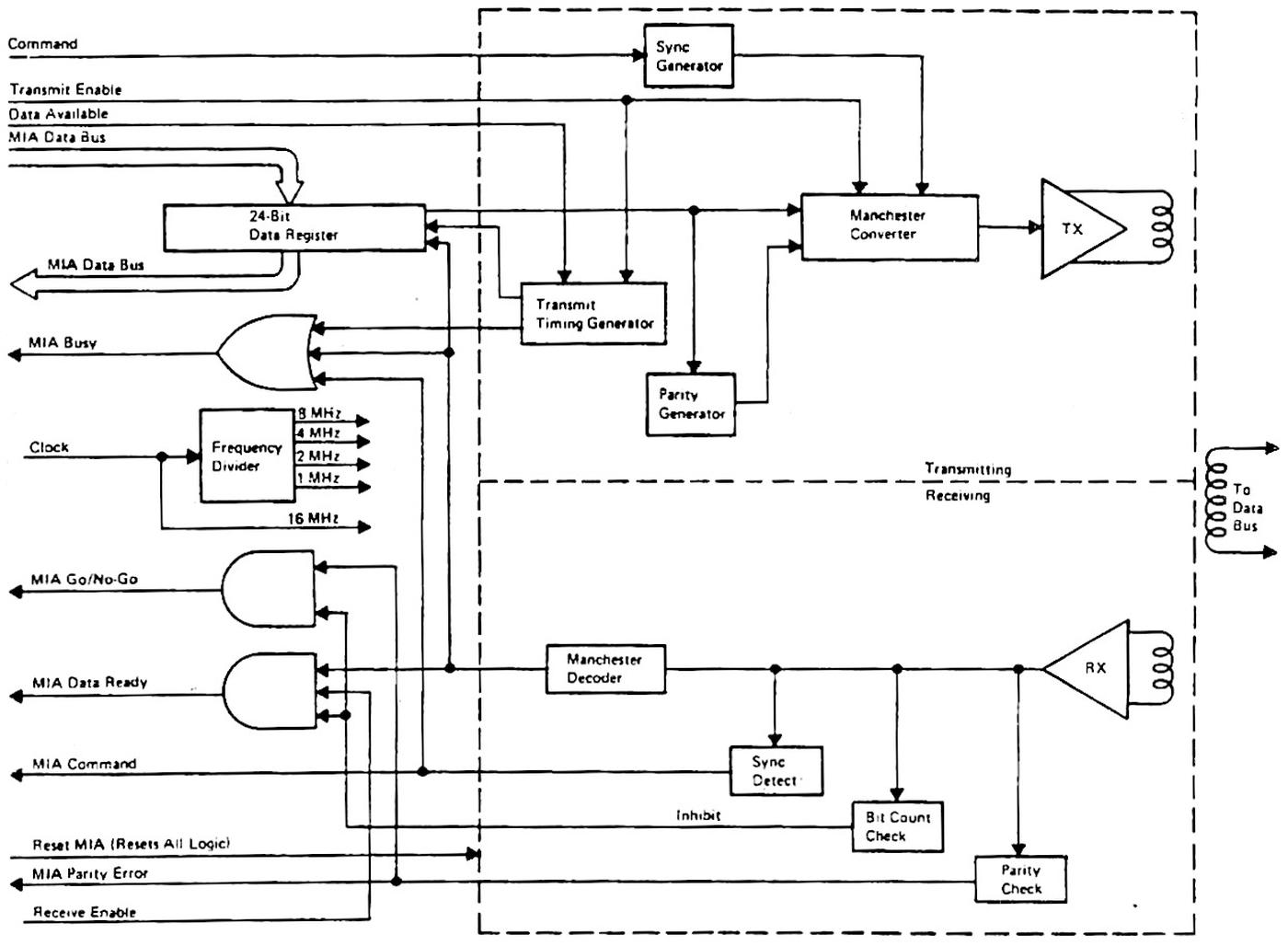 Functional block diagram of the MIA. From Prototype IOP Functional Description, p82. Click for a larger image.
 -
The 4-bit shift register chips are 54LS395 chips. These chips have "tri-state" outputs, allowing them to be connected to a bus. These chips probably provide the interface between the board and the rest of the IOP; the twelve chips on a board would support a 24-bit register for each port, as expected. The 8-bit shift register chips are 54LS1964 shift registers.
I can't figure out why there are so many 8-bit shift register chips; perhaps they act as buffers. My speculation... The Prototype IOP Functional Description states that the IOP has six 28-bit 4-word registers between the 24-bit MIA shift registers and the rest of the IOP. Could the 8-bit shift register chips form these registers, even though shifting is not necessary? The document doesn't make it clear if these registers are on the MIA page or a different page. The shift-register chips provide 256 bits of storage per page, while the register file needs 112 bits, so there are way more bits than required. Moreover, the document says that the registers are structured as 7-4&4 register files for each set of four MIAs, which sounds more like 54LS170 register file chips (for instance) than shift-register chips. Possibly, the design was modified from the Prototype Functional Description, and the 8-bit shift registers provide additional buffering. ↩
-
The 4 Pi name is a geometry joke based on IBM's wildly popular series of mainframes, the System/360. System/360 revolutionized the computer industry with the concept of one family of computers for all applications: business and scientific. The name symbolized that System/360 covered the full 360º of applications. The 4 Pi name extended the idea of a circle to the 3-dimensional world: 4π is the number of steradians making up a full sphere. As IBM put it, "System/4 Pi also fills a sphere—the full spectrum of military computer needs—for airborne, space, or shipboard use." ↩
-
The earliest 4 Pi systems (the TC line) used a different style of page, but the following computers used the standard 4 Pi pages, including the Space Shuttle's AP-101B computer. However, IBM moved to much larger pages, starting with the next computer, the AP-101C in the B-1 bomber. The Space Shuttle's upgraded computer, the AP-101S, used these larger pages. For details, see my article on 4 Pi computer history. ↩
-
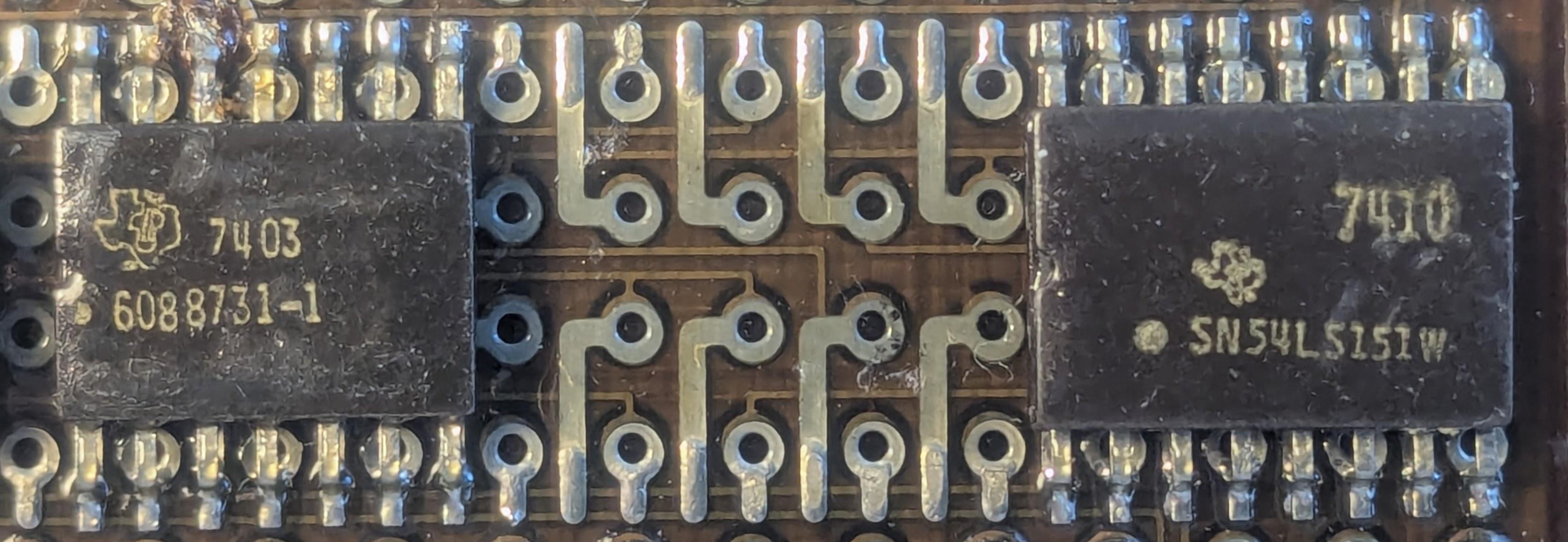
The photo below shows how the flat-pack integrated circuits are mounted on the circuit board. 16 pads are allocated to each integrated circuit; 14-pin integrated circuits "waste" two pads, while larger integrated circuits break the regular pattern. Each pad is connected to a via, a plated hole through the circuit board. These vias provide connections to wiring traces on a different layer of the circuit board; some of these traces are visible in the photo. Vias also hold the leads of through-hole components. The circuit cards in IBM System/360 mainframes used a very similar style of printed-circuit board, with a regular grid of vias. This style of board is very different from the circuit boards used in most other systems, which only had holes where necessary and routed traces less regularly. IBM's style presumably made hole drilling more efficient and was easier for automatic routing, but required thin, precise traces and multi-layer circuit boards, which were not common at the time.
IBM's technology was highly advanced compared to consumer electronics. IBM was using six-layer printed-circuit boards and surface-mount components in the 1960s, but Apple, for instance, didn't switch to surface-mount components until two decades later. Specifically, the Apple IIGS (1986) extensively used surface-mount components, but the Macintosh SE (1987) still used entirely through-hole components a year later.
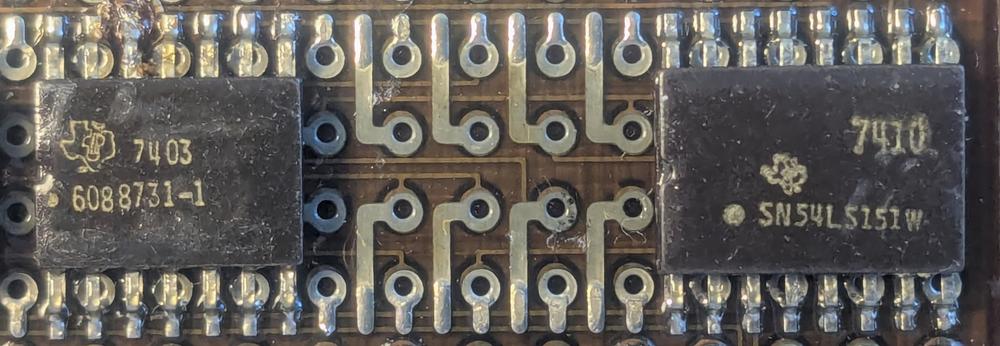 A close-up of the IOP's PROM board.
The photo also illustrates how some integrated circuits are labeled with Specification Control Drawing (SCD) numbers (6088731-1) while others are labeled with standard part numbers (SN54LS151). This SCD number corresponds to a standard 54S10 NAND gate. The chips both have 1974 date codes (74xx), not to be confused with 7400-series part numbers.
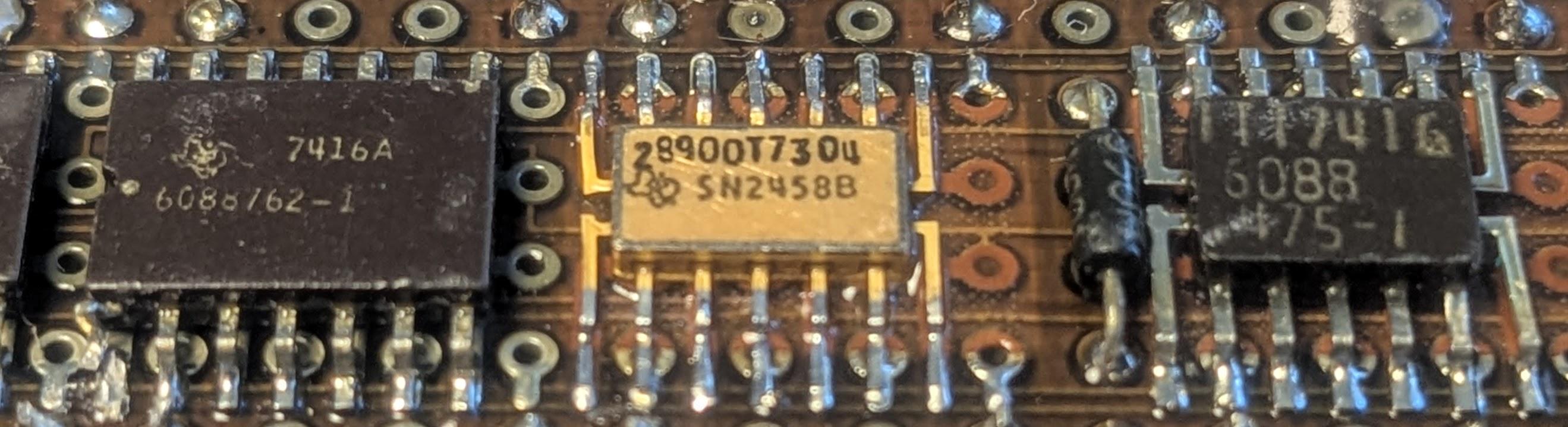
The photo below shows three different types of flat-pack ICs. The first type is most common, with leads extending from the top and bottom sides, similar to a modern surface-mount integrated circuit. The second package has a golden case. It is much smaller and thinner, with leads extending from all four sides. The third package also has leads from four sides, but is somewhat larger.
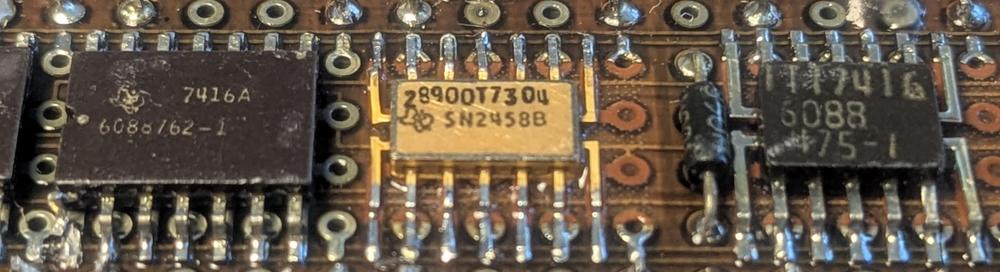 Three types of surface-mount packages.
 -
The change in page size for the IOP is documented in Prototype IOC Functional Description, which says: "Standard 4 Pi Page Extended by Width Change from 8 to 9 inches, New Standard 120 Pin Connector".
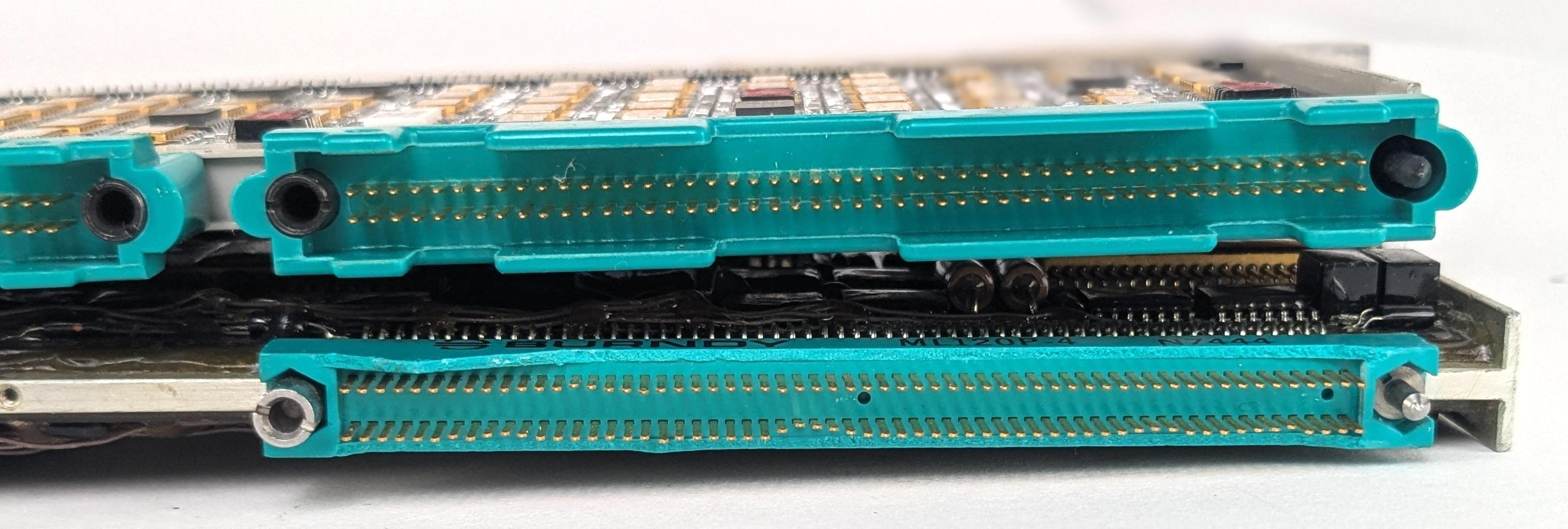
The photo below compares the 98-pin connector on a standard IBM 4 Pi page (top) with the 120-pin connector on the IOP page (bottom). The 120-pin has a narrower pin spacing (0.05") than the 98-pin connector (0.06"), allowing more pins in the same width. However, the 120-pin connector has more spacing between the rows of pins (0.150" vs. 0.100").
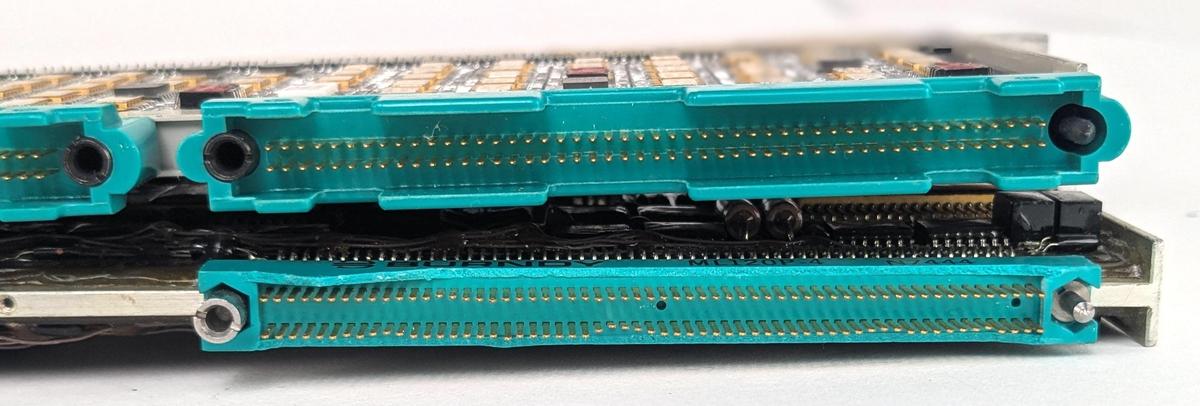 The connectors on a standard IBM 4 Pi page (top) and the IOP page (bottom). The 4 Pi page is courtesy of Eric Schlaepfer. The slight waviness is just due to bent pins.
Also note that both connectors have a peg on one side and a hollow cylinder on the other. These are used for keying, to make sure that a page cannot be plugged into the wrong slot. Each page type has a different combination; with a double connector, there are 16 possible combinations. ↩
-
The exploded view shows seven MIA (interface) pages. This doesn't make sense since there are six MIA pages for the 24 network connections, as the same document lists (in Table 4-1). That table also shows one more page in total than on the exploded view. My guess is that the system was still being changed when the document was written (some entries in the table are marked TBD), resulting in inconsistencies. ↩
-
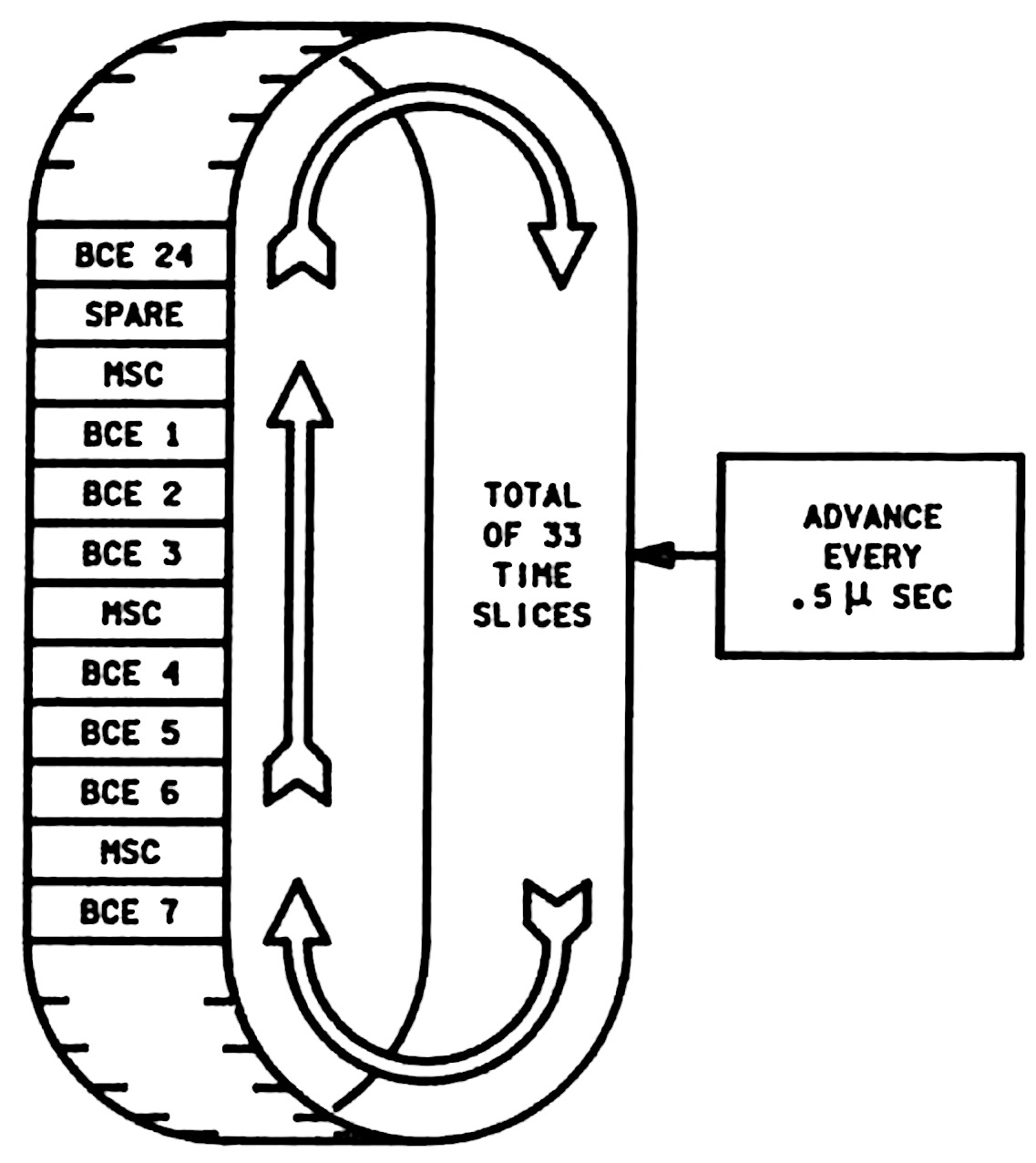
The virtual MSC and BCE processors take turns executing on the IOP's physical processor. A 16.5 µs time interval is split into 33 slices: each BCE gets one time slice, the MSC gets 8 time slices, and one slice is used for BCE self-tests. Thus, the MSC gets much more execution time than a low-level BCE.
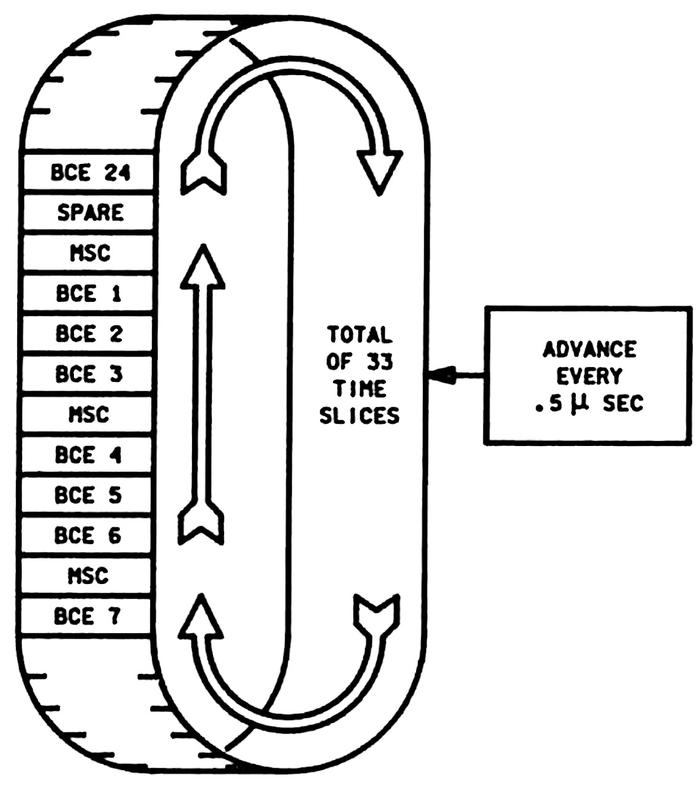 The I/O Processor's slot timer or "wheel". Adapted from Space Shuttle Systems Handbook, 8.3.
Each BCE and the MSC has its own register set (called local store), so the right registers are available for each slot. The physical processor is pipelined, so there are actually four slots active at any time. ↩
-
For details on the instruction sets of the MSC and BSE processors, see Prototype IOP Functional Description, chapter 2. ↩
-
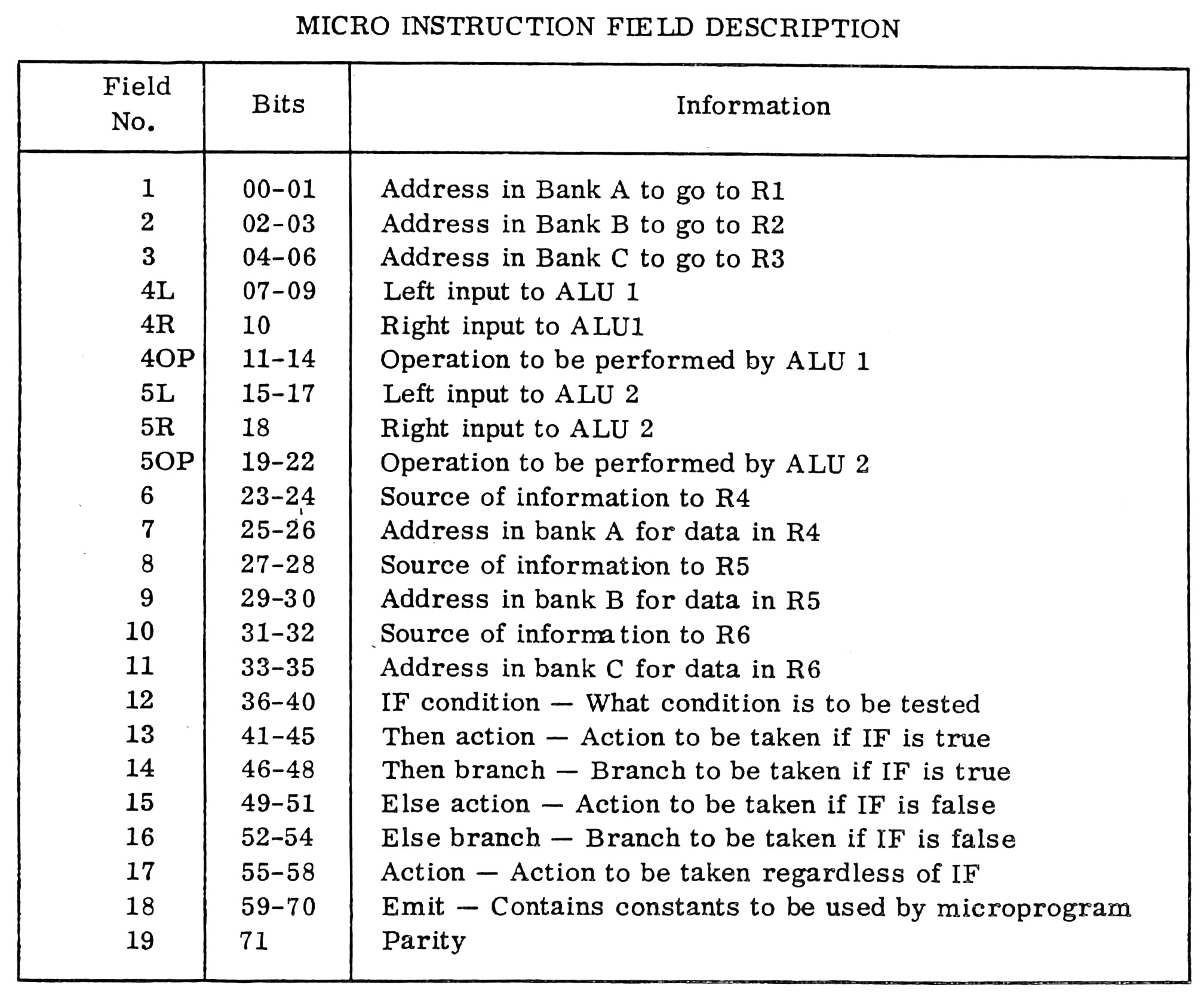
The IOP used a micro-instruction that was 72 bits wide. A micro-instruction controlled the physical processor by specifying the data sources, data destinations, the ALU operations, and conditional branch actions. The table below shows the structure of the micro-instruction in detail. Note that a micro-instruction controls each component of the processor separately at a low level, so it is very different from a machine instruction. A micro-instruction also provides a degree of parallelism, since it specifies three operations for each step (ALU 1 operation, ALU 2 operation, and a conditional action).
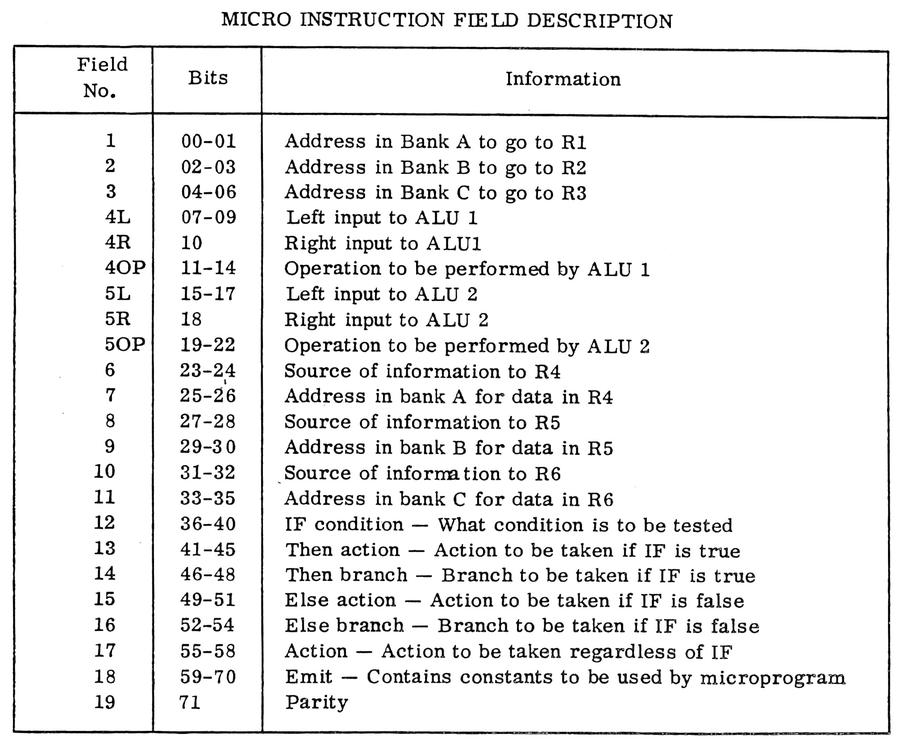 Format of a 72-bit IOP micro-instruction. From Prototype IOP Functional Description.
 -
The PROM chips are Intersil IM5624C parts. These are similar to the Signetics 82S131 and Intel 3622 parts. The front side of the page also contains nine chips labeled "D1-6605-2", probably manufactured by Harris; perhaps these are buffers. ↩
-
The Prototype Input/Output Processor Function Description lists two pages associated with microcode: "Micro Store (ROM)" (the page that I examined), and "Micro Store Page". I assume that the second page held the 512 words that didn't fit on the first page, along with the circuitry for the microcode control logic and registers. ↩
-
Why are the numbers on the PROM chips semi-ordered but also somewhat random? My hypothesis is that the original chips were numbered 1 through 36 in sequence, but when chips needed to be replaced for software patches, each new chip received the next number in sequence, up to 74. ↩
-
With flat-pack ICs, an IOP board can hold up to 20 ICs per row, so 100 ICS on a board and 200 ICs on a double-sided page. With the larger DIP packages, the PROM page holds just 45 ICs. Since DIPs are taller (thicker), the page has only a single board. This shows the large density advantage of flat-pack ICs over DIP ICs.
The density of this page is slightly better because there are a few (15) flat-pack ICs mounted on the back of the PROM board (below). The flat-pack ICs had to be mounted between the rows of DIPs to avoid the pins of the DIP ICs. Because DIPs use through-hole mounting, their pins exit the back side of the board. The large two-pin packages above and below are decoupling capacitors, filtering the power to the ICs.
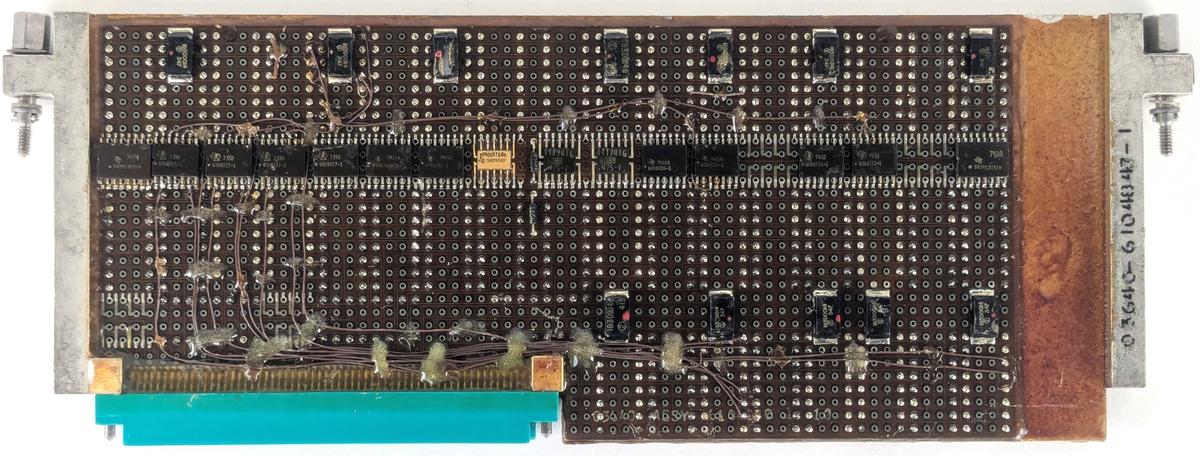 Back of the PROM page.
The back side of the board also shows that the printed-circuit board is an inch smaller than the space available; note the gap on the right. Perhaps the circuit board was designed for a standard 8-inch 4 Pi page, but then mounted on the IOP's special 9-inch page. ↩
-
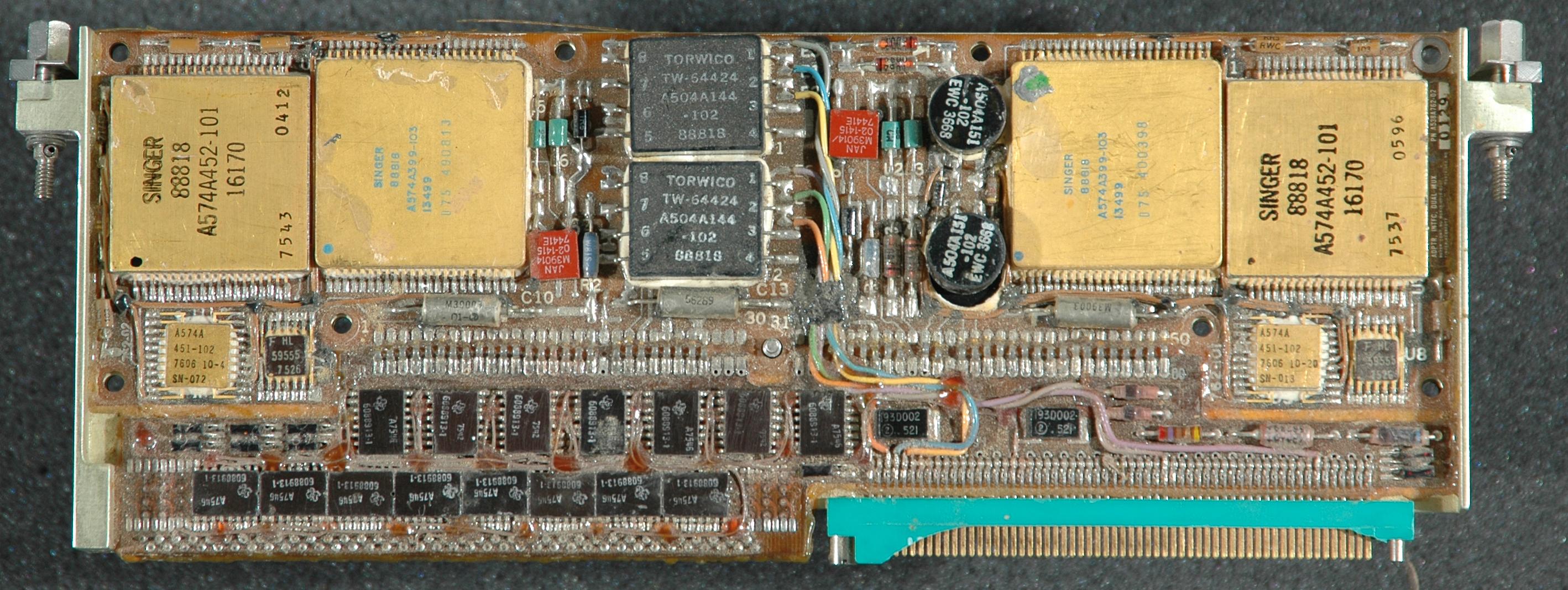
The NASA Office of Logic Design web page has a photo of a Space Shuttle board that might be from the IOP, but its source is unknown (I asked). This board is puzzling because it has the same unusual 9" form factor as the IOP pages, but it also has many differences, so it probably came from a different Shuttle system.
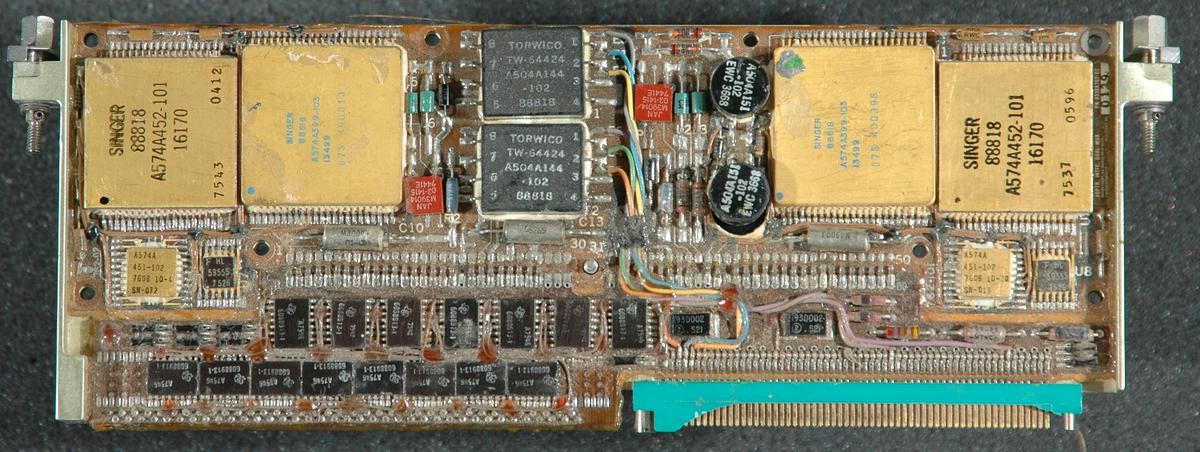 A Space Shuttle board. Note the broken connector; the plastic on these vintage Burndy connections is very often broken. From Space Shuttle Computers and Avionics.
The board is a dual MIA interface; it is labeled "ADPTR. INTFC. DUAL MUX", part number "A538A762-02". This part number does not appear in the IOP documentation, and has a different format from IOP part numbers. The circuitry on the board is very similar to the IOP's interface board, with hybrid modules, transformers, and analog components. Physically, the board has the same dimensions, mounting hardware, and 120-pin connector as the IOP boards. However, the board doesn't have the test point connector at the top and the ICs are arranged haphazardly, instead of in uniform rows, so it doesn't look like it was manufactured by IBM. Moreover, the number of ICs is much smaller. On the other hand, it uses the same 54LS395 4-bit shift register chips (labeled 6088913). I would think that this was a prototype board for the IOP's board, except both boards are from 1976, based on the component dates.
My current hypothesis is that this board was the MIA network interface in a different Space Shuttle component, probably the MDM (Multiplexer/Demultiplexer); the MDM contained a "Serial MIA" board built by Singer-Kearfott. Note that the board has Singer hybrid modules; since Singer-Kearfott invented the MIA network, it makes sense that their modules would be on an interface board. Another possibility is that this board was part of the Shuttle's IMU (Inertial Measurement Unit), which was built by Singer-Kearfott. The IMU communicated with the MDM via a serial I/O line that was very similar to the MIA protocol, but had some differences.
Singer, by the way, is the same Singer that builds sewing machines. How did they end up making advanced components for the Space Shuttle? (Not to mention nuclear missile guidance systems.) In the 1960s, Singer diversified into defense and computers; in 1968, Singer acquired Kearfott, a defense company that built inertial navigation systems. The Singer-Kearfott SKC-2000 computer was considered for the Space Shuttle, but IBM's AP-101 was selected instead. Singer-Kearfott built the Inertial Measurement Units (IMUs) for the Space Shuttle. In 1987, Singer sold its Kearfott Guidance & Navigation division to the Astronautics Corporation. Kearfott still produces guidance and navigation systems, such as the inertial navigation system for the Global Hawk UAV and the Trident II submarine-launched ballistic missile. After a 1987 takeover and two bankruptcies, Singer is back to just sewing machines, now part of the SVP Worldwide sewing machine company. ↩
-
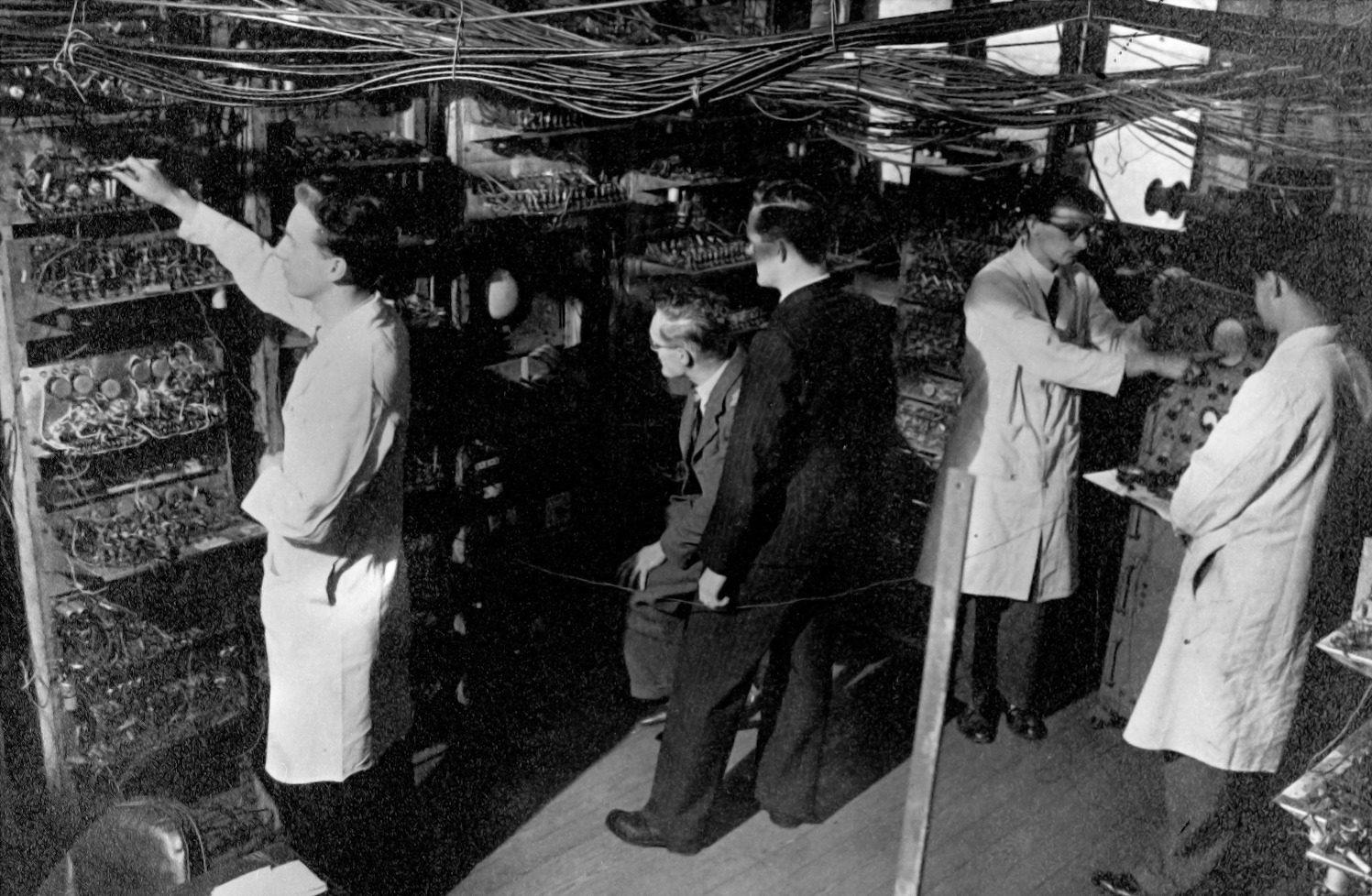
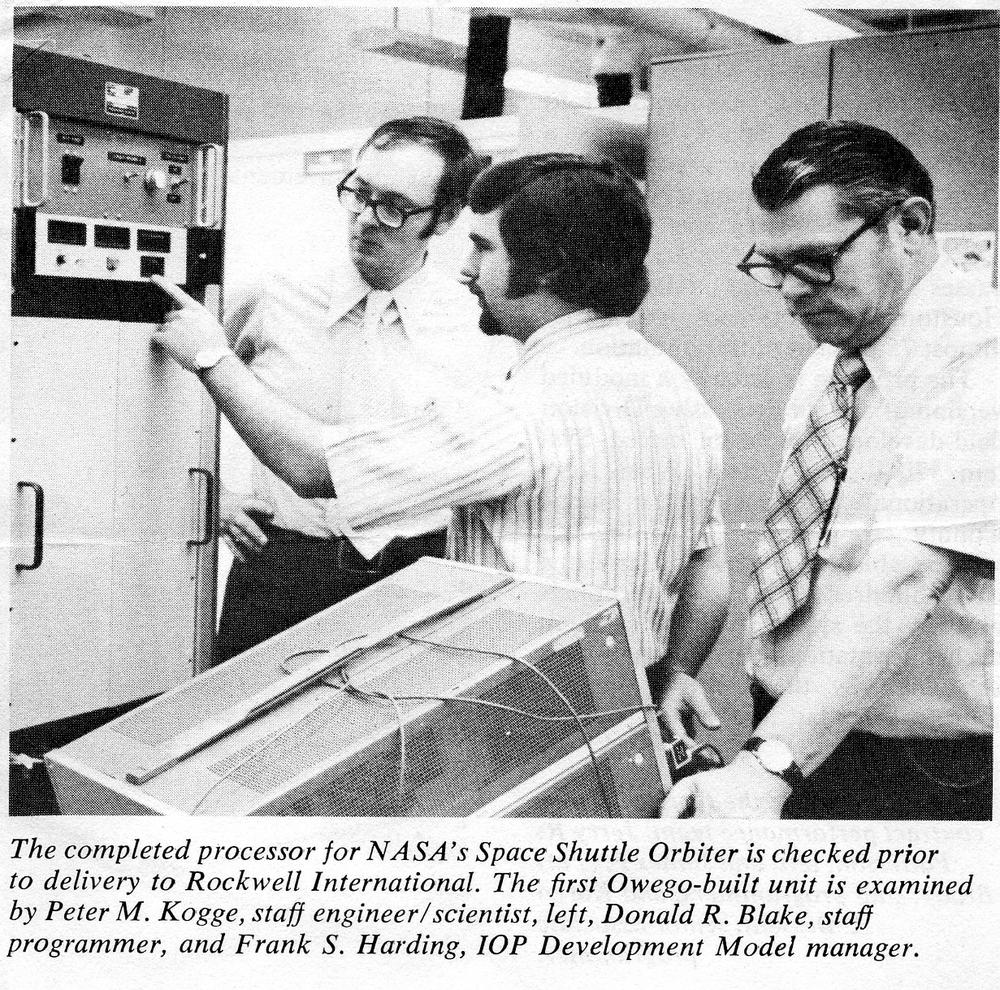
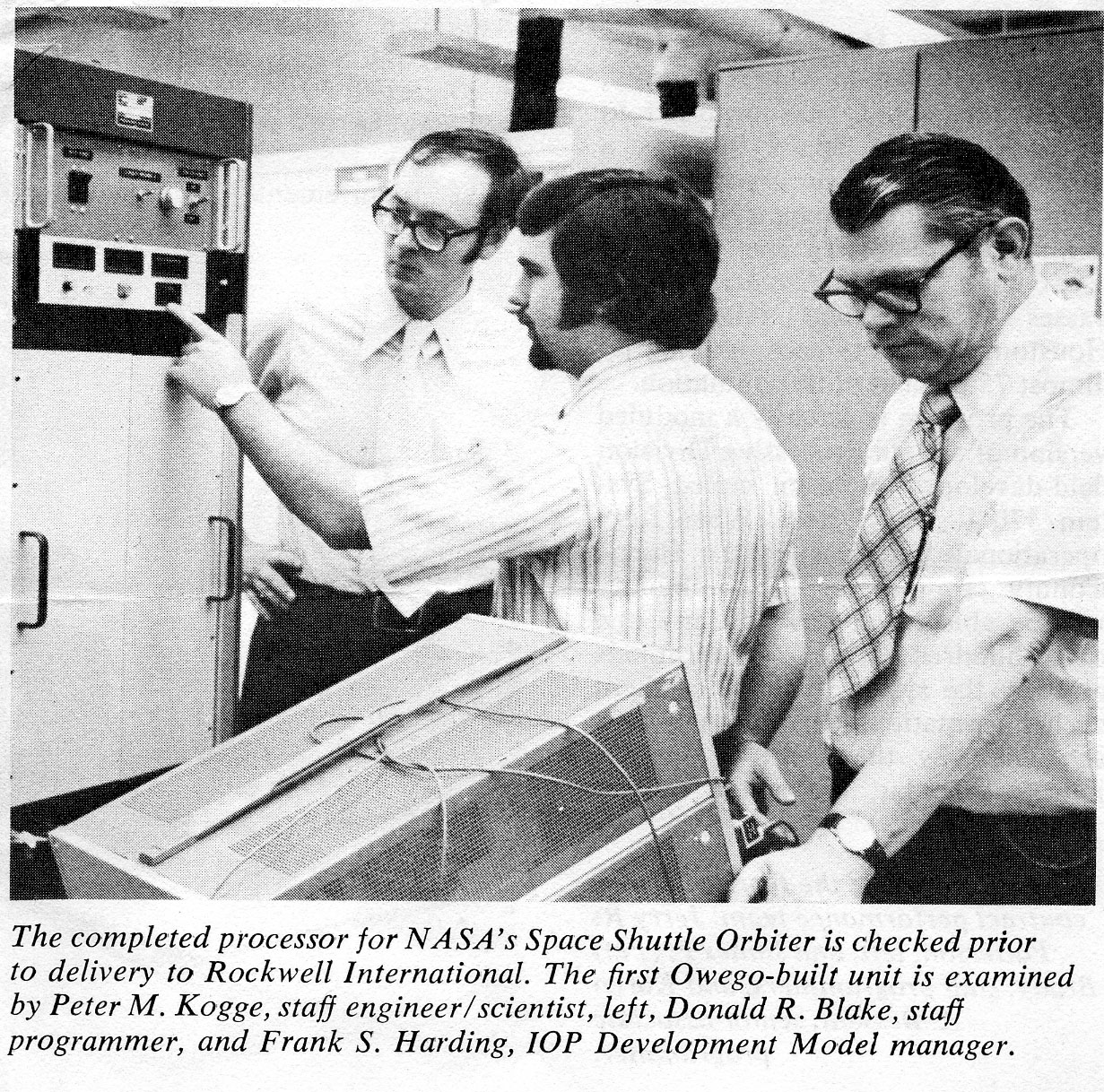
Bonus photo of Peter Kogge working on the I/O Processor:


8 comments:
I cannot help it - I simply HAVE to ask - this all sounds so much like a precursor to CANbus, so did the Shuttle have an OBD-2 port?
Anonymous: instead of an OBD-2 port, the Shuttle had AGE connections (Aerospace Ground Equipment), which is how the computers, for instance, were monitored and debugged on the ground. As far as CANbus, it's a completely unrelated and different network.
Nice article. I started working for the IBM Federal Systems Division in Owego in 1969. I worked on nearly all of the Space Shuttle hardware developed there. If you're interested, I have a publicity photo of the IOP development module (prototype) prior to delivery to Rockwell International. The development module was a 19" rack mounted unit consisting of wire-wrap circuitry. In the photo are Dr. Peter Kogge (mentioned in the article), myself (Donald Blake) and Frank Harding (IOP Development Model manager).
Beautiful analysis, thank you. As much as I am in awe for the systems design, the no-compromise fit-for-purpose architecture, and the electronics engineering - the survivability of the mechanics side of it is what baffles me. Heavy units, countless connectors, large boards, long lines; all with their own self-resonance frequencies and vibration modes, varying contact pressures and resistances, opportunity of oxidation no matter the gold, metal fatigue, varying thermal coefficients - and yet somehow maintain sufficient reliability in the relentless conditions in which this had to operate. All the stress tests and shake/vibe tests on the ground notwithstanding, I would not dare to sign off on something so complex yet critical for survival.
Donald, I would be delighted to see your IOP publicity photo. You can email me at [email protected]
Somewhat reminiscent of the RP2040's PIO state machines. Or should that be a progenitor?
"These computers were designed before microprocessors became popular"
Before they became popular, or before microprocessors with sufficient performance were available? The SLBM fire control system I worked on in the 1980's was of similar (early/mid 70's) design vintage, physical construction, and logical architecture as the shuttle computers. I had a conversation in the late 80's with a GEOS engineer and asked him why the FCS computers didn't use microprocessors. He opined that the available (late 80's) microprocessors were not yet up to the task.
Interestingly, our computer also had a very complex and semi-autonomous I/O processor. Probably for much the same reason, 16 (or 24 depending on the submarine class) missiles and their supporting subsystems required a great deal of interface capacity. We once estimate that almost a third of fire control's weight and volume was specialized interface equipment of one sort or another.
Glad to see a mention of the Manchester code. Did you follow the long overdue IEEE recognition and presentation of a commemorative plaque in Manchester in April?
It's still being used by Voyager 1 and transmitting data that will soon be taking 24 hours to reach Earth
Post a Comment