To use the universal remote, simply point your remote control at the IR module and press a button on the remote control. Then press the Arduino button whenever you want to retransmit the code. My example only supports a single code at a time, but can be easily extended to support multiple codes.
The hardware
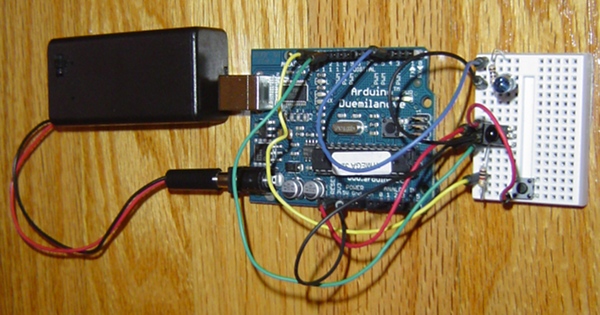
The above picture shows the 9V battery pack, the Arduino board, and the proto board with (top-to-bottom) the IR LED, IR receiver, and pushbutton.
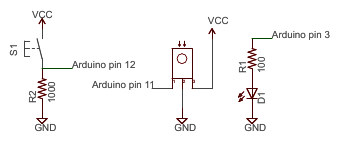
The circuitry is simple: an IR sensor module is connected to pin 11 to record the code, an IR LED is connected to pin 3 to transmit the code, and a control button is connected to pin 12. (My IR library article has details on the sensor and LED if you need them.)
The software
The code can be downloaded as part of my IRremote library download; it is the IRrecord example.
Handling different protocols
The code supports multiple IR protocols, each with its own slight complications:Sony codes can be recorded and played back directly. The button must be held down long enough to transmit a couple times, as Sony devices typically require more than one transmission.
The common NEC protocol is complicated by its "repeat code". If you hold down a button, the remote transmits the code once followed by multiple transmissions of special repeat code. The universal remote records the code, not the repeat code. On playback, it transmits the code once, followed by the repeat code.
The RC5 and RC6 protocols handle repeated transmissions differently. They use two separate codes for each function, differing in a "toggle bit". The first time you hold down a button, the first code is transmitted repeatedly. The next time you hold down a button, the second code is transmitted repeatedly. Subsequent presses continue to alternate. The universal remote code flips the toggle bit each time it transmits.
The universal remote handles any other unknown protocol as a "raw" sequence of modulated IR on and off. The main complication is that IR sensor modules typically stretch out the length of the "on time" by ~100us, and shorten the "off time" correspondingly. The code compensates for this.
Most likely there are some codes that that can't handle, but it has worked with the remotes I've tried.
The code also prints debugging information to the serial console, which can be helpful for debugging any problems.
In conclusion, this is intended as a proof of concept rather than a useful product. The main limitation is supporting one code at a time, but it's straightforward to extend the code. Also note that the record and playback functions can be separated; if you know the IR codes you're dealing with, you can use just the necessary function.


100 comments:
Very interesting - now if I just had a use for it, it would also be usefull.
I found a use for it, thanks for the library!
http://electrosthetics.blogspot.com/2009/11/arduino-universal-remote-and-more.html
I am using a JVC remote from what I can tell its like a NEC in alot of aspects. But I don't understand where to put in the numbers to decode in IRremote to add JVC as a type.
Thank you for the library. Very easy to use.
I'll be using it to trigger an Olympus camera based on a flying insect.
I can also see a lot of uses in a home automation setup.
The code works very well, however I cannot seem to get it to store and repeat more than one! Do you have any example code for this?
This started to work for me after increasing RAWBUF in IRremote.h to 256. Indeed, 129 bytes were collected from the non-standard remote of my aircondition. Maybe the default buffer is a bit tight here.
To the poster who wonders how to replay what's been received: Copy the received code sequence from the serial terminal, remove the s and m characters and pass the numbers to the sendRaw call.
My proof-of-concept sketch is here: http://pastebin.com/EzNNrYey
Thanks Ken for the great library!
This is one of the easiest thing to check for so you might as well be up front and honest.
I am a noob to Arduino so learning this is a bit difficult so please forgive me. I am trying to control a Tascam DR-100 any ideas where I should start. The DR-100 is controllable by IR and they have a little converter that will make the IR Remote wired but I figured that maybe start with the IR thing then try to get the wired working since it must be the same codes. What I want to do is to have an RTC in arduino start the DR-100 recording at a specific time then stop. There is no sleep in the DR-100 so no need to wake it up. Any clues?
Thanks
I'm doing all this reading and investigation because I've lost the remote for an old receiver & pre-amp and am hoping to get this to work in place of the missing remotes. I've found the proper pronto hex codes on remote-central but i'm still not quite sure how to take the pronto hex info from remote central and get it to be used in the arduino? I guess the part that is confusing to me is that there seems to be so many different modulation frequencies and i'm not sure how or even if that matters? any help would be greatly appreciated.
I am using the Library to control Channel master box....
Here are the commands:
#define cmUP 0x35CA8877
#define cmDOWN 0x35CA08F7
#define cmPOWER 0x35CA38C7
#define cmKEY0 0x35CA00FF
#define cmKEY1 0x35CA807F
#define cmKEY2 0x35CA40BF
#define cmKEY3 0x35CAC03F
#define cmKEY4 0x35CA20DF
#define cmKEY5 0x35CAA05F
#define cmKEY6 0x35CA609F
#define cmKEY7 0x35CAE01F
#define cmKEY8 0x35CA10EF
#define cmKEY9 0x35CA906F
Can someone give me some guidance please?
Am trying to make an Arduino based, dedicated "Closed Caption (CC) toggler".
In order to Toggle the CC, my set-top box's native remote requires eight (yes, eight) keystrokes.
This remote is not RC5. RC6, Sony or NEC.
Have built Arduino send/capture device and have captured RAW data from the set-top box's remote.
Problem:
Have attempted to use "IRrecord" to retransmit codes using Arduino apparatus described in the blog.
CAN do this with RC5 codes, thus demonstrating that hardware works properly.
HOWEVER: not able to do it with the set-top box remote that I actually need to use.
Can anyone direct me to a solution for this problem please?
To summarize:
1. Hardware has been built and tested for RC5
2. Have captured codes from remote, which I wish to retransmit from Arduino driven IR LED.
3. How do I send a sequence of eight sets of RAW to the IR LED and have it be readable by my set-top box.
Thank you for your help with this.
BobW
PS: Have successfully built Ken's Arduino TV-Begone.
BobW: See my comment above from April 9 on how I replayed the received raw codes. Still works for me.
Thank you Martin.
Will get to work on this tomorrow.
BobW
Martin:
I'm up and running thanks to your advice. Thanks so much for your help !
BobW
I have no success with this. Trying to use it with a Creative DDTS-100. I've used values from http://lirc.sourceforge.net/remotes/creative/DDTS-100 and changed IrremoteInt.h like this:
// pulse parameters in usec
#define NEC_HDR_MARK 8973
#define NEC_HDR_SPACE 4760
#define NEC_BIT_MARK 591
#define NEC_ONE_SPACE 1675
#define NEC_ZERO_SPACE 567
#define NEC_RPT_SPACE 2308
I then use IRsendDemo and change the send command:
irsend.sendNEC(0x15EA, 16);
The DDTS doesn't react. I see the IR-beam in my digital camera and have placed the transmitter Led really close to the DDTS.
I used the library to control some costumes in a play. Three characters had LEDs, a 9volt battery,an Ardweeny and a IR receiver. Using a Sony TV remo