The stack circuitry of the Intel 8087 floating point chip, reverse-engineered

Early microprocessors were very slow when operating with floating-point numbers. But in 1980, Intel introduced the 8087 floating-point coprocessor, performing floating-point operations up to 100 times faster. This was a huge benefit for IBM PC applications such as AutoCAD, spreadsheets, and flight simulators. The 8087 was so effective that today's computers still use a floating-point system based on the 8087.1

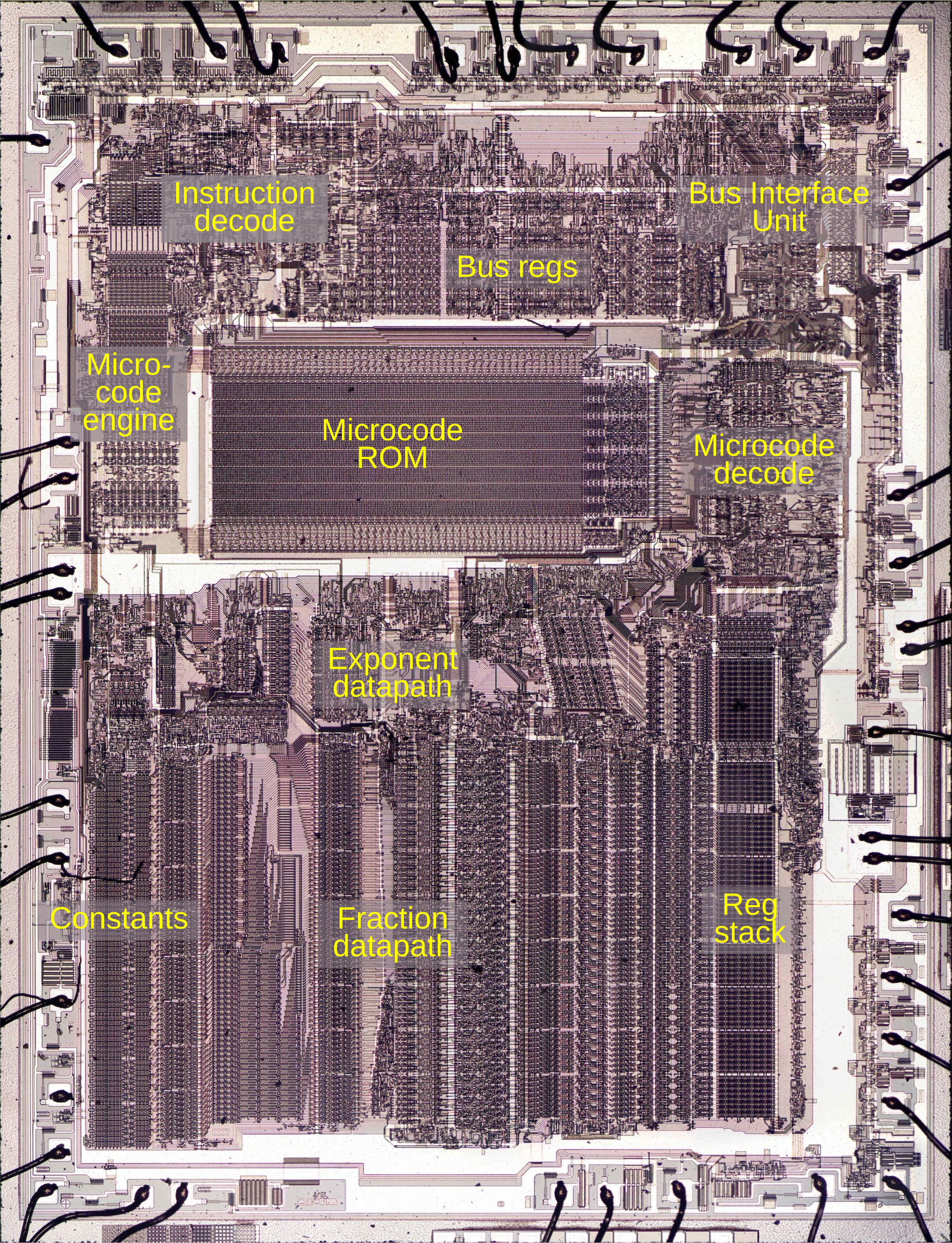
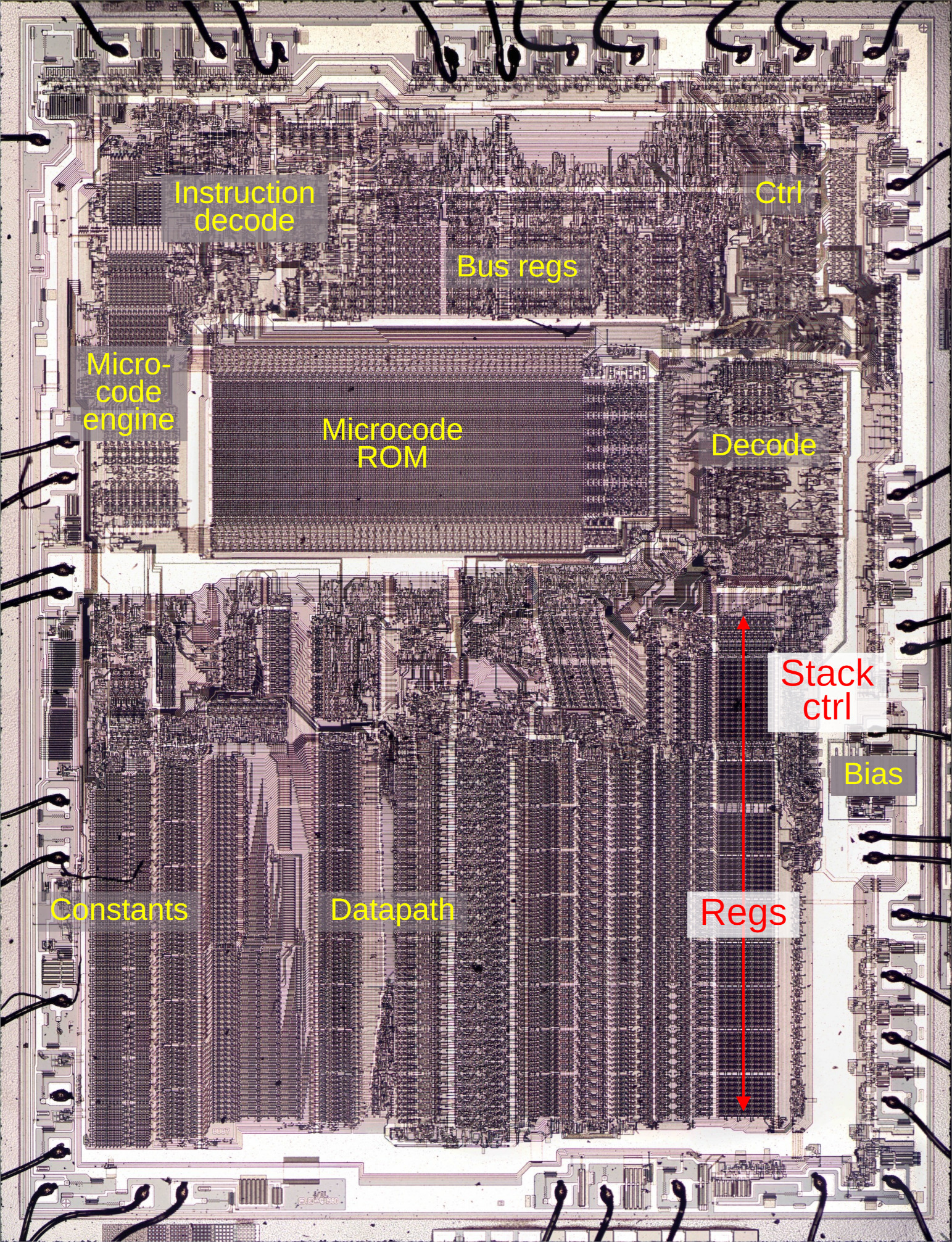
The 8087 was an extremely complex chip for its time, containing somewhere between 40,000 and 75,000 transistors, depending on the source.2 To explore how the 8087 works, I opened up a chip and took numerous photos of the silicon die with a microscope. Around the edges of the die, you can see the hair-thin bond wires that connect the chip to its 40 external pins. The complex patterns on the die are formed by its metal wiring, as well as the polysilicon and silicon underneath. The bottom half of the chip is the "datapath", the circuitry that performs calculations on 80-bit floating point values. At the left of the datapath, a constant ROM holds important constants such as π. At the right are the eight registers that form the stack, along with the stack control circuitry.

Die of the Intel 8087 floating point unit chip, with main functional blocks labeled. The die is 5mm×6mm.  Click for a larger image.

Die of the Intel 8087 floating point unit chip, with main functional blocks labeled. The die is 5mm×6mm. Click for a larger image.

The chip's instructions are defined by the large microcode ROM in the middle. This ROM is very unusual; it is semi-analog, storing two bits per transistor by using four transistor sizes. To execute a floating-point instruction, the 8087 decodes the instruction and the microcode engine starts executing the appropriate micro-instructions from the microcode ROM. The decode circuitry to the right of the ROM generates the appropriate control signals from each micro-instruction. The bus registers and control circuitry handle interactions with the main 8086 processor and the rest of the system. Finally, the bias generator uses a charge pump to create a negative voltage to bias the chip's substrate, the underlying silicon.

The stack registers and control circuitry (in red above) are the subject of this blog post. Unlike most processors, the 8087 organizes its registers in a stack, with instructions operating on the top of the stack. For instance, the square root instruction replaces the value on the top of the stack with its square root. You can also access a register relative to the top of the stack, for instance, adding the top value to the value two positions down from the top. The stack-based architecture was intended to improve the instruction set, simplify compiler design, and make function calls more efficient, although it didn't work as well as hoped.

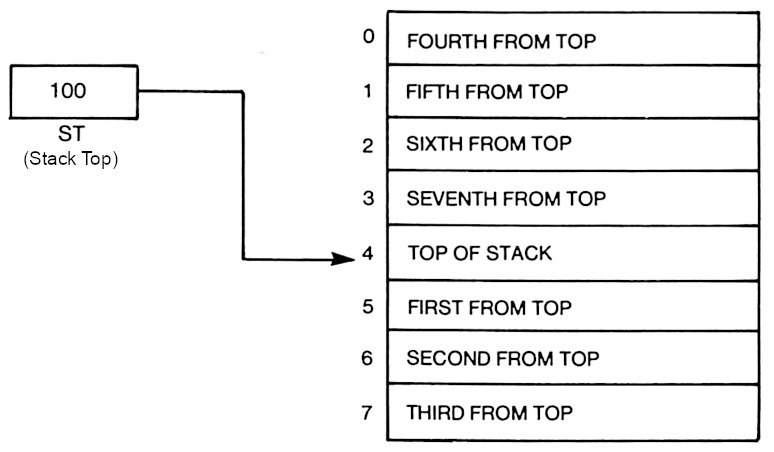
The stack on the 8087. From The 8087 Primer, page 60.

The stack on the 8087. From The 8087 Primer, page 60.

The diagram above shows how the stack operates. The stack consists of eight registers, with the Stack Top (ST) indicating the current top of the stack. To push a floating-point value onto the stack, the Stack Top is decremented and then the value is stored in the new top register. A pop is performed by copying the value from the stack top and then incrementing the Stack Top. In comparison, most processors specify registers directly, so register 2 is always the same register.

The registers

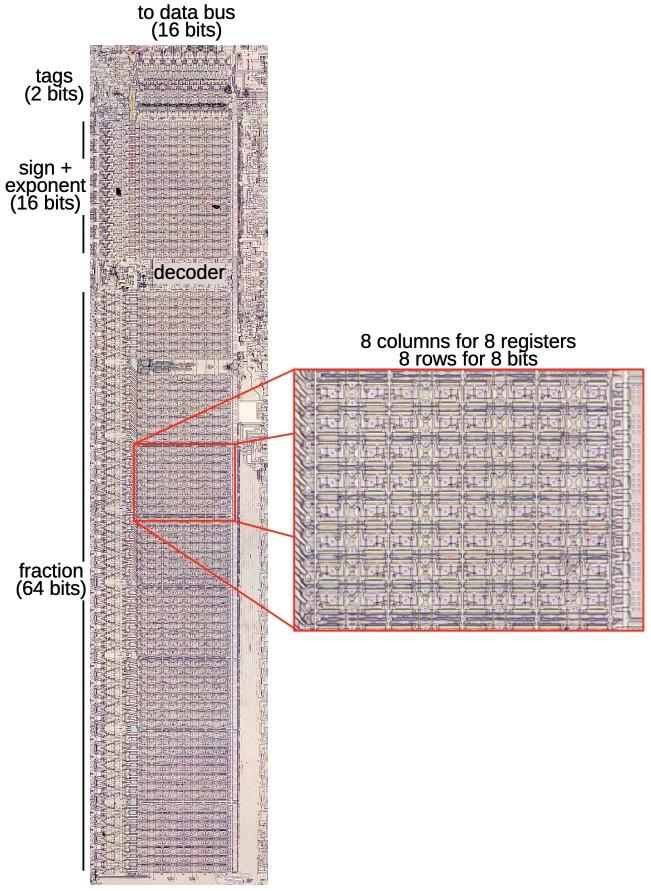
The stack registers occupy a substantial area on the die of the 8087 because floating-point numbers take many bits. A floating-point number consists of a fractional part (sometimes called the mantissa or significand), along with the exponent part; the exponent allows floating-point numbers to cover a range from extremely small to extremely large. In the 8087, floating-point numbers are 80 bits: 64 bits of significand, 15 bits of exponent, and a sign bit. An 80-bit register was very large in the era of 8-bit or 16-bit computers; the eight registers in the 8087 would be equivalent to 40 registers in the 8086 processor.

The registers in the 8087 form an 8×80 grid of cells. The close-up shows an 8×8 block. I removed the metal layer with acid to reveal the underlying silicon circuitry.

The registers in the 8087 form an 8×80 grid of cells. The close-up shows an 8×8 block. I removed the metal layer with acid to reveal the underlying silicon circuitry.

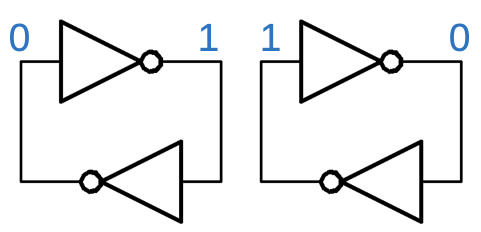
The registers store each bit in a static RAM cell. Each cell has two inverters connected in a loop. This circuit forms a stable feedback loop, with one inverter on and one inverter off. Depending on which inverter is on, the circuit stores a 0 or a 1. To write a new value into the circuit, one of the lines is pulled low, flipping the loop into the desired state. The trick is that each inverter uses a very weak transistor to pull the output high, so its output is easily overpowered to change the state.

Two inverters in a loop can store a 0 or a 1.

Two inverters in a loop can store a 0 or a 1.

These inverter pairs are arranged in an 8 × 80 grid that implements eight words of 80 bits. Each of the 80 rows has two bitlines that provide access to a bit. The bitlines provide both read and write access to a bit; the pair of bitlines allows either inverter to be pulled low to store the desired bit value. Eight vertical wordlines enable access to one word, one column of 80 bits. Each wordline turns on 160 pass transistors, connecting the bitlines to the inverters in the selected column. Thus, when a wordline is enabled, the bitlines can be used to read or write that word.

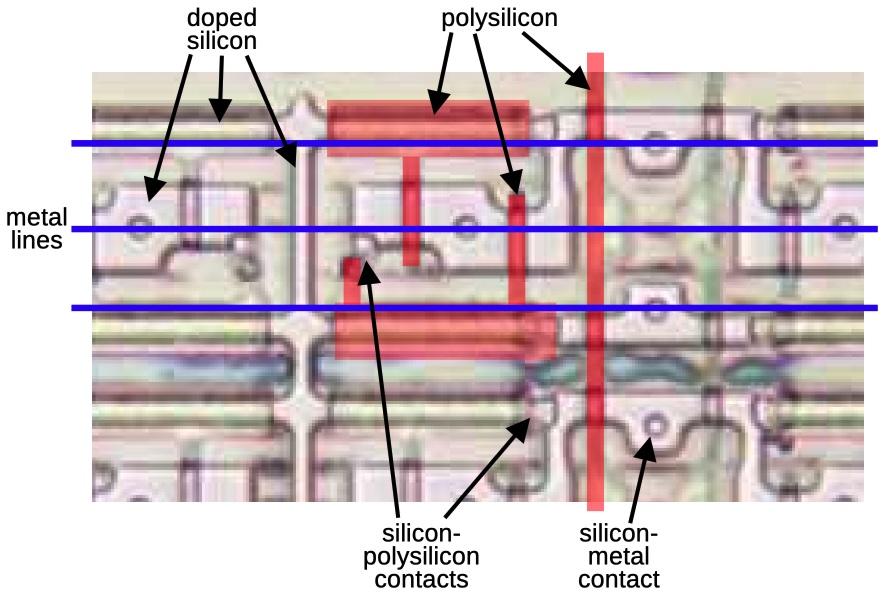
Although the chip looks two-dimensional, it actually consists of multiple layers. The bottom layer is silicon. The pinkish regions below are where the silicon has been "doped" to change its electrical properties, making it an active part of the circuit. The doped silicon forms a grid of horizontal and vertical wiring, with larger doped regions in the middle. On top of the silicon, polysilicon wiring provides two functions. First, it provides a layer of wiring to connect the circuit. But more importantly, when polysilicon crosses doped silicon, it forms a transistor. The polysilicon provides the gate, turning the transistor on and off. In this photo, the polysilicon is barely visible, so I've highlighted part of it in red. Finally, horizontal metal wires provide a third layer of interconnecting wiring. Normally, the metal hides the underlying circuitry, so I removed the metal with acid for this photo. I've drawn blue lines to represent the metal layer. Contacts provide connections between the various layers.

A close-up of a storage cell in the registers. The metal layer and most of the polysilicon have been removed to show the underlying silicon.

A close-up of a storage cell in the registers. The metal layer and most of the polysilicon have been removed to show the underlying silicon.

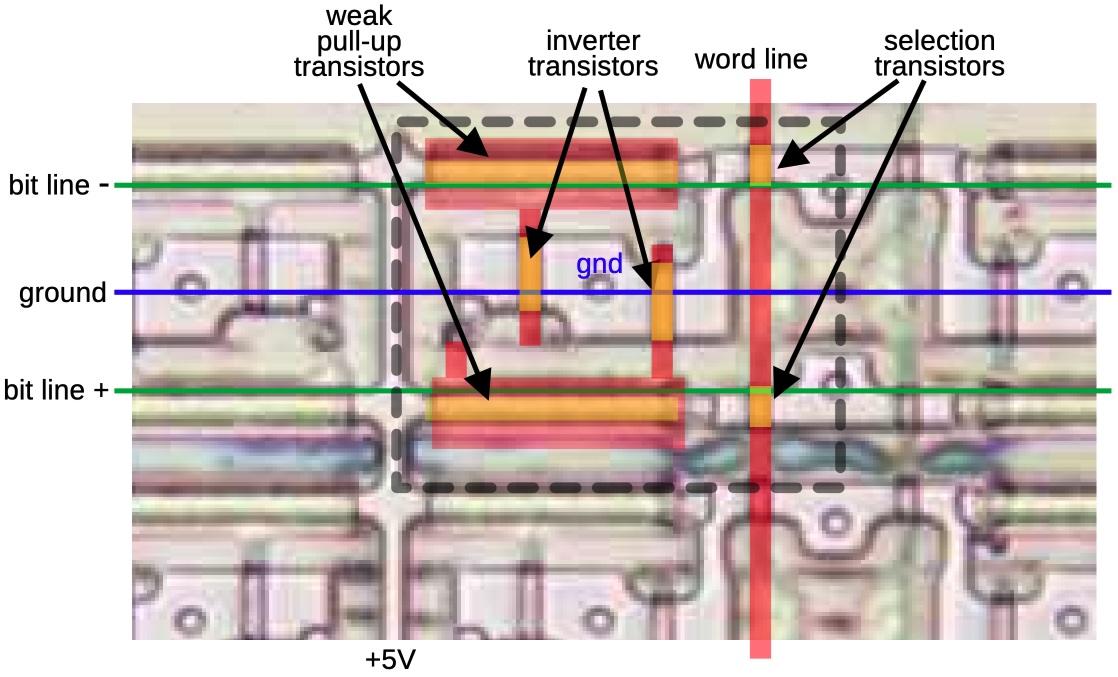
The layers combine to form the inverters and selection transistors of a memory cell, indicated with the dotted line below. There are six transistors (yellow), where polysilicon crosses doped silicon. Each inverter has a transistor that pulls the output low and a weak transistor to pull the output high. When the word line (vertical polysilicon) is active, it connects the selected inverters to the bit lines (horizontal metal) through the two selection transistors. This allows the bit to be read or written.

The function of the circuitry in a storage cell.

The function of the circuitry in a storage cell.

Each register has two tag bits associated with it, an unusual form of metadata to indicate if the register is empty, contains zero, contains a valid value, or contains a special value such as infinity. The tag bits are used to optimize performance internally and are mostly irrelevant to the programmer. As well as being accessed with a register, the tag bits can be accessed in parallel as a 16-bit "Tag Word". This allows the tags to be saved or loaded as part of the 8087's state, for instance, during interrupt handling.

The decoder

The decoder circuit, wedged into the middle of the register file, selects one of the registers. A register is specified internally with a 3-bit value. The decoder circuit energizes one of the eight register select lines based on this value.

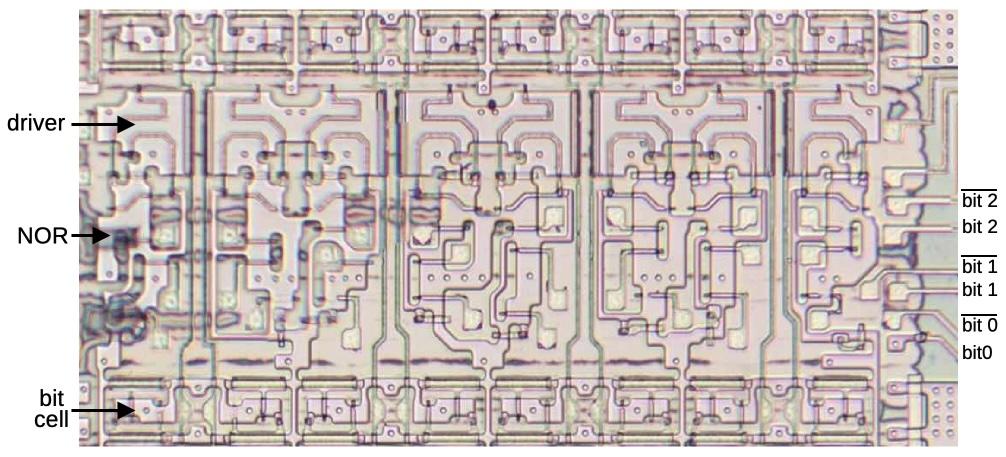
The decoder circuitry is straightforward: it has eight 3-input NOR gates to match one of the eight bit patterns. The select line is then powered through a high-current driver that uses large transistors. (In the photo below, you can compare the large serpentine driver transistors to the small transistors in a bit cell.)

The decoder circuitry has eight similar blocks to drive the eight select lines.

The decoder circuitry has eight similar blocks to drive the eight select lines.

The decoder has an interesting electrical optimization. As shown earlier, the register select lines are eight polysilicon lines running vertically, the length of the register file. Unfortunately, polysilicon has fairly high resistance, better than silicon but much worse than metal. The problem is that the resistance of a long polysilicon line will slow down the system. That is, the capacitance of transistor gates in combination with high resistance causes an RC (resistive-capacitive) delay in the signal.

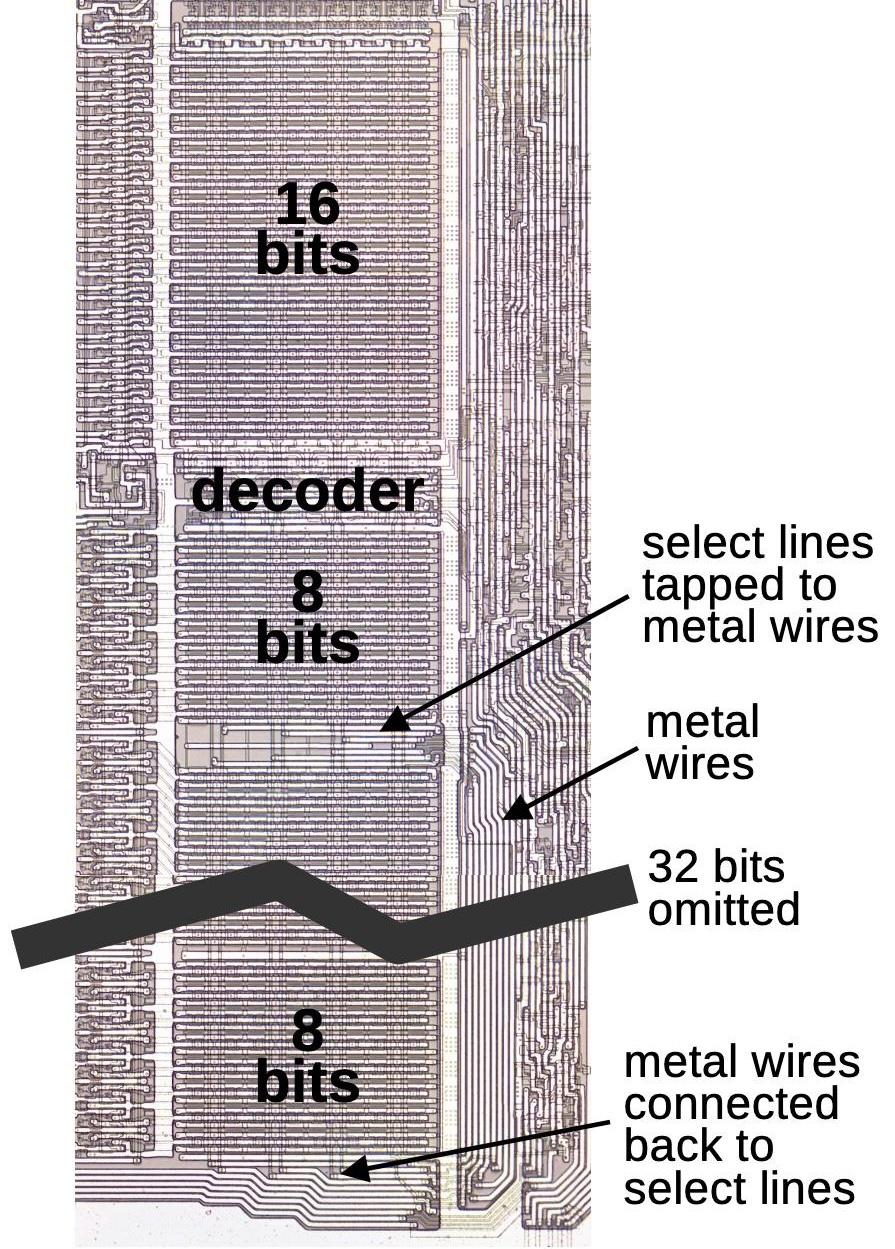
The solution is that the register select lines also run in the metal layer, a second set of lines immediately to the right of the register file. These lines branch off from the register file about 1/3 of the way down, run to the bottom, and then connect back to the polysilicon select lines at the bottom. This reduces the maximum resistance through a select line, increasing the speed.

A diagram showing how 8 metal lines run parallel to the main select lines. The register file is much taller than shown; the middle has been removed to make the diagram fit.

A diagram showing how 8 metal lines run parallel to the main select lines. The register file is much taller than shown; the middle has been removed to make the diagram fit.

The stack control circuitry

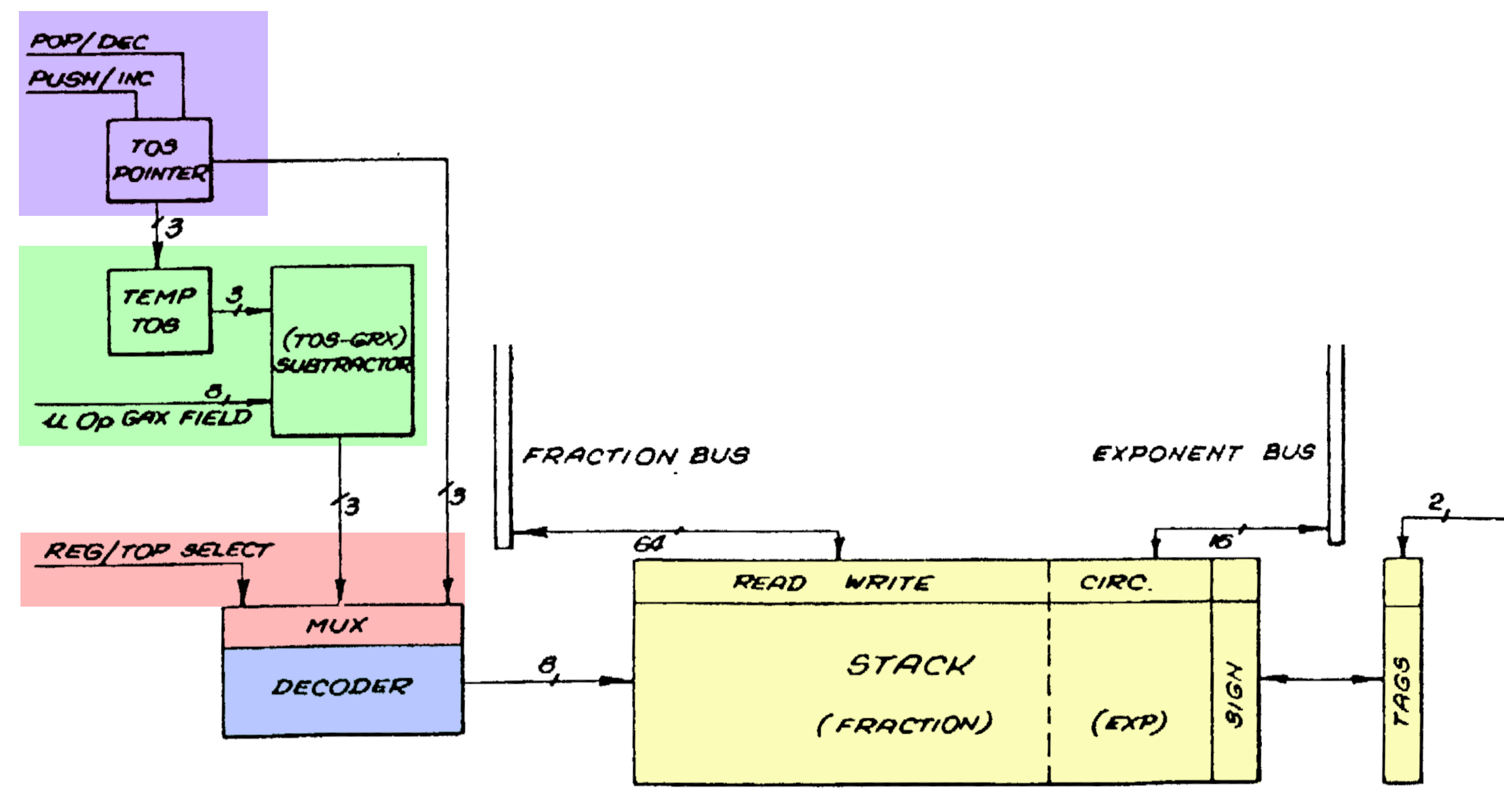
A stack needs more control circuitry than a regular register file, since the circuitry must keep track of the position of the top of the stack.3 The control circuitry increments and decrements the top of stack (TOS) pointer as values are pushed or popped (purple).4 Moreover, an 8087 instruction can access a register based on its offset, for instance the third register from the top. To support this, the control circuitry can temporarily add an offset to the top of stack position (green). A multiplexer (red) selects either the top of stack or the adder output, and feeds it to the decoder (blue), which selects one of the eight stack registers in the register file (yellow), as described earlier.

The register stack in the 8087. Adapted from Patent USRE33629E. I don't know what the GRX field is. I also don't know why this shows a subtractor and not an adder.

The register stack in the 8087. Adapted from Patent USRE33629E. I don't know what the GRX field is. I also don't know why this shows a subtractor and not an adder.

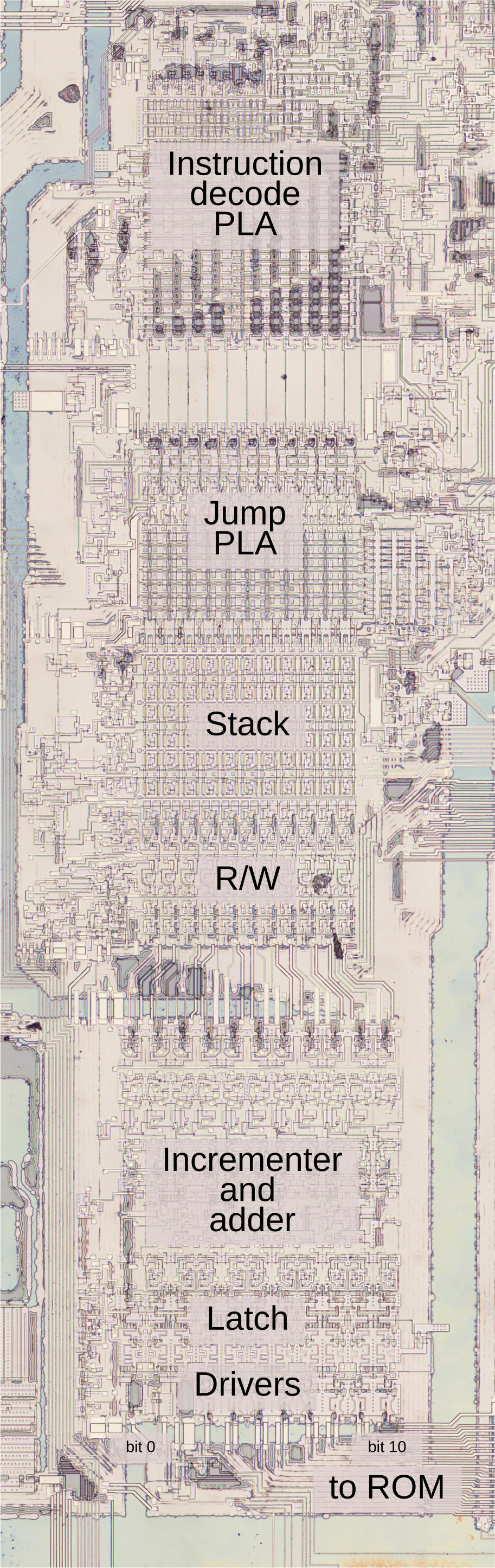
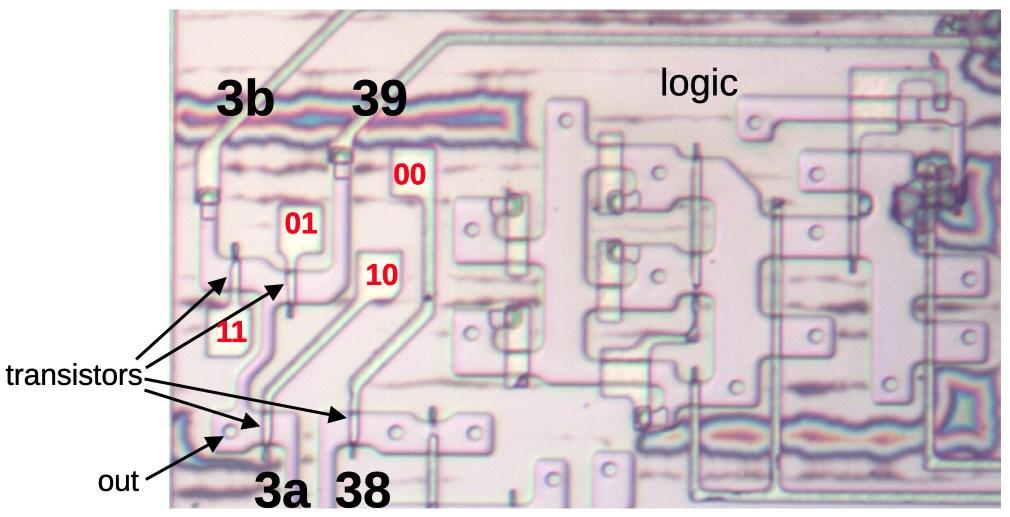
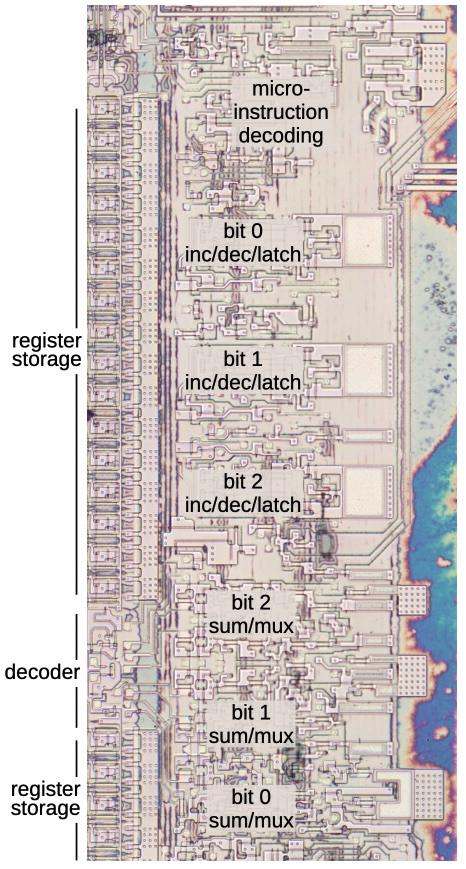
The physical implementation of the stack circuitry is shown below. The logic at the top selects the stack operation based on the 16-bit micro-instruction.5 Below that are the three latches that hold the top of stack value. (The large white squares look important, but they are simply "jumpers" from the ground line to the circuitry, passing under metal wires.)

The stack control circuitry. The blue regions on the right are oxide residue that remained when I dissolved the metal rail for the 5V power.

The stack control circuitry. The blue regions on the right are oxide residue that remained when I dissolved the metal rail for the 5V power.

The three-bit adder is at the bottom, along with the multiplexer. You might expect the adder to use a simple "full adder" circuit. Instead, it is a faster carry-lookahead adder. I won't go into details here, but the summary is that at each bit position, an AND gate produces a Carry Generate signal while an XOR gate produces a Carry Propagate signal. Logic gates combine these signals to produce the output bits in parallel, avoiding the slowdown of the carry rippling through the bits.

The incrementer/decrementer uses a completely different approach. Each of the three bits uses a toggle flip-flop. A few logic gates determine if each bit should be toggled or should keep its previous value. For instance, when incrementing, the top bit is toggled if the lower bits are 11 (e.g. incrementing from 011 to 100). For decrementing, the top bit is toggled if the lower bits are 00 (e.g. 100 to 011). Simpler logic determines if the middle bit should be toggled. The bottom bit is easier, toggling every time whether incrementing or decrementing.

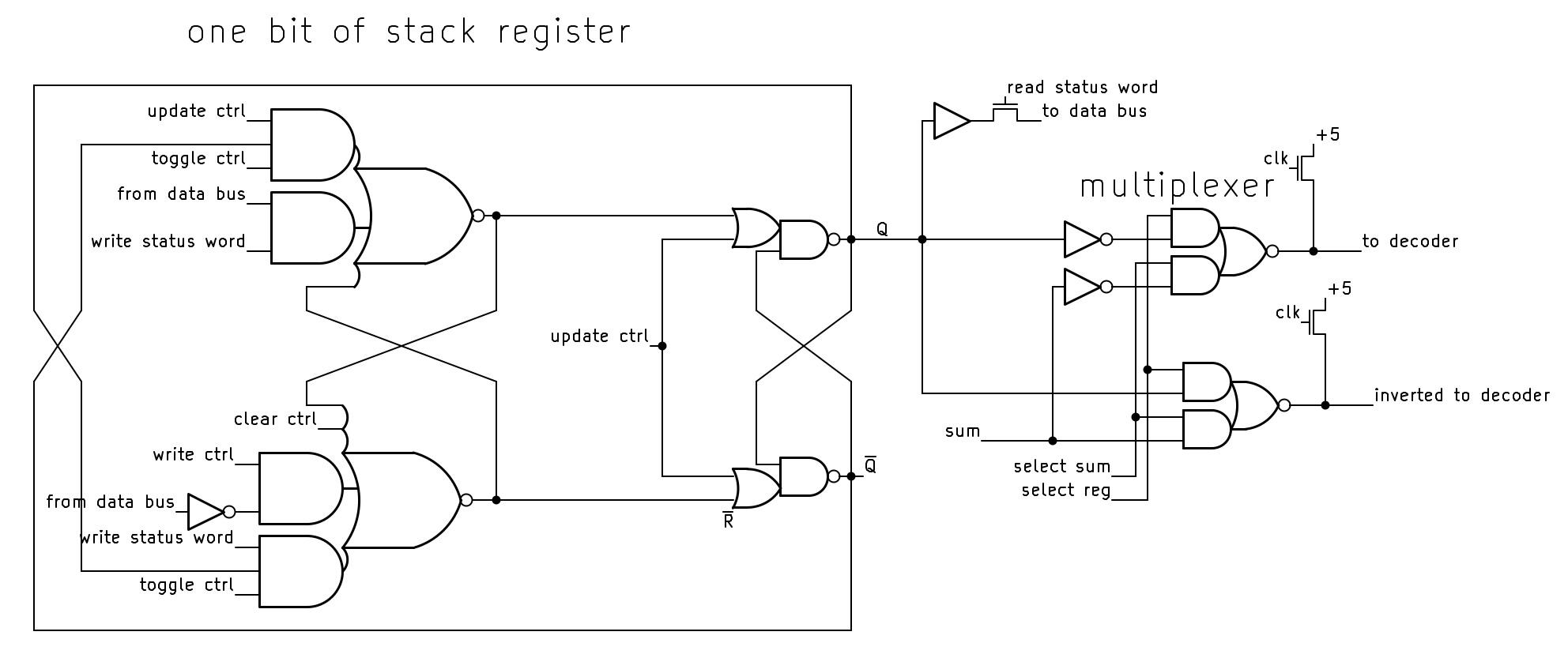
The schematic below shows the circuitry for one bit of the stack. Each bit is implemented with a moderately complicated flip-flop that can be cleared, loaded with a value, or toggled, based on control signals from the microcode. The flip-flop is constructed from two set-reset (SR) latches. Note that the flip-flop outputs are crossed when fed back to the input, providing the inversion for the toggle action. At the right, the multiplexer selects either the register value or the sum from the adder (not shown), generating the signals to the decoder.

Schematic of one bit of the stack.

Schematic of one bit of the stack.

Drawbacks of the stack approach

According to the designers of the 8087,7 the main motivation for using a stack rather than a flat register set was that instructions didn't have enough bits to address multiple register operands. In addition, a stack has "advantages over general registers for expression parsing and nested function calls." That is, a stack works well for a mathematical expression since sub-expressions can be evaluated on the top of the stack. And for function calls, you avoid the cost of saving registers to memory, since the subroutine can use the stack without disturbing the values underneath. At least that was the idea.

The main problem is "stack overflow". The 8087's stack has eight entries, so if you push a ninth value onto the stack, the stack will overflow. Specifically, the top-of-stack pointer will wrap around, obliterating the bottom value on the stack. The 8087 is designed to detect a stack overflow using the register tags: pushing a value to a non-empty register triggers an invalid operation exception.6

The designers expected that stack overflow would be rare and could be handled by the operating system (or library code). After detecting a stack overflow, the software should dump the existing stack to memory to provide the illusion of an infinite stack. Unfortunately, bad design decisions made it difficult "both technically and commercially" to handle stack overflow.

One of the 8087's designers (Kahan) attributes the 8087's stack problems to the time difference between California, where the designers lived, and Israel, where the 8087 was implemented. Due to a lack of communication, each team thought the other was implementing the overflow software. It wasn't until the 8087 was in production that they realized that "it might not be possible to handle 8087 stack underflow/overflow in a reasonable way. It's not impossible, just impossible to do it in a reasonable way."

As a result, the stack was largely a problem rather than a solution. Most 8087 software saved the full stack to memory before performing a function call, creating more memory traffic. Moreover, compilers turned out to work better with regular registers than a stack, so compiler writers awkwardly used the stack to emulate regular registers. The GCC compiler reportedly needs 3000 lines of extra code to support the x87 stack.

In the 1990s, Intel introduced a new floating-point system called SSE, followed by AVX in 2011. These systems use regular (non-stack) registers and provide parallel operations for higher performance, making the 8087's stack instructions largely obsolete.

The success of the 8087

At the start, Intel was unenthusiastic about producing the 8087, viewing it as unlikely to be a success. John Palmar, a principal architect of the chip, had little success convincing skeptical Intel management that the market for the 8087 was enormous. Eventually, he said, "I'll tell you what. I'll relinquish my salary, provided you'll write down your number of how many you expect to sell, then give me a dollar for every one you sell beyond that."7 Intel didn't agree to the deal—which would have made a fortune for Palmer—but they reluctantly agreed to produce the chip.

Intel's Santa Clara engineers shunned the 8087, considering it unlikely to work: the 8087 would be two to three times more complex than the 8086, with a die so large that a wafer might not have a single working die. Instead, Rafi Nave, at Intel's Israel site, took on the risky project: “Listen, everybody knows it's not going to work, so if it won't work, I would just fulfill their expectations or their assessment. If, by chance, it works, okay, then we'll gain tremendous respect and tremendous breakthrough on our abilities.”

A small team of seven engineers developed the 8087 in Israel. They designed the chip on Mylar sheets: a millimeter on Mylar represented a micron on the physical chip. The drawings were then digitized on a Calma system by clicking on each polygon to create the layout. When the chip was moved into production, the yield was very low but better than feared: two working dies per four-inch wafer.

The 8087 ended up being a large success, said to have been Intel's most profitable product line at times. The success of the 8087 (along with the 8088) cemented the reputation of Intel Israel, which eventually became Israel's largest tech employer. The benefits of floating-point hardware proved to be so great that Intel integrated the floating-point unit into later processors starting with the 80486 (1989). Nowadays, most modern computers, from cellphones to mainframes, provide floating point based on the 8087, so I consider the 8087 one of the most influential chips ever created.

For more, follow me on Bluesky (@righto.com), Mastodon (@[email protected]), or RSS. I wrote some articles about the 8087 a few years ago, including the die, the ROM, the bit shifter, and the constants, so you may have seen some of this material before.

Notes and references

  1. Most computers now use the IEEE 754 floating-point standard, which is based on the 8087. This standard has been awarded a milestone in computation. 

  2. Curiously, reliable sources differ on the number of transistors in the 8087 by almost a factor of 2. Intel says 40,000, as does designer William Kahan (link). But in A Numeric Data Processor, designers Rafi Nave and John Palmer wrote that the chip contains "the equivalent of over 65,000 devices" (whatever "equivalent" means). This number is echoed by a contemporary article in Electronics (1980) that says "over 65,000 H-MOS transistors on a 78,000-mil2 die." Many other sources, such as Upgrading & Repairing PCs, specify 45,000 transistors. Designer Rafi Nave stated that the 8087 has 63,000 or 64,000 transistors if you count the ROM transistors directly, but if you count ROM transistors as equivalent to two transistors, then you get about 75,000 transistors. 

  3. The 8087 has a 16-bit Status Word that contains the stack top pointer, exception flags, the four-bit condition code, and other values. Although the Status Word appears to be a 16-bit register, it is not implemented as a register. Instead, parts of the Status Word are stored in various places around the chip: the stack top pointer is in the stack circuitry, the exception flags are part of the interrupt circuitry, the condition code bits are next to the datapath, and so on. When the Status Word is read or written, these various circuits are connected to the 8087's internal data bus, making the Status Word appear to be a monolithic entity. Thus, the stack circuitry includes support for reading and writing it. 

  4. Intel filed several patents on the 8087, including Numeric data processor, another Numeric data processor, Programmable bidirectional shifter, Fraction bus for use in a numeric data processor, and System bus arbitration, circuitry and methodology

  5. I started looking at the stack in detail to reverse engineer the micro-instruction format and determine how the 8087's microcode works. I'm working with the "Opcode Collective" on Discord on this project, but progress is slow due to the complexity of the micro-instructions. 

  6. The 8087 detects stack underflow in a similar manner. If you pop more values from the stack than are present, the tag will indicate that the register is empty and shouldn't be accessed. This triggers an invalid operation exception. 

  7. The 8087 is described in detail in The 8086 Family User's Manual, Numerics Supplement. An overview of the stack is on page 60 of The 8087 Primer by Palmer and Morse. More details are in Kahan's On the Advantages of the 8087's Stack, an unpublished course note (maybe for CS 279?) with a date of Nov 2, 1990 or perhaps August 23, 1994. Kahan discusses why the 8087's design makes it hard to handle stack overflow in How important is numerical accuracy, Dr. Dobbs, Nov. 1997. Another information source is the Oral History of Rafi Nave 

Unusual circuits in the Intel 386's standard cell logic

I've been studying the standard cell circuitry in the Intel 386 processor recently. The 386, introduced in 1985, was Intel's most complex processor at the time, containing 285,000 transistors. Intel's existing design techniques couldn't handle this complexity and the chip began to fall behind schedule. To meet the schedule, the 386 team started using a technique called standard cell logic. Instead of laying out each transistor manually, the layout process was performed by a computer.

The idea behind standard cell logic is to create standardized circuits (standard cells) for each type of logic element, such as an inverter, NAND gate, or latch. You feed your circuit description into software that selects the necessary cells, positions these cells into columns, and then routes the wiring between the cells. This "automatic place and route" process creates the chip layout much faster than manual layout. However, switching to standard cells was a risky decision since if the software couldn't create a dense enough layout, the chip couldn't be manufactured. But in the end, the 386 finished ahead of schedule, an almost unheard-of accomplishment.1

The 386's standard cell circuitry contains a few circuits that I didn't expect. In this blog post, I'll take a quick look at some of these circuits: surprisingly large multiplexers, a transistor that doesn't fit into the standard cell layout, and inverters that turned out not to be inverters. (If you want more background on standard cells in the 386, see my earlier post, "Reverse engineering standard cell logic in the Intel 386 processor".)

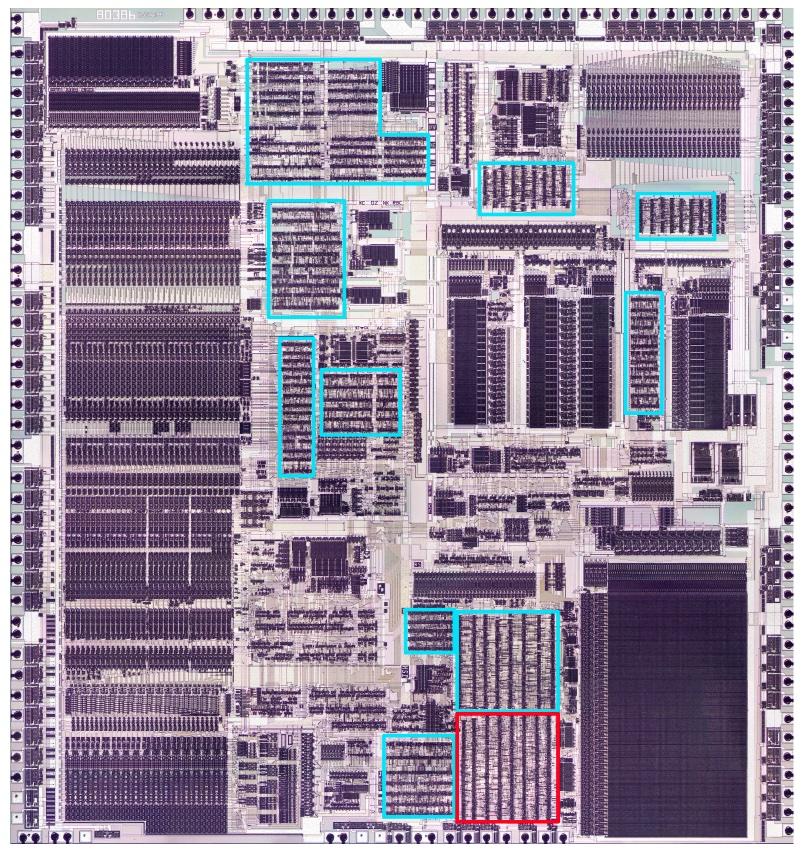
The photo below shows the 386 die with the automatic-place-and-route regions highlighted; I'm focusing on the red region in the lower right. These blocks of logic have cells arranged in rows, giving them a characteristic striped appearance. The dark stripes are the transistors that make up the logic gates, while the lighter regions between the stripes are the "routing channels" that hold the wiring that connects the cells. In comparison, functional blocks such as the datapath on the left and the microcode ROM in the lower right were designed manually to optimize density and performance, giving them a more solid appearance.

The 386 die with the standard-cell regions highlighted.

The 386 die with the standard-cell regions highlighted.

As for other features on the chip, the black circles around the border are bond wire connections that go to the chip's external pins. The chip has two metal layers, a small number by modern standards, but a jump from the single metal layer of earlier processors such as the 286. (Providing two layers of metal made automated routing practical: one layer can hold horizontal wires while the other layer can hold vertical wires.) The metal appears white in larger areas, but purplish where circuitry underneath roughens its surface. The underlying silicon and the polysilicon wiring are obscured by the metal layers.

The giant multiplexers

The standard cell circuitry that I'm examining (red box above) is part of the control logic that selects registers while executing an instruction. You might think that it is easy to select which registers take part in an instruction, but due to the complexity of the x86 architecture, it is more difficult. One problem is that a 32-bit register such as EAX can also be treated as the 16-bit register AX, or two 8-bit registers AH and AL. A second problem is that some instructions include a "direction" bit that switches the source and destination registers. Moreover, sometimes the register is specified by bits in the instruction, but in other cases, the register is specified by the microcode. Due to these factors, selecting the registers for an operation is a complicated process with many cases, using control bits from the instruction, from the microcode, and from other sources.

Three registers need to be selected for an operation—two source registers and a destination register—and there are about 17 cases that need to be handled. Registers are specified with 7-bit control signals that select one of the 30 registers and control which part of the register is accessed. With three control signals, each 7 bits wide, and about 17 cases for each, you can see that the register control logic is large and complicated. (I wrote more about the 386's registers here.)

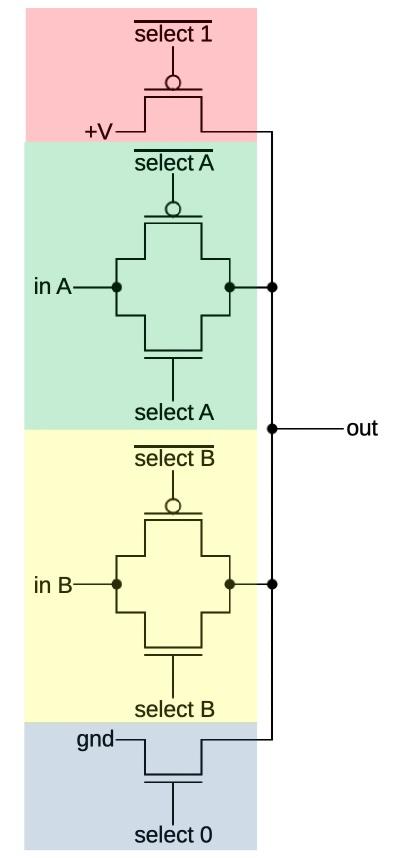
I'm still reverse engineering the register control logic, so I won't go into details. Instead, I'll discuss how the register control circuit uses multiplexers, implemented with standard cells. A multiplexer is a circuit that combines multiple input signals into a single output by selecting one of the inputs.2 A multiplexer can be implemented with logic gates, for instance, by ANDing each input with the corresponding control line, and then ORing the results together. However, the 386 uses a different approach—CMOS switches—that avoids a large AND/OR gate.

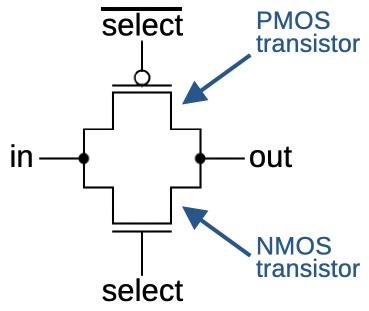
Schematic of a CMOS switch.

Schematic of a CMOS switch.

The schematic above shows how a CMOS switch is constructed from two MOS transistors. When the two transistors are on, the output is connected to the input, but when the two transistors are off, the output is isolated. An NMOS transistor is turned on when its input is high, but a PMOS transistor is turned on when its input is low. Thus, the switch uses two control inputs, one inverted. The motivation for using two transistors is that an NMOS transistor is better at pulling the output low, while a PMOS transistor is better at pulling the output high, so combining them yields the best performance.3 Unlike a logic gate, the CMOS switch has no amplification, so a signal is weakened as it passes through the switch. As will be seen below, inverters can be used to amplify the signal.

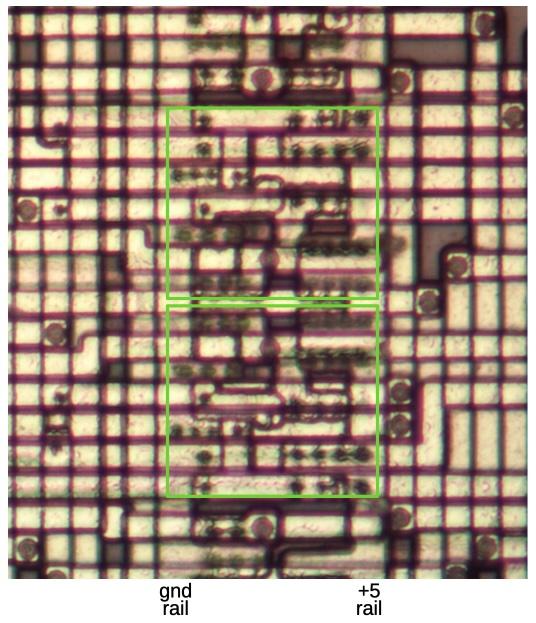
The image below shows how CMOS switches appear under the microscope. This image is very hard to interpret because the two layers of metal on the 386 are packed together densely, but you can see that some wires run horizontally and others run vertically. The bottom layer of metal (called M1) runs vertically in the routing area, as well as providing internal wiring for a cell. The top layer of metal (M2) runs horizontally; unlike M1, the M2 wires can cross a cell. The large circles are vias that connect the M1 and M2 layers, while the small circles are connections between M1 and polysilicon or M1 and silicon. The central third of the image is a column of standard cells with two CMOS switches outlined in green. The cells are bordered by the vertical ground rail and +5V rail that power the cells. The routing areas are on either side of the cells, holding the wiring that connects the cells.

Two CMOS switches, highlighted in green. The lower switch is flipped vertically compared to the upper switch.

Two CMOS switches, highlighted in green. The lower switch is flipped vertically compared to the upper switch.

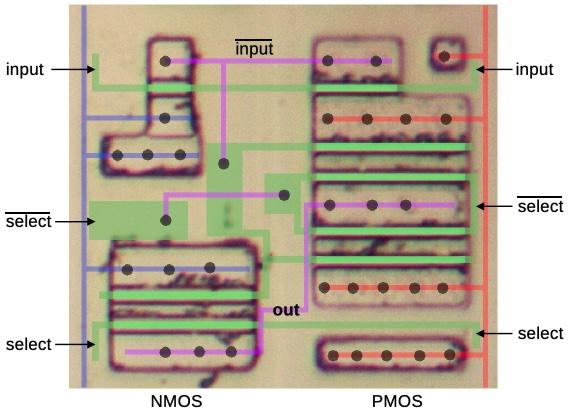
Removing the metal layers reveals the underlying silicon with a layer of polysilicon wiring on top. The doped silicon regions show up as dark outlines. I've drawn the polysilicon in green; it forms a transistor (brighter green) when it crosses doped silicon. The metal ground and power lines are shown in blue and red, respectively, with other metal wiring in purple. The black dots are vias between layers. Note how metal wiring (purple) and polysilicon wiring (green) are combined to route signals within the cell. Although this standard cell is complicated, the important thing is that it only needs to be designed once. The standard cells for different functions are all designed to have the same width, so the cells can be arranged in columns, snapped together like Lego bricks.

A diagram showing the silicon for a standard-cell switch. The polysilicon is shown in green. The bottom metal is shown in blue, red, and purple.

A diagram showing the silicon for a standard-cell switch. The polysilicon is shown in green. The bottom metal is shown in blue, red, and purple.

To summarize, this switch circuit allows the input to be connected to the output or disconnected, controlled by the select signal. This switch is more complicated than the earlier schematic because it includes two inverters to amplify the signal. The data input and the two select lines are connected to the polysilicon (green); the cell is designed so these connections can be made on either side. At the top, the input goes through a standard two-transistor inverter. The lower left has two transistors, combining the NMOS half of an inverter with the NMOS half of the switch. A similar circuit on the right combines the PMOS part of an inverter and switch. However, because PMOS transistors are weaker, this part of the circuit is duplicated.

A multiplexer is constructed by combining multiple switches, one for each input. Turning on one switch will select the corresponding input. For instance, a four-to-one multiplexer has four switches, so it can select one of the four inputs.

A four-way multiplexer constructed from CMOS switches and individual transistors.

A four-way multiplexer constructed from CMOS switches and individual transistors.

The schematic above shows a hypothetical multiplexer with four inputs. One optimization is that if an input is always 0, the PMOS transistor can be omitted. Likewise, if an input is always 1, the NMOS transistor can be omitted. One set of select lines is activated at a time to select the corresponding input. The pink circuit selects 1, green selects input A, yellow selects input B, and blue selects 0. The multiplexers in the 386 are similar, but have more inputs.


The diagram below shows how much circuitry is devoted to multiplexers in this block of standard cells. The green, purple, and red cells correspond to the multiplexers driving the three register control outputs. The yellow cells are inverters that generate the inverted control signals for the CMOS switches. This diagram also shows how the automatic layout of cells results in a layout that appears random.

A block of standard-cell logic with multiplexers highlighted. The metal and polysilicon layers were removed for this photo, revealing the silicon transistors.

A block of standard-cell logic with multiplexers highlighted. The metal and polysilicon layers were removed for this photo, revealing the silicon transistors.

The misplaced transistor

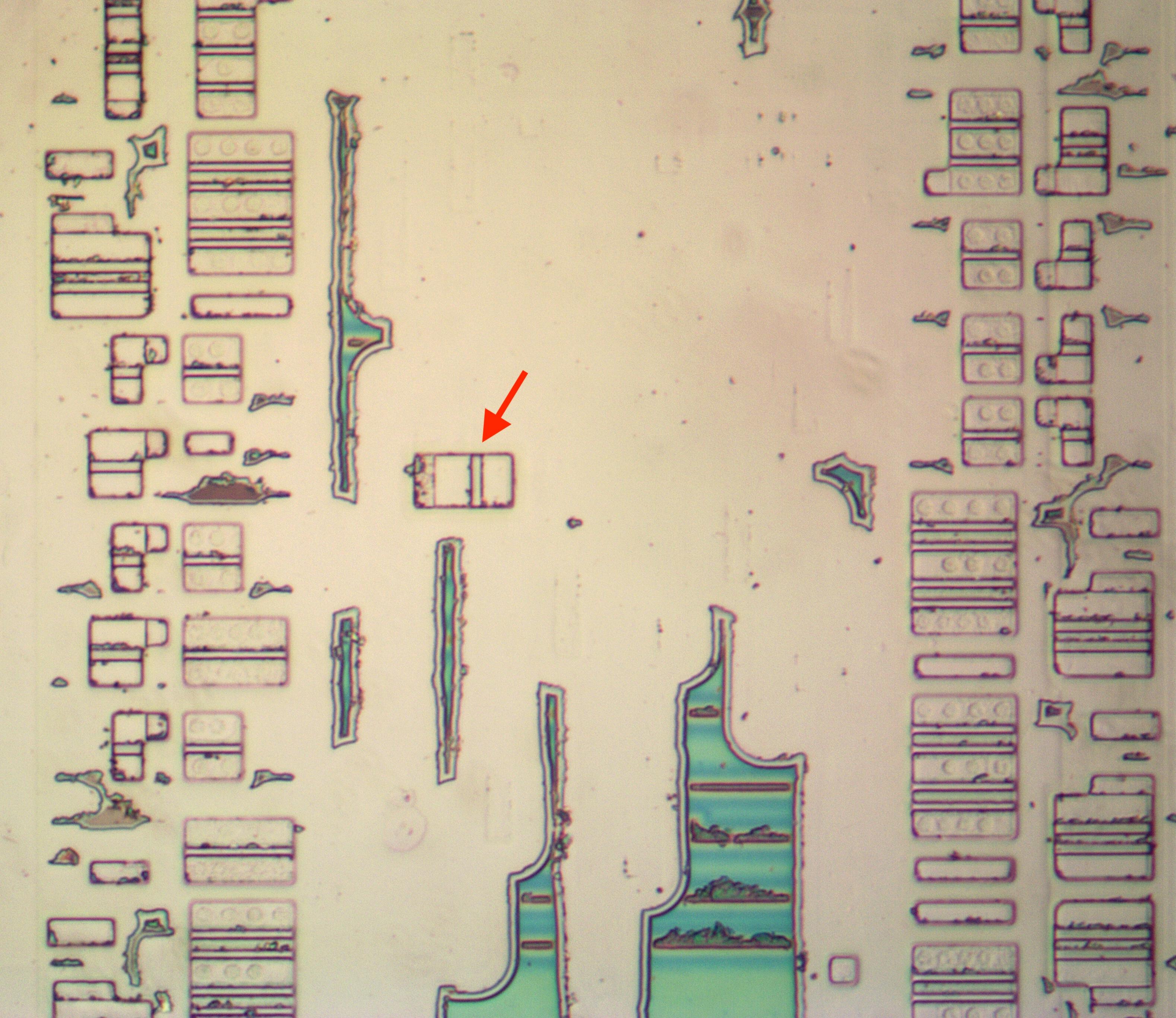
The idea of standard-cell logic is that standardized cells are arranged in columns. The space between the cells is the "routing channel", holding the wiring that links the cells. The 386 circuitry follows this layout, except for one single transistor, sitting between two columns of cells.

The "misplaced" transistor, indicated by the arrow. The irregular green regions are oxide that was incompletely removed.

The "misplaced" transistor, indicated by the arrow. The irregular green regions are oxide that was incompletely removed.

I wrote some software tools to help me analyze the standard cells. Unfortunately, my tools assumed that all the cells were in columns, so this one wayward transistor caused me considerable inconvenience.

The transistor turns out to be a PMOS transistor, pulling a signal high as part of a multiplexer. But why is this transistor out of place? My hypothesis is that the transistor is a bug fix. Regenerating the cell layout was very costly, taking many hours on an IBM mainframe computer. Presumably, someone found that they could just stick the necessary transistor into an unused spot in the routing channel, manually add the necessary wiring, and avoid the delay of regenerating all the cells.

The fake inverter

The simplest CMOS gate is the inverter, with an NMOS transistor to pull the output low and a PMOS transistor to pull the output high. The standard cell circuitry that I examined contains over a hundred inverters of various sizes. (Performance is improved by using inverters that aren't too small but also aren't larger than necessary for a particular circuit. Thus, the standard cell library includes inverters of multiple sizes.)

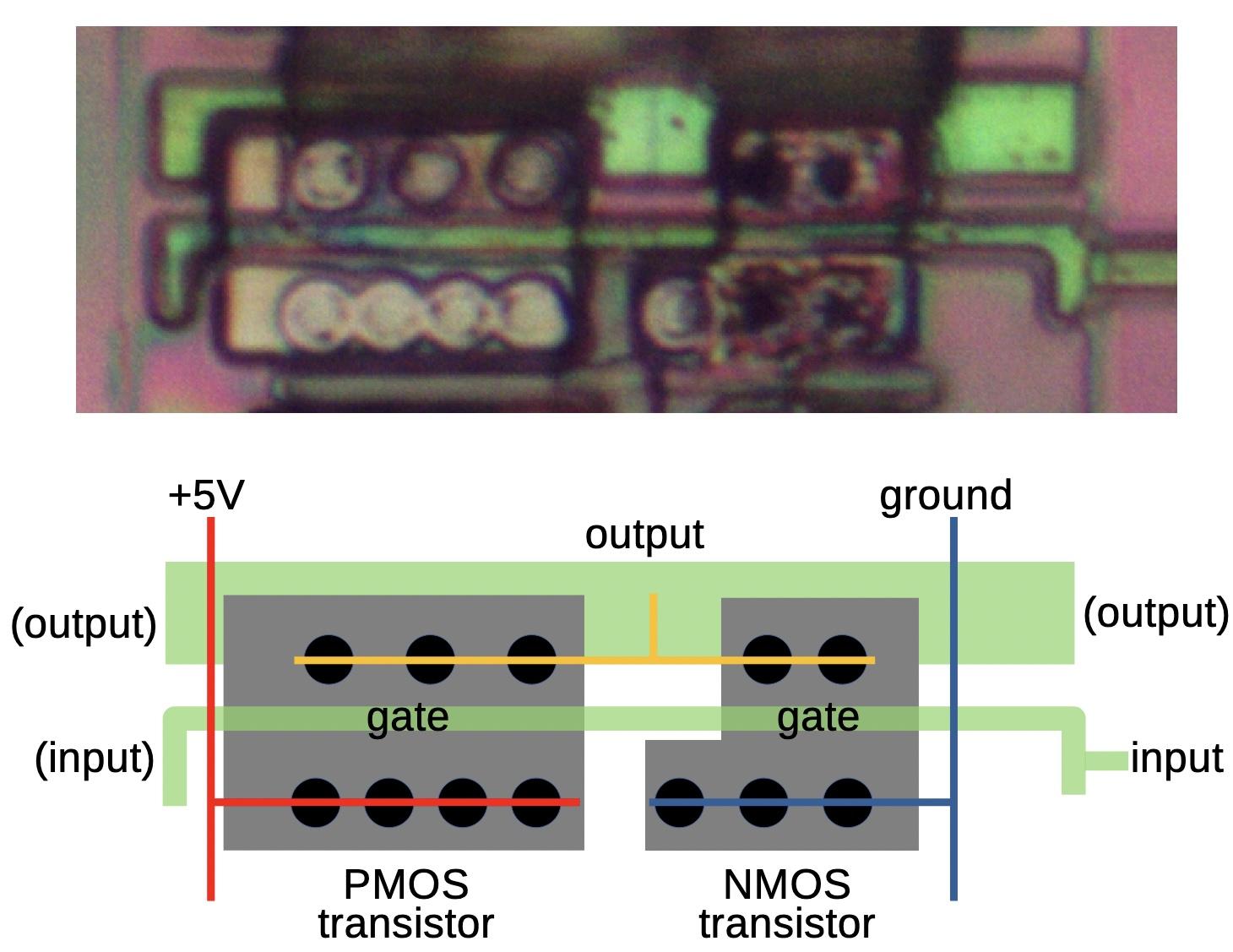
The image below shows a medium-sized standard-cell inverter under the microscope. For this image, I removed the two metal layers with acid to show the underlying polysilicon (bright green) and silicon (gray). The quality of this image is poor—it is difficult to remove the metal without destroying the polysilicon—but the diagram below should clarify the circuit. The inverter has two transistors: a PMOS transistor connected to +5 volts to pull the output high when the input is 0, and an NMOS transistor connected to ground to pull the output low when the input is 1. (The PMOS transistor needs to be larger because PMOS transistors don't function as well as NMOS transistors due to silicon physics.)

An inverter as seen on the die. The corresponding standard cell is shown below.

An inverter as seen on the die. The corresponding standard cell is shown below.

The polysilicon input line plays a key role: where it crosses the doped silicon, a transistor gate is formed. To make the standard cell more flexible, the input to the inverter can be connected on either the left or the right; in this case, the input is connected on the right and there is no connection on the left. The inverter's output can be taken from the polysilicon on the upper left or the right, but in this case, it is taken from the upper metal layer (not shown). The power, ground, and output lines are in the lower metal layer, which I have represented by the thin red, blue, and yellow lines. The black circles are connections between the metal layer and the underlying silicon.

This inverter appears dozens of times in the circuitry. However, I came across a few inverters that didn't make sense. The problem was that the inverter's output was connected to the output of a multiplexer. Since an inverter is either on or off, its value would clobber the output of the multiplexer.4 This didn't make any sense. I double- and triple-checked the wiring to make sure I hadn't messed up. After more investigation, I found another problem: the input to a "bad" inverter didn't make sense either. The input consisted of two signals shorted together, which doesn't work.

Finally, I realized what was going on. A "bad inverter" has the exact silicon layout of an inverter, but it wasn't an inverter: it was independent NMOS and PMOS transistors with separate inputs. Now it all made sense. With two inputs, the input signals were independent, not shorted together. And since the transistors were controlled separately, the NMOS transistor could pull the output low in some circumstances, the PMOS transistor could pull the output high in other circumstances, or both transistors could be off, allowing the multiplexer's output to be used undisturbed. In other words, the "inverter" was just two more cases for the multiplexer.

The "bad" inverter. (Image is flipped vertically for comparison with the previous inverter.)

The "bad" inverter. (Image is flipped vertically for comparison with the previous inverter.)

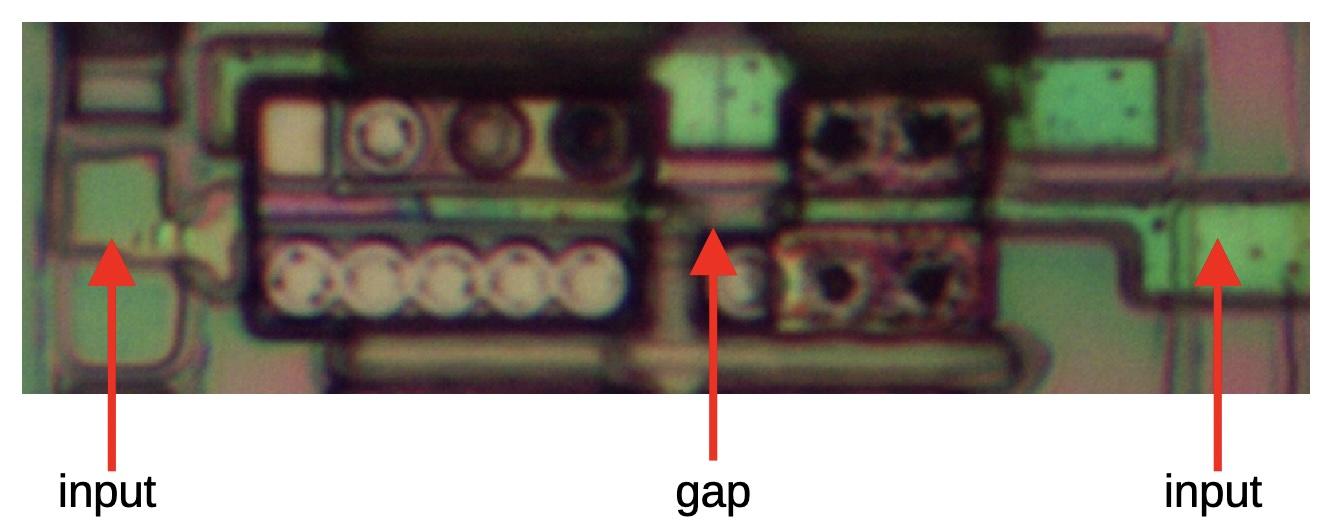
If you compare the "bad inverter" cell below with the previous cell, they look almost the same, but there are subtle differences. First, the gates of the two transistors are connected in the real inverter, but disconnected by a small gap in the transistor pair. I've indicated this gap in the photo above; it is hard to tell if the gap is real or just an imaging artifact, so I didn't spot it. The second difference is that the "fake" inverter has two input connections, one to each transistor, while the inverter has a single input connection. Unfortunately, I assumed that the two connections were just a trick to route the signal across the inverter without requiring an extra wire. In total, this cell was used 32 times as a real inverter and 9 times as independent transistors.

Conclusions

Standard cell logic and automatic place and route have a long history before the 386, back to the early 1970s, so this isn't an Intel invention.5 Nonetheless, the 386 team deserves the credit for deciding to use this technology at a time when it was a risky decision. They needed to develop custom software for their placing and routing needs, so this wasn't a trivial undertaking. This choice paid off and they completed the 386 ahead of schedule. The 386 ended up being a huge success for Intel, moving the x86 architecture to 32 bits and defining the dominant computer architecture for the rest of the 20th century.

If you're interested in standard cell logic, I also wrote about standard cell logic in an IBM chip. I plan to write more about the 386, so follow me on Mastodon, Bluesky, or RSS for updates. Thanks to Pat Gelsinger and Roxanne Koester for providing helpful papers.

For more on the 386 and other chips, follow me on Mastodon (@[email protected]), Bluesky (@righto.com), or RSS. (I've given up on Twitter.) If you want to read more about the 386, I've written about the clock pin, prefetch queue, die versions, packaging, and I/O circuits.

Notes and references

  1. The decision to use automatic place and route is described on page 13 of the Intel 386 Microprocessor Design and Development Oral History Panel, a very interesting document on the 386 with discussion from some of the people involved in its development. 

  2. Multiplexers often take a binary control signal to select the desired input. For instance, an 8-to-1 multiplexer selects one of 8 inputs, so a 3-bit control signal can specify the desired input. The 386's multiplexers use a different approach with one control signal per input. One of the 8 control signals is activated to select the desired input. This approach is called a "one-hot encoding" since one control line is activated (hot) at a time. 

  3. Some chips, such as the MOS Technology 6502 processor, are built with NMOS technology, without PMOS transistors. Multiplexers in the 6502 use a single NMOS transistor, rather than the two transistors in the CMOS switch. However, the performance of the switch is worse. 

  4. One very common circuit in the 386 is a latch constructed from an inverter loop and a switch/multiplexer. The inverter's output and the switch's output are connected together. The trick, however, is that the inverter is constructed from special weak transistors. When the switch is disabled, the inverter's weak output is sufficient to drive the loop. But to write a value into the latch, the switch is enabled and its output overpowers the weak inverter.

    The point of this is that there are circuits where an inverter and a multiplexer have their outputs connected. However, the inverter must be constructed with special weak transistors, which is not the situation that I'm discussing. 

  5. I'll provide more history on standard cells in this footnote. RCA patented a bipolar standard cell in 1971, but this was a fixed arrangement of transistors and resistors, more of a gate array than a modern standard cell. Bell Labs researched standard cell layout techniques in the early 1970s, calling them Polycells, including a 1973 paper by Brian Kernighan. By 1979, A Guide to LSI Implementation discussed the standard cell approach and it was described as well-known in this patent application. Even so, Electronics called these design methods "futuristic" in 1980.

    Standard cells became popular in the mid-1980s as faster computers and improved design software made it practical to produce semi-custom designs that used standard cells. Standard cells made it to the cover of Digital Design in August 1985, and the article inside described numerous vendors and products. Companies like Zymos and VLSI Technology (VTI) focused on standard cells. Traditional companies such as Texas Instruments, NCR, GE/RCA, Fairchild, Harris, ITT, and Thomson introduced lines of standard cell products in the mid-1980s.  

Solving the NYTimes Pips puzzle with a constraint solver

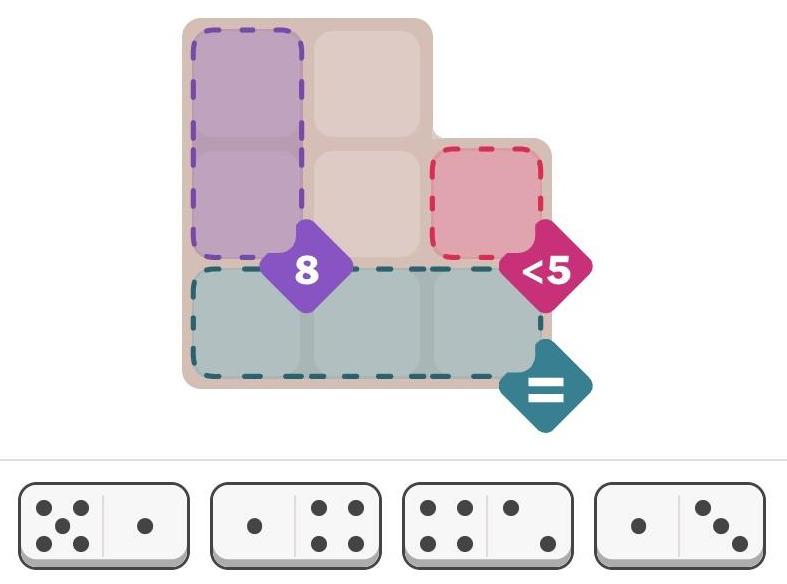
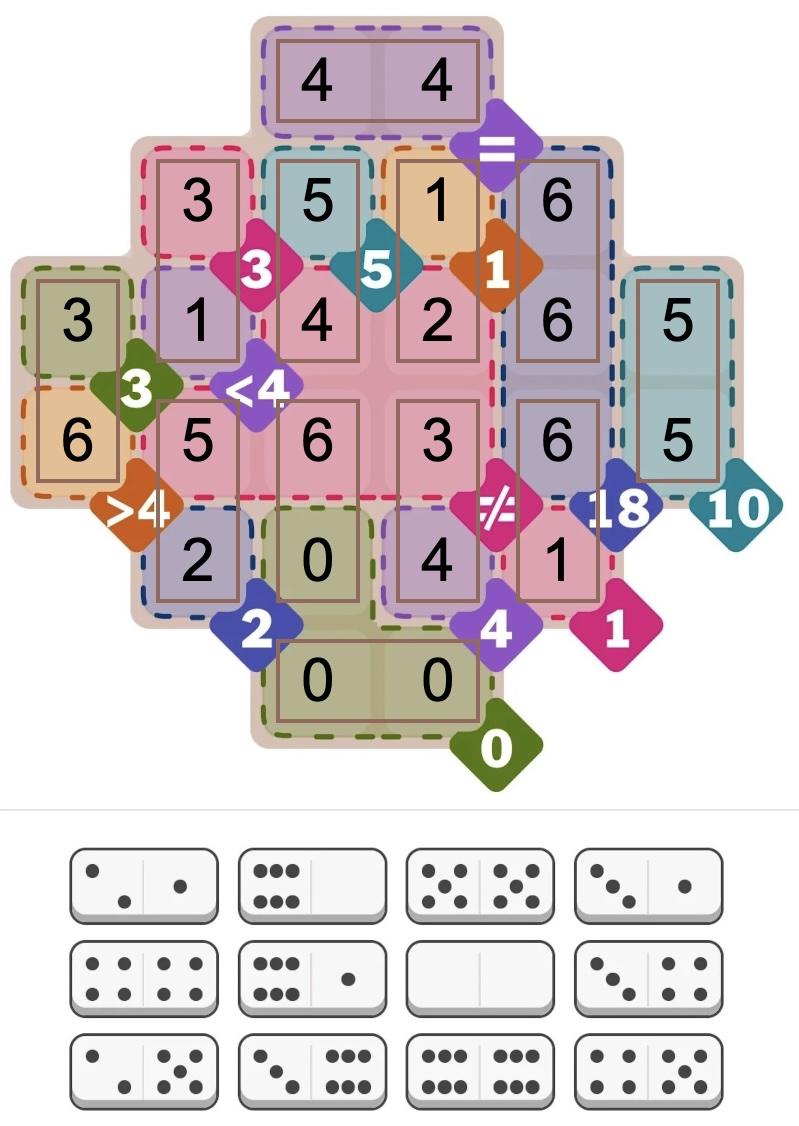
The New York Times recently introduced a new daily puzzle called Pips. You place a set of dominoes on a grid, satisfying various conditions. For instance, in the puzzle below, the pips (dots) in the purple squares must sum to 8, there must be fewer than 5 pips in the red square, and the pips in the three green squares must be equal. (It doesn't take much thought to solve this "easy" puzzle, but the "medium" and "hard" puzzles are more challenging.)

The New York Times Pips puzzle from Oct 5, 2025 (easy). Hint: What value must go in the three green squares?

The New York Times Pips puzzle from Oct 5, 2025 (easy). Hint: What value must go in the three green squares?

I was wondering about how to solve these puzzles with a computer. Recently, I saw an article on Hacker News—"Many hard LeetCode problems are easy constraint problems"—that described the benefits and flexibility of a system called a constraint solver. A constraint solver takes a set of constraints and finds solutions that satisfy the constraints: exactly what Pips requires.

I figured that solving Pips with a constraint solver would be a good way to learn more about these solvers, but I had several questions. Did constraint solvers require incomprehensible mathematics? How hard was it to express a problem? Would the solver quickly solve the problem, or would it get caught in an exponential search?

It turns out that using a constraint solver was straightforward; it took me under two hours from knowing nothing about constraint solvers to solving the problem. The solver found solutions in milliseconds (for the most part). However, there were a few bumps along the way. In this blog post, I'll discuss my experience with the MiniZinc1 constraint modeling system and show how it can solve Pips.

Approaching the problem

Writing a program for a constraint solver is very different from writing a regular program. Instead of telling the computer how to solve the problem, you tell it what you want: the conditions that must be satisfied. The solver then "magically" finds solutions that satisfy the problem.

To solve the problem, I created an array called pips that holds the number of domino pips at each position in the grid. Then, the three constraints for the above problem can be expressed as follows. You can see how the constraints directly express the conditions in the puzzle.

constraint pips[1,1] + pips[2,1] == 8;
constraint pips[2,3] < 5;
constraint all_equal([pips[3,1], pips[3,2], pips[3,3]]);

Next, I needed to specify where dominoes could be placed for the puzzle. To do this, I defined an array called grid that indicated the allowable positions: 1 indicates a valid position and 0 indicates an invalid position. (If you compare with the puzzle at the top of the article, you can see that the grid below matches its shape.)

grid = [|
1,1,0|
1,1,1|
1,1,1|];

I also defined the set of dominoes for the problem above, specifying the number of spots in each half:

spots = [|5,1| 1,4| 4,2| 1,3|];

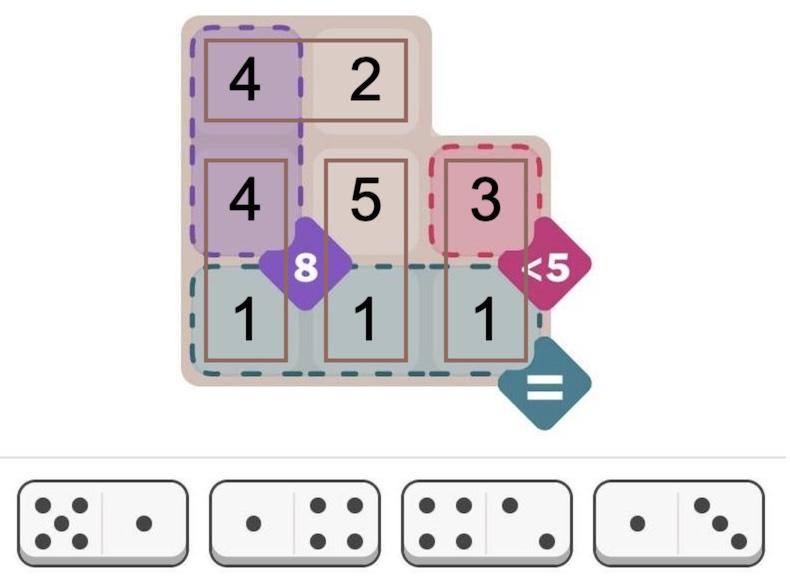
So far, the constraints directly match the problem. However, I needed to write some more code to specify how these pieces interact. But before I describe that code, I'll show a solution. I wasn't sure what to expect: would the constraint solver give me a solution or would it spin forever? It turned out to find the unique solution in 109 milliseconds, printing out the solution arrays. The pips array shows the number of pips in each position, while the dominogrid array shows which domino (1 through 4) is in each position.

pips = 
[| 4, 2, 0
 | 4, 5, 3
 | 1, 1, 1
 |];
dominogrid = 
[| 3, 3, 0
 | 2, 1, 4
 | 2, 1, 4
 |];

The text-based solution above is a bit ugly. But it is easy to create graphical output. MiniZinc provides a JavaScript API, so you can easily display solutions on a web page. I wrote a few lines of JavaScript to draw the solution, as shown below. (I just display the numbers since I was too lazy to draw the dots.) Solving this puzzle is not too impressive—it's an "easy" puzzle after all—but I'll show below that the solver can also handle considerably more difficult puzzles.

Graphical display of the solution.

Graphical display of the solution.

Details of the code

While the above code specifies a particular puzzle, a bit more code is required to define how dominoes and the grid interact. This code may appear strange because it is implemented as constraints, rather than the procedural operations in a normal program.

My main design decision was how to specify the locations of dominoes. I considered assigning a grid position and orientation to each domino, but it seemed inconvenient to deal with multiple orientations. Instead, I decided to position each half of the domino independently, with an x and y coordinate in the grid.2 I added a constraint that the two halves of each domino had to be in neighboring cells, that is, either the X or Y coordinates had to differ by 1.

constraint forall(i in DOMINO) (abs(x[i, 1] - x[i, 2]) + abs(y[i, 1] - y[i, 2]) == 1);

It took a bit of thought to fill in the pips array with the number of spots on each domino. In a normal programming language, one would loop over the dominoes and store the values into pips. However, here it is done with a constraint so the solver makes sure the values are assigned. Specifically, for each half-domino, the pips array entry at the domino's x/y coordinate must equal the corresponding spots on the domino:

constraint forall(i in DOMINO, j in HALF) (pips[y[i,j], x[i, j]] == spots[i, j]);

I decided to add another array to keep track of which domino is in which position. This array is useful to see the domino locations in the output, but it also keeps dominoes from overlapping. I used a constraint to put each domino's number (1, 2, 3, etc.) into the occupied position of dominogrid:

constraint forall(i in DOMINO, j in HALF) (dominogrid[y[i,j], x[i, j]] == i);

Next, how do we make sure that dominoes only go into positions allowed by grid? I used a constraint that a square in dominogrid must be empty or the corresponding grid must allow a domino.3 This uses the "or" condition, which is expressed as \/, an unusual stylistic choice. (Likewise, "and" is expressed as /\. These correspond to the logical symbols ∨ and ∧.)

constraint forall(i in 1..H, j in 1..W) (dominogrid[i, j] == 0 \/ grid[i, j] != 0);

Honestly, I was worried that I had too many arrays and the solver would end up in a rathole ensuring that the arrays were consistent. But I figured I'd try this brute-force approach and see if it worked. It turns out that it worked for the most part, so I didn't need to do anything more clever.

Finally, the program requires a few lines to define some constants and variables. The constants below define the number of dominoes and the size of the grid for a particular problem:

int: NDOMINO = 4; % Number of dominoes in the puzzle
int: W = 3; % Width of the grid in this puzzle
int: H = 3; % Height of the grid in this puzzle

Next, datatypes are defined to specify the allowable values. This is very important for the solver; it is a "finite domain" solver, so limiting the size of the domains reduces the size of the problem. For this problem, the values are integers in a particular range, called a set:

set of int: DOMINO = 1..NDOMINO; % Dominoes are numbered 1 to NDOMINO
set of int: HALF = 1..2; % The domino half is 1 or 2
set of int: xcoord = 1..W; % Coordinate into the grid
set of int: ycoord = 1..H;

At last, I define the sizes and types of the various arrays that I use. One very important syntax is var, which indicates variables that the solver must determine. Note that the first two arrays, grid and spots do not have var since they are constant, initialized to specify the problem.

array[1..H,1..W] of 0..1: grid; % The grid defining where dominoes can go
array[DOMINO, HALF] of int: spots; % The number of spots on each half of each domino
array[DOMINO, HALF] of var xcoord: x; % X coordinate of each domino half
array[DOMINO, HALF] of var ycoord: y; % Y coordinate of each domino half
array[1..H,1..W] of var 0..6: pips; % The number of pips (0 to 6) at each location.
array[1..H,1..W] of var 0..NDOMINO: dominogrid; % The domino sequence number at each location

You can find all the code on GitHub. One weird thing is that because the code is not procedural, the lines can be in any order. You can use arrays or constants before you use them. You can even move include statements to the end of the file if you want!

Complications

Overall, the solver was much easier to use than I expected. However, there were a few complications.

By changing a setting, the solver can find multiple solutions instead of stopping after the first. However, when I tried this, the solver generated thousands of meaningless solutions. A closer look showed that the problem was that the solver was putting arbitrary numbers into the "empty" cells, creating valid but pointlessly different solutions. It turns out that I didn't explicitly forbid this, so the sneaky constraint solver went ahead and generated tons of solutions that I didn't want. Adding another constraint fixed the problem. The moral is that even if you think your constraints are clear, solvers are very good at finding unwanted solutions that technically satisfy the constraints. 4

A second problem is that if you do something wrong, the solver simply says that the problem is unsatisfiable. Maybe there's a clever way of debugging, but I ended up removing constraints until the problem can be satisfied, and then see what I did wrong with that constraint. (For instance, I got the array indices backward at one point, making the problem insoluble.)

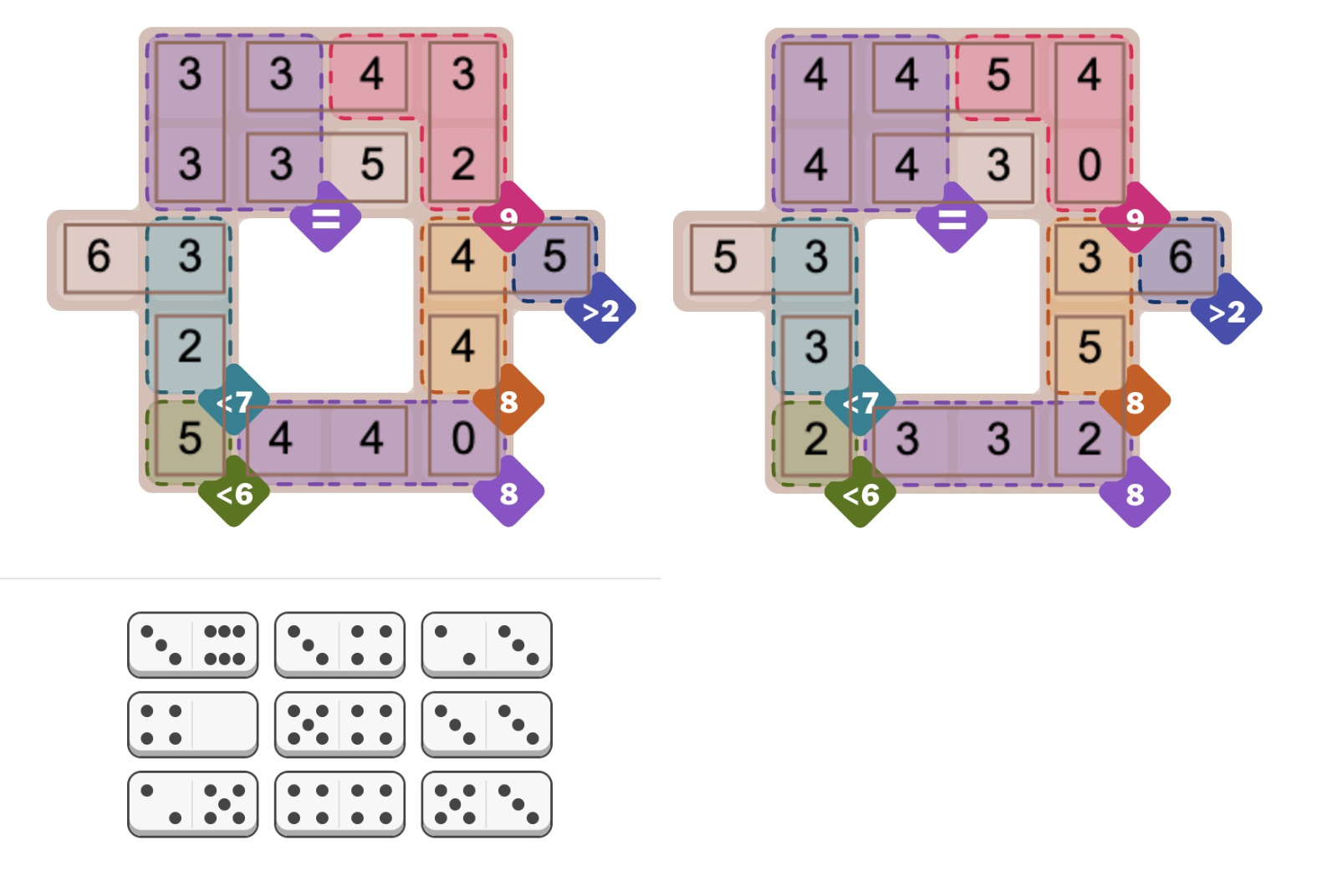
The most concerning issue is the unpredictability of the solver: maybe it will take milliseconds or maybe it will take hours. For instance, the Oct 5 hard Pips puzzle (below) caused the solver to take minutes for no apparent reason. However, the MiniZinc IDE supports different solver backends. I switched from the default Gecode solver to Chuffed, and it immediately found numerous solutions, 384 to be precise. (Sometimes the Pips puzzles sometimes have multiple solutions, which players find controversial.) I suspect that the multiple solutions messed up the Gecode solver somehow, perhaps because it couldn't narrow down a "good" branch in the search tree. For a benchmark of the different solvers, see the footnote.5

Two of the 384 solutions to the NYT Pips puzzle from Oct 5, 2025 (hard difficulty).

Two of the 384 solutions to the NYT Pips puzzle from Oct 5, 2025 (hard difficulty).

How does a constraint solver work?

If you were writing a program to solve Pips from scratch, you'd probably have a loop to try assigning dominoes to positions. The problem is that the problem grows exponentially. If you have 16 dominoes, there are 16 choices for the first domino, 15 choices for the second, and so forth, so about 16! combinations in total, and that's ignoring orientations. You can think of this as a search tree: at the first step, you have 16 branches. For the next step, each branch has 15 sub-branches. Each sub-branch has 14 sub-sub-branches, and so forth.

An easy optimization is to check the constraints after each domino is added. For instance, as soon as the "less than 5" constraint is violated, you can backtrack and skip that entire section of the tree. In this way, only a subset of the tree needs to be searched; the number of branches will be large, but hopefully manageable.

A constraint solver works similarly, but in a more abstract way. The constraint solver assigns values to the variables, backtracking when a conflict is detected. Since the underlying problem is typically NP-complete, the solver uses heuristics to attempt to improve performance. For instance, variables can be assigned in different orders. The solver attempts to generate conflicts as soon as possible so large pieces of the search tree can be pruned sooner rather than later. (In the domino case, this corresponds to placing dominoes in places with the tightest constraints, rather than scattering them around the puzzle in "easy" spots.)

Another technique is constraint propagation. The idea is that you can derive new constraints and catch conflicts earlier. For instance, suppose you have a problem with the constraints "a equals c" and "b equals c". If you assign "a=1" and "b=2", you won't find a conflict until later, when you try to find a value for "c". But with constraint propagation, you can derive a new constraint "a equals b", and the problem will turn up immediately. (Solvers handle more complicated constraint propagation, such as inequalities.) The tradeoff is that generating new constraints takes time and makes the problem larger, so constraint propagation can make the solver slower. Thus, heuristics are used to decide when to apply constraint propagation.

Researchers are actively developing new algorithms, heuristics, and optimizations6 such as backtracking more aggressively (called "backjumping"), keeping track of failing variable assignments (called "nogoods"), and leveraging Boolean SAT (satisfiability) solvers. Solvers compete in annual challenges to test these techniques against each other. The nice thing about a constraint solver is that you don't need to know anything about these techniques; they are applied automatically.

Conclusions

I hope this has convinced you that constraint solvers are interesting, not too scary, and can solve real problems with little effort. Even as a beginner, I was able to get started with MiniZinc quickly. (I read half the tutorial and then jumped into programming.)

One reason to look at constraint solvers is that they are a completely different programming paradigm. Using a constraint solver is like programming on a higher level, not worrying about how the problem gets solved or what algorithm gets used. Moreover, analyzing a problem in terms of constraints is a different way of thinking about algorithms. Some of the time it's frustrating when you can't use familiar constructs such as loops and assignments, but it expands your horizons.

Finally, writing code to solve Pips is more fun than solving the problems by hand, at least in my opinion, so give it a try!

For more, follow me on Bluesky (@righto.com), Mastodon (@[email protected]), RSS, or subscribe here.

Solution to the Pips puzzle, September 21, 2005 (hard). This puzzle has regions that must all be equal (=) and regions that must all be different (≠). Conveniently, MiniZinc has all_equal and alldifferent constraint functions.

Solution to the Pips puzzle, September 21, 2005 (hard). This puzzle has regions that must all be equal (=) and regions that must all be different (≠). Conveniently, MiniZinc has all_equal and alldifferent constraint functions.

Notes and references

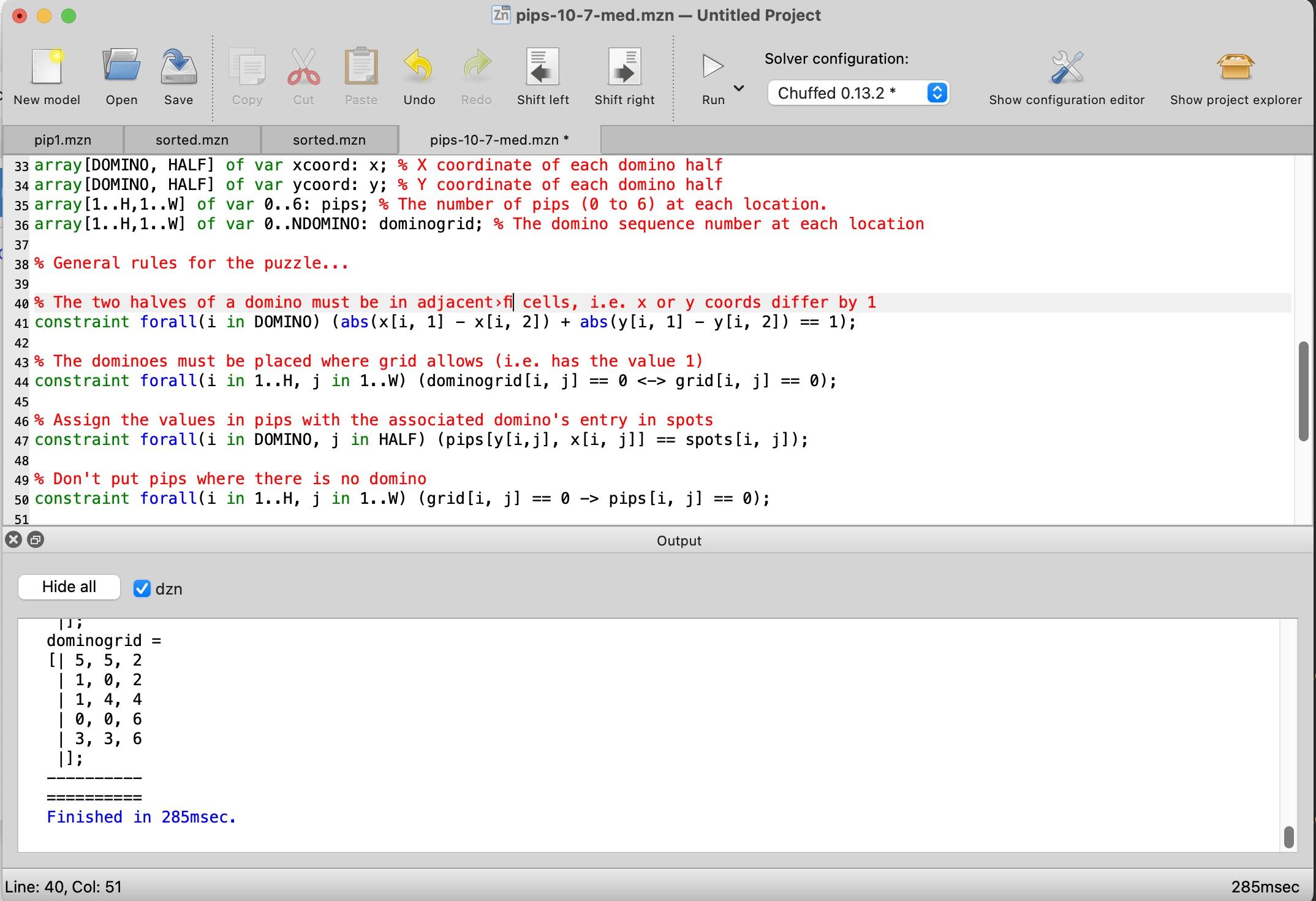
  1. I started by downloading the MiniZinc IDE and reading the MiniZinc tutorial. The MiniZinc IDE is straightforward, with an editor window at the top and an output window at the bottom. Clicking the "Run" button causes it to generate a solution.

    Screenshot of the MiniZinc IDE. Click for a larger view.

    Screenshot of the MiniZinc IDE. Click for a larger view.


  2. It might be cleaner to combine the X and Y coordinates into a single Point type, using a MiniZinc record type

  3. I later decided that it made more sense to enforce that dominogrid is empty if and only if grid is 0 at that point, although it doesn't affect the solution. This constraint uses the "if and only if" operator <->.

    constraint forall(i in 1..H, j in 1..W) (dominogrid[i, j] == 0 <-> grid[i, j] == 0);


  4. To prevent the solver from putting arbitrary numbers in the unused positions of pips, I added a constraint to force these values to be zero:

    constraint forall(i in 1..H, j in 1..W) (grid[i, j] == 0 -> pips[i, j] == 0);
    

    Generating multiple solutions had a second issue, which I expected: A symmetric domino can be placed in two redundant ways. For instance, a double-six domino can be flipped to produce a solution that is technically different but looks the same. I fixed this by adding constraints for each symmetric domino to allow only one of the two redundant positions. The constraint below forces a preferred orientation for symmetric dominoes.

    constraint forall(i in DOMINO) (spots[i,1] != spots[i,2] \/ x[i,1] > x[i,2] \/ (x[i,1] == x[i,2] /\ y[i,1] > y[i,2]));
    

    To enable multiple solutions in MiniZinc, the setting is under Show Configuration Editor > User Defined Behavior > Satisfaction Problems or the --all flag from the command line. 

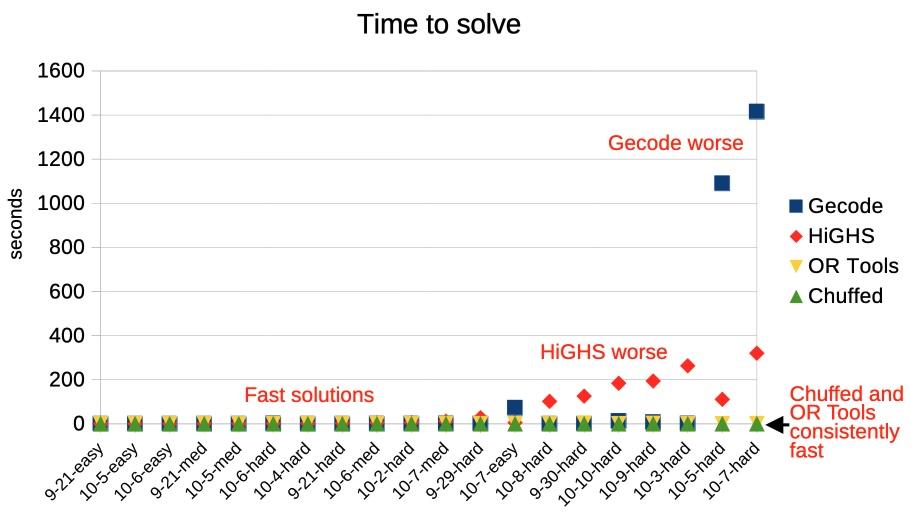
  5. MiniZinc has five solvers that can solve this sort of integer problem: Chuffed, OR Tools CP-SAT, Gecode, HiGHS, and Coin-OR BC. I measured the performance of the five solvers against 20 different Pips puzzles. Most of the solvers found solutions in under a second, most of the time, but there is a lot of variation.

    Timings for different solvers on 20 Pip puzzles.

    Timings for different solvers on 20 Pip puzzles.

    Overall, Chuffed had the best performance on the puzzles that I tested, taking well under a second. Google's OR-Tools won all the categories in the 2025 MiniZinc challenge, but it was considerably slower than Chuffed for my Pips programs. The default Gecode solver performed very well most of the time, but it did terribly on a few problems, taking over 15 minutes. HiGHs was slower in general, taking a few minutes on the hardest problems, but it didn't fail as badly as Gecode. (Curiously, Gecode and HiGHS sometimes found different problems to be difficult.) Finally, Coin-OR BC was uniformly bad; at best it took a few seconds, but one puzzle took almost two hours and others weren't solved before I gave up after two hours. (I left Coin-OR BC off the graph because it messed up the scale.)

    Don't treat these results too seriously because different solvers are optimized for different purposes. (In particular, Coin-OR BC is designed for linear problems.) But the results demonstrate the unpredictability of solvers: maybe you get a solution in a second and maybe you get a solution in hours. 

  6. If you want to read more about solvers, Constraint Satisfaction Problems is an overview presentation. The Gecode algorithms are described in a nice technical report: Constraint Programming Algorithms used in Gecode. Chuffed is more complicated: "Chuffed is a state of the art lazy clause solver designed from the ground up with lazy clause generation in mind. Lazy clause generation is a hybrid approach to constraint solving that combines features of finite domain propagation and Boolean satisfiability." The Chuffed paper Lazy clause generation reengineered and slides are more of a challenge.  

A Navajo weaving of an integrated circuit: the 555 timer

The noted Diné (Navajo) weaver Marilou Schultz recently completed an intricate weaving composed of thick white lines on a black background, punctuated with reddish-orange diamonds. Although this striking rug may appear abstract, it shows the internal circuitry of a tiny silicon chip known as the 555 timer. This chip has hundreds of applications in everything from a sound generator to a windshield wiper controller. At one point, the 555 was the world's best-selling integrated circuit with billions sold. But how did the chip get turned into a rug?

"Popular Chip" by Marilou Schultz.
 Photo courtesy of First American Art Magazine.

"Popular Chip" by Marilou Schultz. Photo courtesy of First American Art Magazine.

The 555 chip is constructed from a tiny flake of silicon with a layer of metallic wiring on top. In the rug, this wiring is visible as the thick white lines, while the silicon forms the black background. One conspicuous feature of the rug is the reddish-orange diamonds around the perimeter. These correspond to the connections between the silicon chip and its eight pins. Tiny golden bond wires—thinner than a human hair—are attached to the square bond pads to provide these connections. The circuitry of the 555 chip contains 25 transistors, silicon devices that can switch on and off. The rug is dominated by three large transistors, the filled squares with a 王 pattern inside, while the remaining transistors are represented by small dots.

The weaving was inspired by a photo of the 555 timer die taken by Antoine Bercovici (Siliconinsider); I suggested this photo to Schultz as a possible subject for a rug. The diagram below compares the weaving (left) with the die photo (right). As you can see, the weaving closely follows the actual chip, but there are a few artistic differences. For instance, two of the bond pads have been removed, the circuitry at the top has been simplified, and the part number at the bottom has been removed.

A comparison of the rug (left) and the original photograph (right).
Dark-field image of the 555 timer is courtesy of Antoine Bercovici.

A comparison of the rug (left) and the original photograph (right). Dark-field image of the 555 timer is courtesy of Antoine Bercovici.

Antoine took the die photo with a dark field microscope, a special type of microscope that produces an image on a black background. This image emphasizes the metal layer on the top of the die. In comparison, a standard bright-field microscope produced the image below. When a chip is manufactured, regions of silicon are "doped" with impurities to create transistors and resistors. These regions are visible in the image below as subtle changes in the color of the silicon.

The RCA CA555 chip. Photo courtesy of Tiny Transistors.

The RCA CA555 chip. Photo courtesy of Tiny Transistors.

In the weaving, the chip's design appears almost monumental, making it easy to forget that the actual chip is microscopic. For the photo below, I obtained a version of the chip packaged in a metal can, rather than the typical rectangle of black plastic. Cutting the top off the metal can reveals the tiny chip inside, with eight gold bond wires connecting the die to the pins of the package. If you zoom in on the photo, you may recognize the three large transistors that dominate the rug.

The 555 timer die inside a metal-can package, with a penny for comparison. Click this image (or any other) for a larger version.

The 555 timer die inside a metal-can package, with a penny for comparison. Click this image (or any other) for a larger version.

The artist, Marilou Schultz, has been creating chip rugs since 1994, when Intel commissioned a rug based on the Pentium as a gift to AISES (American Indian Science & Engineering Society). Although Schultz learned weaving as a child, the Pentium rug was a challenge due to its complex pattern and lack of symmetry; a day's work might add just an inch to the rug. This dramatic weaving was created with wool from the long-horned Navajo-Churro sheep, colored with traditional plant dyes.

"Replica of a Chip", created by Marilou Schultz, 1994. Wool. Photo taken at the National Gallery of Art, 2024.

"Replica of a Chip", created by Marilou Schultz, 1994. Wool. Photo taken at the National Gallery of Art, 2024.

For the 555 timer weaving, Schultz experimented with different materials. Silver and gold metallic threads represent the aluminum and copper in the chip. The artist explains that "it took a lot more time to incorporate the metallic threads," but it was worth the effort because "it is spectacular to see the rug with the metallics in the dark with a little light hitting it." Aniline dyes provided the black and lavender colors. Although natural logwood dye produces a beautiful purple, it fades over time, so Schultz used an aniline dye instead. The lavender colors are dedicated to the weaver's mother, who passed away in February; purple was her favorite color.

Inside the chip

How does the 555 chip produce a particular time delay? You add external components—resistors and a capacitor—to select the time. The capacitor is filled (charged) at a speed controlled by the resistor. When the capacitor get "full", the 555 chip switches operation and starts emptying (discharging) the capacitor. It's like filling a sink: if you have a large sink (capacitor) and a trickle of water (large resistor), the sink fills slowly. But if you have a small sink (capacitor) and a lot of water (small resistor), the sink fills quickly. By using different resistors and capacitors, the 555 timer can provide time intervals from microseconds to hours.

I've constructed an interactive chip browser that shows how the regions of the rug correspond to specific electronic components in the physical chip. Click on any part of the rug to learn the function of the corresponding component in the chip.

Click the die or schematic for details...

For instance, two of the large square transistors turn the chip's output on or off, while the third large transistor discharges the capacitor when it is full. (To be precise, the capacitor goes between 1/3 full and 2/3 full to avoid issues near "empty" and "full".) The chip has circuits called comparators that detect when the capacitor's voltage reaches 1/3 or 2/3, switching between emptying and filling at those points. If you want more technical details about the 555 chip, see my previous articles: an early 555 chip, a 555 timer similar to the rug, and a more modern CMOS version of the 555.

Conclusions

The similarities between Navajo weavings and the patterns in integrated circuits have long been recognized. Marilou Schultz's weavings of integrated circuits make these visual metaphors into concrete works of art. This connection is not just metaphorical, however; in the 1960s, the semiconductor company Fairchild employed numerous Navajo workers to assemble chips in Shiprock, New Mexico. I wrote about this complicated history in The Pentium as a Navajo Weaving.

This work is being shown at SITE Santa Fe's Once Within a Time exhibition (running until January 2026). I haven't seen the exhibition in person, so let me know if you visit it. For more about Marilou Schultz's art, see The Diné Weaver Who Turns Microchips Into Art, or A Conversation with Marilou Schultz on YouTube.

Many thanks to Marilou Schultz for discussing her art with me. Thanks to First American Art Magazine for providing the photo of her 555 rug. Follow me on Mastodon (@[email protected]), Bluesky (@righto.com), or RSS for updates.

Why do people keep writing about the imaginary compound Cr2Gr2Te6?

I was reading the latest issue of the journal Science, and a paper mentioned the compound Cr2Gr2Te6. For a moment, I thought my knowledge of the periodic table was slipping, since I couldn't remember the element Gr. It turns out that Gr was supposed to be Ge, germanium, but that raises two issues. First, shouldn't the peer reviewers and proofreaders at a top journal catch this error? But more curiously, it appears that this formula is a mistake that has been copied around several times.

The Science paper [1] states, "Intrinsic ferromagnetism in these materials was discovered in Cr2Gr2Te6 and CrI3 down to the bilayer and monolayer thickness limit in 2017." I checked the referenced paper [2] and verified that the correct compound is Cr2Ge2Te6, with Ge for germanium.

But in the process, I found more publications that specifically mention the 2017 discovery of intrinsic ferromagnetism in both Cr2Gr2Te6 and CrI3. A 2021 paper in Nanoscale [3] says, "Since the discovery of intrinsic ferromagnetism in atomically thin Cr2Gr2Te6 and CrI3 in 2017, research on two-dimensional (2D) magnetic materials has become a highlighted topic." Then, a 2023 book chaper [4] opens with the abstract: "Since the discovery of intrinsic long-range magnetic order in two-dimensional (2D) layered magnets, e.g., Cr2Gr2Te6 and CrI3 in 2017, [...]"

This illustrates how easy it is for a random phrase to get copied around with nobody checking it. (Earlier, I found a bogus computer definition that has persisted for over 50 years.) To be sure, these could all be independent typos—it's an easy typo to make since Ge and Gr are neighbors on the keyboard and Cr2Gr2 scans better than Cr2Ge2. A few other papers [5, 6, 7] have the same typo, but in different contexts. My bigger concern is that once AI picks up the erroneous formula, it will propagate as misinformation forever. I hope that by calling out this error, I can bring an end to it. In any case, if anyone ends up here after a web search, I can at least confirm that there isn't a new element Gr and the real compound is Cr2Ge2Te6, chromium germanium telluride.

A shiny crystal of Cr2Ge2Te6, about 5mm across. Photo courtesy of 2D Semiconductors, a supplier of quantum materials.

A shiny crystal of Cr2Ge2Te6 about 5mm across. Photo courtesy of 2D Semiconductors, a supplier of quantum materials.

References

[1] He, B. et al. (2025) ‘Strain-coupled, crystalline polymer-inorganic interfaces for efficient magnetoelectric sensing’, Science, 389(6760), pp 623-631. (link)

[2] Gong, C. et al. (2017) ‘Discovery of intrinsic ferromagnetism in two-dimensional van der Waals crystals’, Nature, 546(7657), pp. 265–269. (link)

[3] Zhang, S. et al. (2021) ‘Two-dimensional magnetic materials: structures, properties and external controls’, Nanoscale, 13(3), pp. 1398–1424. (link)

[4] Yin, T. (2024) ‘Novel Light-Matter Interactions in 2D Magnets’, in D. Ranjan Sahu (ed.) Modern Permanent Magnets - Fundamentals and Applications. (link)

[5] Zhao, B. et al. (2023) ‘Strong perpendicular anisotropic ferromagnet Fe3GeTe2/graphene van der Waals heterostructure’, Journal of Physics D: Applied Physics, 56(9) 094001. (link)

[6] Ren, H. and Lan, M. (2023) ‘Progress and Prospects in Metallic FexGeTe2 (3≤x≤7) Ferromagnets’, Molecules, 28(21), p. 7244. (link)

[7] Hu, S. et al. (2019) 'Anomalous Hall effect in Cr2Gr2Te6/Pt hybride structure', Taiwan-Japan Joint Workshop on Condensed Matter Physics for Young Researchers, Saga, Japan. (link)